
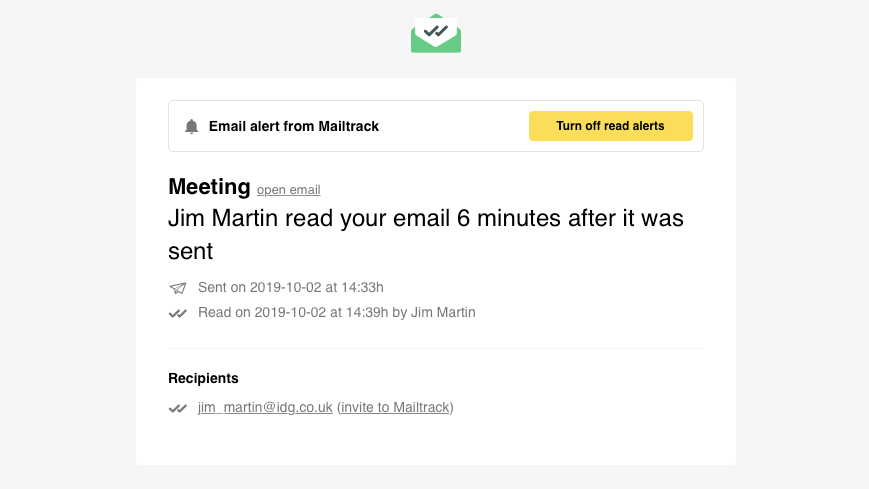
How to Know if an Email Has Been Read
Are you tired of wondering whether your email has been read? Do you want to know for sure whether the recipient has opened their eyes on the message you’ve sent them? Look no further! In this article, we’ll explore the various ways to find out if an email has been read.
Why is it Important to Know if an Email Has Been Read?
Knowing whether an email has been read can be crucial in today’s digital age. Whether it’s for business or personal reasons, understanding whether your message has been received and acknowledged can help you gauge the recipient’s interest and response time.
Methods to Check if an Email Has Been Read
There are several methods to check if an email has been read, depending on the email client you’re using. Here are some of the most popular ones:
Method 1: Using Gmail’s Built-in Feature
Gmail offers a built-in feature that allows you to see when someone has opened your email. To use this feature, follow these steps:
- Ensure you have a Google Workspace account.
- Compose an email and add the recipient’s email address.
- Before sending the email, click on the three dots next to the “Send” button.
- Select “Request read receipt” from the dropdown menu.
- The recipient will receive a notification asking them to confirm whether they’ve read your email.
Method 2: Using Outlook
Outlook also offers a feature that allows you to see when someone has opened your email. To use this feature, follow these steps:
- Ensure you have an active Microsoft 365 account.
- Compose an email and add the recipient’s email address.
- Before sending the email, click on the “Options” button.
- Select “Require read receipt” from the dropdown menu.
- The recipient will receive a notification asking them to confirm whether they’ve read your email.
Method 3: Using Thunderbird
Thunderbird is another popular email client that allows you to see when someone has opened your email. To use this feature, follow these steps:
- Ensure you have an active Thunderbird account.
- Compose an email and add the recipient’s email address.
- Before sending the email, click on the “Type” button.
- Select “Notify of delivery state” from the dropdown menu.
- The recipient will receive a notification asking them to confirm whether they’ve read your email.
Method 4: Using Apple Mail
Apple Mail also offers a feature that allows you to see when someone has opened your email. To use this feature, follow these steps:
- Ensure you have an active Apple ID account.
- Compose an email and add the recipient’s email address.
- Before sending the email, click on the “New Message” button.
- Select “Notification of reading” from the dropdown menu.
- The recipient will receive a notification asking them to confirm whether they’ve read your email.
Method 5: Using Smartphones And Tablets
If you’re using a smartphone or tablet, there are also various apps that allow you to see when someone has opened your email. Some popular options include:
- K-9 Mail: A free app available on Android devices.
- Itrackmail: A paid app available on iOS devices.
These apps use the built-in features of your email client to notify you when someone has read your email.
Other Methods
There are also other methods that can help you determine whether an email has been read. Some of these include:
- Tracking Pixels: A small image that is embedded in your email, which allows you to see whether the recipient has opened their eyes on the message.
- Read Receipts: A feature offered by some email clients that allows you to request a confirmation from the recipient when they’ve read your email.
Conclusion
Knowing whether an email has been read can be crucial in today’s digital age. By using the methods outlined above, you can ensure that you receive a notification when someone has opened their eyes on your message. Whether it’s for business or personal reasons, understanding whether your message has been received and acknowledged can help you gauge the recipient’s interest and response time.
Frequently Asked Questions
Here are some frequently asked questions related to this topic:
- Q: How do I Know if Someone Has Read my Email?
A: Depending on the email client you’re using, there are various methods to check whether an email has been read. Some popular options include Gmail’s built-in feature, Outlook, Thunderbird, Apple Mail, and smartphone/tablet apps like K-9 Mail or iTrackMail. - Q: Why is it Important to Know if Someone Has Read my Email?
A: Knowing whether an email has been read can be crucial in today’s digital age. It helps you gauge the recipient’s interest and response time, which can be essential for business or personal reasons. - Q: Can I Use Other Methods to Determine Whether an Email Has Been Read?
A: Yes, there are other methods that can help you determine whether an email has been read. Some of these include tracking pixels, read receipts, and using extensions for your browser.
I hope this helps! If you have any further questions or concerns, please don’t hesitate to reach out.


