
How to Recycle HP Printer Cartridges: A Step-by-step Guide
Are you tired of constantly replacing printer cartridges, only to end up with a big bill? Do you want to reduce your environmental impact by recycling instead of buying new? Look no further! In this article, we’ll show you how to recycle HP printer cartridges in just a few simple steps.
Why Recycle Printer Cartridges?
Recycling printer cartridges is a great way to save money and help the environment. Here are some benefits:
- Cost Savings: Recycling your printer cartridges can save you up to 50% on replacement costs.
- Environmental Benefits: Recycling reduces waste, conserves natural resources, and decreases greenhouse gas emissions.
- Increased Efficiency: Reusing existing cartridges means less energy is needed to produce new ones.
Step 1: Check The Ink Level
Before recycling your printer cartridges, it’s essential to check their ink levels. Here’s how:
- On Windows:
- Open the HP Printer Assistant software.
- Click on “Levels” and select the cartridge you want to check.
- Follow the prompts to see if the cartridge needs to be refilled or replaced.
- On macOS:
- Go to System Preferences > Printers & Scanners.
- Select your printer and click on the Options tab.
- Click on “Supply Levels” and follow the prompts.
Step 2: Purchase a Refill Kit
Now that you know if your cartridges need to be refilled or replaced, it’s time to buy a refill kit. Here’s what you need:
- A compatible HP printer
- The correct refill kit for your cartridge (4-color or single-color)
- Ink syringes and needles
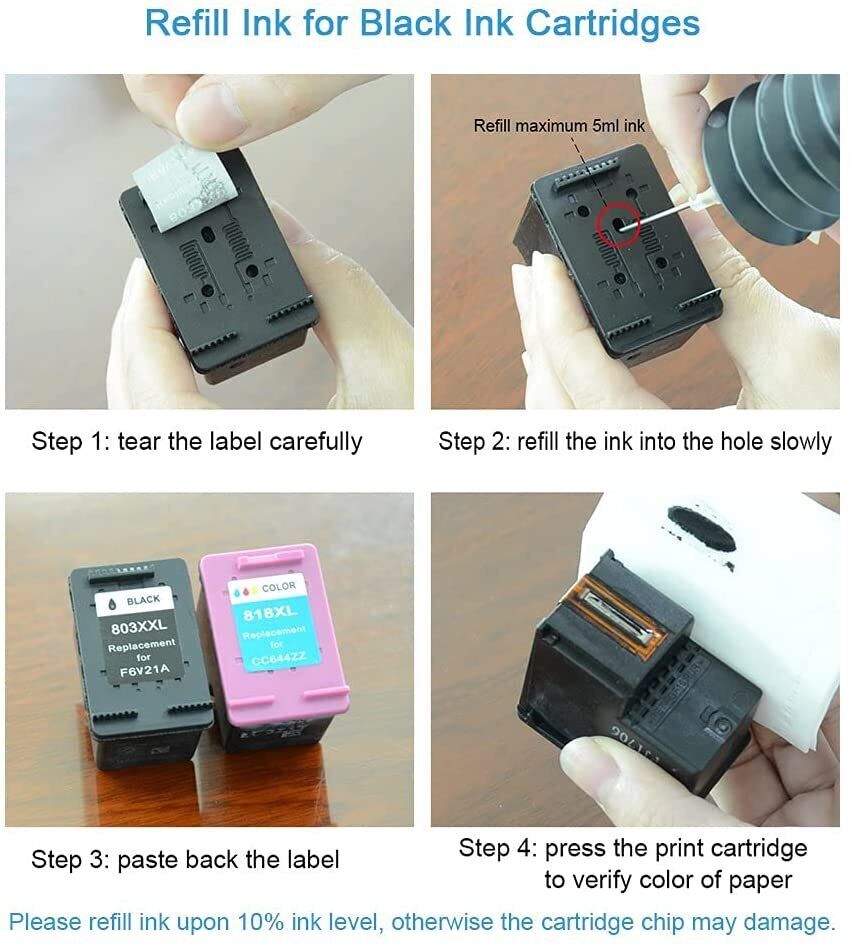
Step 3: Refill The Cartridges
Follow these steps to refill your printer cartridges:
- Prepare The Area: Place a newspaper sheet on a flat surface to protect it from spills.
- Remove The Cartridges: Take out the cartridge you want to refill, making sure not to touch any of its sensitive components.
- Identify The Refill Forum: Find the correct hole or port where you need to inject the ink (usually marked with an icon).
- Insert The Needle: Carefully insert the needle into the refill forum and attach it to the syringe.
- Inject The Ink: Fill the syringe with the required amount of ink, then slowly inject it into the cartridge through the correct hole.
- Repeat For Each Color: Repeat the process for the other colors in your printer.
Tips And Tricks
- Always use a compatible refill kit for your HP printer to avoid damaging the cartridges or printer.
- Don’t overfill the cartridges, as this can cause them to leak or become damaged.
- If you’re unsure about any part of the process, consult online tutorials or seek help from a professional.
Conclusion
Recycling HP printer cartridges is a simple and effective way to save money and reduce your environmental impact. By following these easy steps, you’ll be able to refill your cartridges like a pro!
Frequently Asked Questions (FAQs)
- What Are The Benefits of Recycling Printer Cartridges?
- Cost savings: Up to 50% on replacement costs.
- Environmental benefits: Reduces waste, conserves natural resources, and decreases greenhouse gas emissions.
- How Often Should I Refill my Printer Cartridges?
- Refill your cartridges when they’re about 25-30% full or when you notice a decrease in print quality.
- Can I Use Any Type of Ink For Refilling?
- No! Use only HP-branded ink to ensure compatibility and avoid damaging the cartridge or printer.
- Will Refilling Affect my Printer’s Warranty?
- Check with your manufacturer; some may void the warranty if you modify or refill cartridges.
Bonus Tip:
If you’re struggling with any part of the process, search for videos on YouTube that demonstrate how to recycle HP printer cartridges. There are many helpful tutorials available in Italian!


