
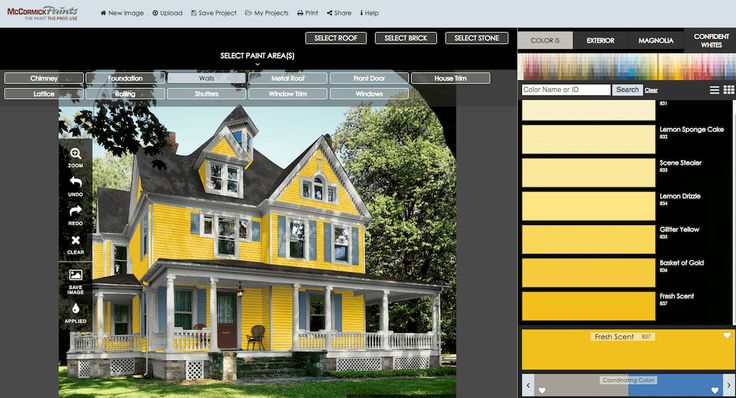
The Ultimate Guide to Choosing The Perfect Color For Your Home
Are you tired of living in a dull and uninspiring home? Do you want to give your space a fresh new look without breaking the bank? Look no further! In this article, we’ll explore the world of color palette apps that can help you find the perfect hue for your walls, furniture, and decor.
Why Choose The Right Color For Your Home?
Choosing the right color for your home can make all the difference in creating a warm and inviting atmosphere. It’s not just about aesthetics; the right color scheme can also affect your mood, energy levels, and even productivity. A poorly chosen color palette can lead to feelings of anxiety, stress, and disconnection.
What Are Color Palette Apps?
Color palette apps are mobile applications that allow you to test and visualize different colors on your walls, furniture, or other surfaces using a smartphone camera. These apps use augmented reality (AR) technology to superimpose the color over the actual surface, giving you an accurate representation of how it will look in real life.
Top Color Palette Apps For Android And Ios
Here are some of the best color palette apps available for both Android and iOS devices:
1. Prestige Colorpic – Paint Color (Android/iOS/iPadOS)
This app allows you to virtually try out different colors on your walls, furniture, or other surfaces using a smartphone camera. With over 10,000 colors to choose from, Prestige ColorPic is an excellent option for those who want to explore various color combinations.
2. Paint My Wall – Room Painting (iOS/iPadOS)
This app uses AR technology to simulate painting on your walls, furniture, or other surfaces. With a vast library of colors and the ability to save and share your favorite combinations, Paint My Wall is an ideal choice for those who want to get creative with their color palette.
3. Glidden (iOS/iPadOS)
As one of the leading paint brands in the world, Glidden offers a comprehensive app that allows you to identify colors on surfaces, explore various design styles, and even purchase paint directly from the app.
4. Paint My Room – Proof Colors
This fast and user-friendly app enables you to test and visualize different color combinations on your walls and furniture using a smartphone camera. With six base tonalities available for free and the option to upgrade to premium colors, Paint My Room is an excellent choice for those who want to find their perfect paint match.
5. Home Harmony (iOS/iPadOS)
This all-in-one app allows you to project a room or exterior surface using AR technology, choose from various color palettes, and even visualize different types of flooring before making a purchase.
How Do Color Palette Apps Work?
Using a color palette app is relatively simple. Here’s a step-by-step guide on how to get started:
- Choose Your App: Select the color palette app that suits your needs.
- Take a Photo: Use your smartphone camera to capture an image of the surface you want to paint or decorate (e.G., Wall, furniture, or exterior façade).
- Select Colors: Browse through the available colors and select the ones that appeal to you.
- Test And Visualize: Superimpose the chosen color over the captured image using AR technology.
- Adjust And Refine: Make any necessary adjustments to the color combination until you’re satisfied with the result.
Benefits of Using Color Palette Apps
Using a color palette app offers numerous benefits, including:
- Saving time and money by avoiding costly mistakes
- Exploring various color combinations and styles without making a physical commitment
- Improving your decision-making process and confidence in choosing the right colors for your space
- Enhancing your creativity and inspiration for home decor projects
Conclusion
Choosing the perfect color for your home can be a daunting task, but with the help of color palette apps, you can explore various options and make an informed decision. These apps provide an easy-to-use platform to visualize different colors on your walls, furniture, or other surfaces using AR technology.
Whether you’re looking to refresh your living room, update your bedroom, or give your exterior façade a fresh new look, color palette apps are the perfect tool for the job.
Frequently Asked Questions
Here are some frequently asked questions about color palette apps:
Q: What is the best color palette app for Android and iOS?
A: Some of the top-rated color palette apps include Prestige ColorPic – Paint Color, Paint My Wall – Room Painting, Glidden, Paint My Room – Proof Colors, Home Harmony.
Q: How do I use a color palette app?
A: Using a color palette app involves taking a photo of the surface you want to paint or decorate, selecting colors from the available options, testing and visualizing the chosen combination using AR technology, and adjusting and refining the result as needed.
Q: What are the benefits of using a color palette app?
A: Using a color palette app can save time and money by avoiding costly mistakes, improve decision-making processes, enhance creativity and inspiration for home decor projects, and provide an accurate representation of how colors will look in real life.


