
Unlocking The World of Whatsapp Emojis: A Comprehensive Guide
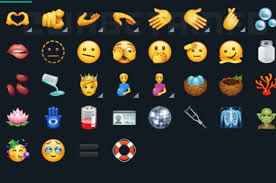
In today’s digital age, communication has become an essential part of our daily lives. With the rise of instant messaging apps like WhatsApp, people have found new ways to express themselves and connect with others. One of the most popular features of WhatsApp is its vast collection of emojis, which allow users to add a personal touch to their messages. However, with the constant release of new updates, many users find it challenging to keep up with the latest emoji trends. In this article, we will explore the world of WhatsApp emojis and provide a comprehensive guide on how to unlock the latest features.
What Are Whatsapp Emojis?
WhatsApp emojis are a set of pictorial symbols used to convey emotions and messages in a fun and creative way. They can be used to express feelings, add humor, or even convey complex ideas through simple graphics. With over 2,000 emojis available on WhatsApp, users have a vast range of options to choose from.
How to Get The New Emojis on Whatsapp
To get the new emojis on WhatsApp, you need to update your operating system to the latest version. For Android devices, this can be done by going to Settings > System > Advanced > Update Center and following the instructions. On iOS devices, go to Settings > General > Software Update and follow the prompts.
Updating Whatsapp on Android Devices
To update WhatsApp on an Android device, follow these steps:
- Go to the Play Store app on your device.
- Tap on the three horizontal lines in the top left corner.
- Select “My apps & games.”
- Find WhatsApp in the list of installed apps.
- Tap on the “Update” button next to it.
Updating Whatsapp on Ios Devices
To update WhatsApp on an iOS device, follow these steps:
- Go to the Settings app on your device.
- Tap on General.
- Select Software Update.
- If an update is available, tap on “Download and Install.”
How to Get New Stickers on Whatsapp
New stickers can be added to WhatsApp by searching for them in the app or downloading a sticker pack from the Play Store or App Store.
Using Bitmoji to Create Personalized Emojis
Bitmoji is a popular app that allows users to create personalized emojis. To use Bitmoji, follow these steps:
- Download and install the Bitmoji app on your device.
- Create an avatar by selecting physical characteristics such as hair color, eye shape, and nose size.
- Save your avatar and add it to Gboard or another keyboard app.
Tips For Using Emojis Effectively
Emojis can be a powerful tool in communication, but they should be used effectively to avoid misinterpretation. Here are some tips for using emojis:
- Use emojis sparingly to avoid overwhelming the recipient.
- Consider the context and audience before using an emoji.
- Be mindful of cultural differences when using emojis.
Conclusion
In conclusion, WhatsApp emojis have become a staple in modern communication. With new updates being released regularly, it’s essential to stay up-to-date with the latest features. By following the steps outlined in this article, users can unlock the world of WhatsApp emojis and express themselves more effectively.
Faqs
- What Are Whatsapp Emojis?
WhatsApp emojis are a set of pictorial symbols used to convey emotions and messages in a fun and creative way. - How do I Get New Emojis on Whatsapp?
To get new emojis, update your operating system to the latest version. - Can I Use Emojis on Other Messaging Apps?
Yes, many messaging apps have their own collection of emojis that can be used for communication. - What is Bitmoji?
Bitmoji is a popular app that allows users to create personalized emojis. - How do I Use Bitmoji?
To use Bitmoji, download and install the app on your device, create an avatar, save it, and add it to Gboard or another keyboard app. - What Are The Benefits of Using Emojis in Communication?
Emojis can be a powerful tool in communication, allowing users to convey emotions and ideas more effectively. - Can I Use Emojis to Express Complex Ideas?
Yes, emojis can be used to convey complex ideas through simple graphics and symbols. - Are There Any Risks Associated With Using Emojis?
While emojis are generally safe to use, some keyboards may contain malware or viruses that can compromise user data.


