
Getting Started With Audible: A Comprehensive Guide
Are you curious about the world of audiobooks? Look no further than Audible, a revolutionary service that offers an unparalleled listening experience. With millions of titles to choose from, including podcasts, original audio content, and bestsellers, Audible is the perfect platform for book lovers who want to multitask.
What is Audible?
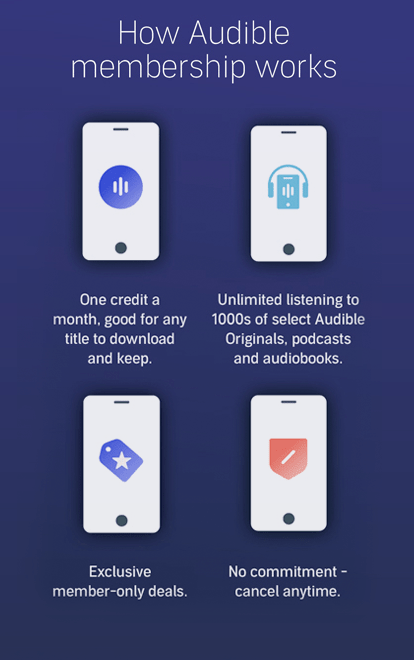
Audible is a subscription-based service provided by Amazon, allowing users to access a vast library of audiobooks, podcasts, and original content. The platform offers a seamless listening experience, with features like adjustable speed, bookmarks, and downloads for offline listening.
Benefits of Using Audible
- Convenience: With Audible, you can listen to your favorite books on-the-go, whether it’s during your daily commute, while exercising, or during chores.
- Accessibility: The service is available on multiple devices, including smartphones, tablets, and computers, making it easy to access from anywhere.
- Personalization: You can choose from a vast library of titles, including genres like fiction, non-fiction, romance, mystery, and more.
How Much Does Audible Cost?
The cost of using Audible varies depending on the subscription plan you choose:
- The basic plan costs $9.99 Per month.
- The premium plan costs $14.95 Per month.
- You can also try Audible free for 30 days, with no obligation to continue.
How Do I Get Started With Audible?
Getting started with Audible is easy:
- Download The App: Download the Audible app from your device’s app store.
- Sign Up: Sign up for an account using your Amazon login credentials or create a new account.
- Choose Your Plan: Select the subscription plan that suits you best.
What Devices Can I Use With Audible?
Audible is compatible with multiple devices, including:
- Smartphones (Android and iOS)
- Tablets (Android and iOS)
- Computers (Windows and macOS)
How Do I Cancel My Subscription?
To cancel your subscription, follow these steps:
- Open The App: Open the Audible app on your device.
- Go to Settings: Go to the settings menu within the app.
- Select Account: Select the account option.
- Cancel Subscription: Follow the prompts to cancel your subscription.
What Are Some Popular Audiobooks on Audible?
Some popular audiobooks on Audible include:
- “The Hitchhiker’s Guide to the Galaxy” by Douglas Adams
- “The Girl with the Dragon Tattoo” by Stieg Larsson
- “The Nightingale” by Kristin Hannah
How Do I Download Audiobooks For Offline Listening?
To download audiobooks for offline listening, follow these steps:
- Open The App: Open the Audible app on your device.
- Select an Audiobook: Select the audiobook you want to download.
- Tap “Download”: Tap the download button to start the download process.
Can I Listen to Podcasts on Audible?
Yes, you can listen to podcasts on Audible. The platform offers a wide range of popular and engaging podcasts across various genres.
How Do I Access My Account Information on Audible?
To access your account information on Audible, follow these steps:
- Open The App: Open the Audible app on your device.
- Go to Settings: Go to the settings menu within the app.
- Select Account: Select the account option.
What Are Some Popular Podcasts on Audible?
Some popular podcasts on Audible include:
- “The Joe Rogan Experience”
- “How I Built This”
- “Radiolab”
Can I Get a Refund For My Subscription?
Yes, you can get a refund for your subscription if you’re not satisfied with the service. Contact Audible’s customer support team to initiate the refund process.
What Are Some Tips For Using Audible Effectively?
Here are some tips for using Audible effectively:
- Create a Playlist: Create a playlist of your favorite audiobooks and podcasts.
- Adjust Speed: Adjust the speed of the audiobook to suit your listening preferences.
- Use Bookmarks: Use bookmarks to keep track of your progress.
Can I Share My Audiobooks With Friends?
Yes, you can share your audiobooks with friends. Audible offers a feature called “Share” that allows you to share your favorite books and podcasts with friends.
How Do I Report Issues or Concerns on Audible?
To report issues or concerns on Audible, follow these steps:
- Open The App: Open the Audible app on your device.
- Go to Settings: Go to the settings menu within the app.
- Select Help: Select the help option.
- Report Issue: Report your issue or concern.
What Are Some Common Issues With Audible?
Some common issues with Audible include:
- Technical Problems: Technical problems with the app or service.
- Subscription Issues: Issues with subscription plans or payments.
- Audiobook Availability: Audiobooks not available for download.
Can I Get a Discount on My Subscription?
Yes, you can get a discount on your subscription by taking advantage of promotional offers and discounts. Keep an eye on the Audible website and social media channels for exclusive deals.
How Do I Contact Audible’s Customer Support Team?
To contact Audible’s customer support team, follow these steps:
- Open The App: Open the Audible app on your device.
- Go to Settings: Go to the settings menu within the app.
- Select Help: Select the help option.
- Contact Support: Contact the support team for assistance.
What Are Some Tips For Saving Money With Audible?
Here are some tips for saving money with Audible:
- Use Promotional Codes: Use promotional codes to get discounts on your subscription.
- Take Advantage of Sales: Take advantage of sales and promotions to save money.
- Refer Friends: Refer friends to Audible to earn rewards and discounts.
Can I Get a Free Trial on Audible?
Yes, you can get a free trial on Audible by signing up for the service. The free trial period is 30 days, allowing you to try out the service before committing to a paid subscription.
How Do I Upgrade My Subscription Plan?
To upgrade your subscription plan, follow these steps:
- Open The App: Open the Audible app on your device.
- Go to Settings: Go to the settings menu within the app.
- Select Account: Select the account option.
- Upgrade Plan: Follow the prompts to upgrade your subscription plan.
What Are Some Popular Features of Audible?
Some popular features of Audible include:
- Adjustable Speed: The ability to adjust the speed of audiobooks to suit your listening preferences.
- Bookmarks: The feature to keep track of your progress in audiobooks.
- Downloads: The option to download audiobooks for offline listening.
Can I Get a Refund on My Subscription?
Yes, you can get a refund on your subscription if you’re not satisfied with the service. Contact Audible’s customer support team to initiate the refund process.
What Are Some Tips For Getting The Most Out of Audible?
Here are some tips for getting the most out of Audible:
- Explore Different Genres: Explore different genres and topics to discover new content.
- Create Playlists: Create playlists of your favorite audiobooks and podcasts.
- Use Features: Use features like adjustable speed, bookmarks, and downloads to enhance your listening experience.
Can I Share My Audible Content With Friends?
Yes, you can share your Audible content with friends. The service offers a feature called “Share” that allows you to share your favorite audiobooks and podcasts with friends.
How Do I Report Issues or Concerns on Audible?
To report issues or concerns on Audible, follow these steps:
- Open The App: Open the Audible app on your device.
- Go to Settings: Go to the settings menu within the app.
- Select Help: Select the help option.
- Report Issue: Report your issue or concern.
What Are Some Common Issues With Audible?
Some common issues with Audible include:
- Technical Problems: Technical problems with the app or service.
- Subscription Issues: Issues with subscription plans or payments.
- Audiobook Availability: Audiobooks not available for download.
Can I Get a Discount on My Subscription?
Yes, you can get a discount on your subscription by taking advantage of promotional offers and discounts. Keep an eye on the Audible website and social media channels for exclusive deals.
Audible is a revolutionary service that has transformed the way we consume books. With its vast library of titles, seamless listening experience, and features like adjustable speed and bookmarks, Audible is the perfect platform for book lovers who want to multitask. By following these tips and guidelines, you can get the most out of Audible and enjoy an unparalleled listening experience.
Audible Features
- Adjustable speed
- Bookmarks
- Downloads
- Share feature
Tips For Using Audible Effectively
- Explore different genres
- Create playlists
- Use features like adjustable speed, bookmarks, and downloads
Common Issues With Audible
- Technical problems
- Subscription issues
- Audiobook availability
Discounts And Promotions on Audible
- Take advantage of sales and promotions
- Refer friends to earn rewards and discounts


