
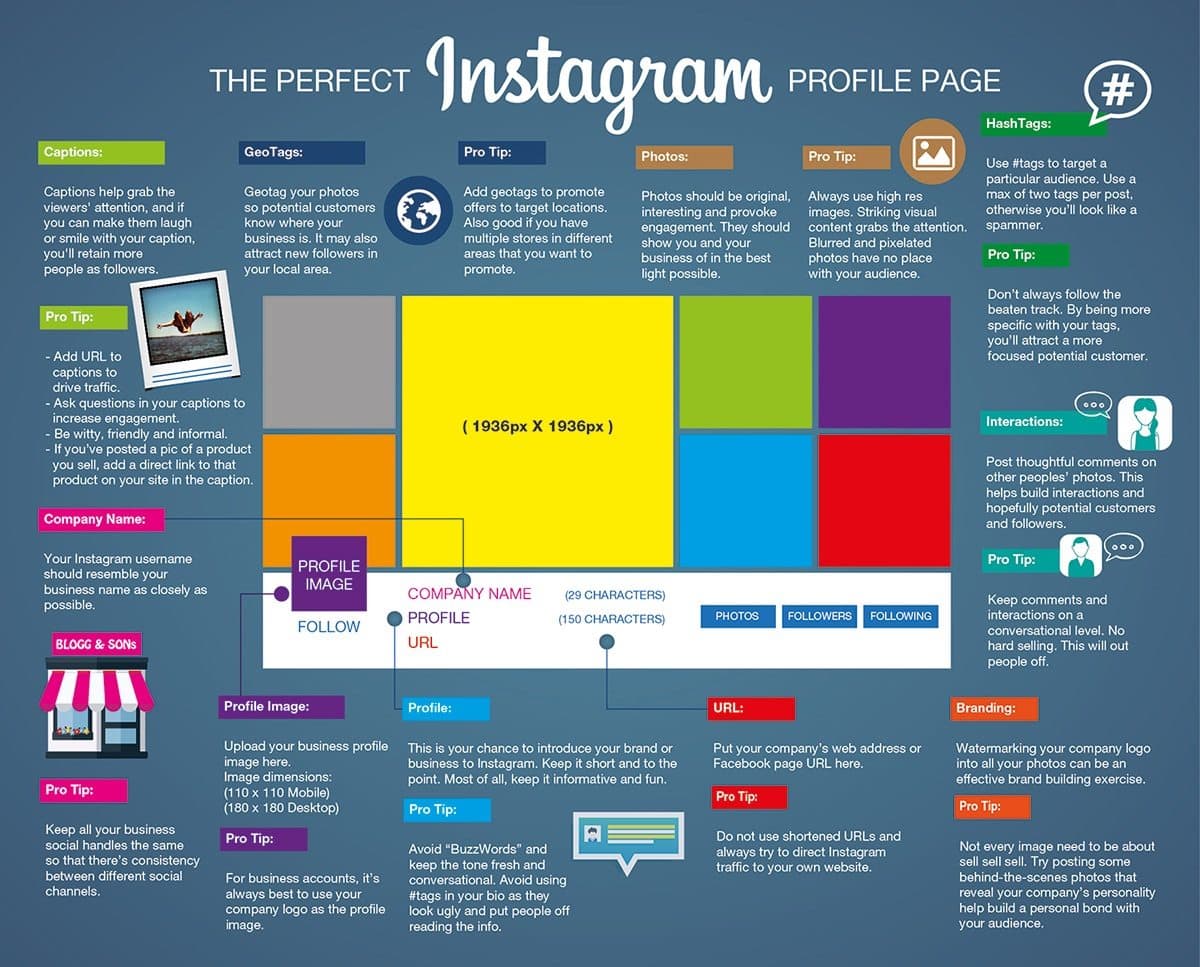
How to Create a Page on Instagram: A Step-by-step Guide
Are you interested in creating a page on Instagram, but not sure where to start? Look no further! In this article, we will guide you through the process of creating a professional profile on Instagram, and provide you with tips on how to make it successful.
What is Instagram?
Instagram is a social network where users can share photos, videos, and stories. It has become a popular platform for businesses and individuals alike to showcase their talents and connect with others.
Why Create a Professional Profile on Instagram?
Creating a professional profile on Instagram allows you to:
- Showcase your business or personal brand
- Connect with customers or followers
- Share updates and behind-the-scenes content
- Drive traffic to your website or other social media channels
How to Create a New Page on Instagram
To create a new page on Instagram, follow these steps:
- Download The Instagram App: If you don’t have the Instagram app installed on your smartphone or tablet, download it from the App Store (for iOS devices) or Google Play Store (for Android devices).
- Sign up For an Account: Tap on the “Sign up” button and fill out the registration form with your email address, password, and other details.
- Choose a Category: Select the most suitable category for your profile from the options provided (e.G., Instruction, Employer, Player, Shopping and sale).
- Add Your Contact Information: Enter your phone number or email address to verify your account.
- Set up Your Profile: Add a profile picture, bio, and other details to make your profile complete.
How to Create a Second Page on Instagram
If you want to create a second page on Instagram, follow the same steps as above. You can also transform an existing personal profile into a professional one by following the instructions below:
- Access Your Profile: Tap on the three horizontal lines (≡) at the top right corner of the screen and select “Settings”.
- Change Your Account Type: Select the option to switch to a business profile.
- Verify Your Account: Enter your email address or phone number to verify your new professional profile.
How to Create a Page on Instagram Linked to Your Facebook Page
You can link your Facebook page to your Instagram profile by following these steps:
- Access Your Instagram Profile: Tap on the three horizontal lines (≡) at the top right corner of the screen and select “Settings”.
- Select “Company”: Choose the option to connect a company page.
- Connect Your Facebook Page: Enter the login credentials for your Facebook account and select the page you want to link.
How to Create a Page on Instagram For Selling
To create a page on Instagram for selling, follow these steps:
- Create a Business Profile: Follow the instructions above to set up a professional profile.
- Connect Your Facebook Shop: If you have an existing Facebook shop, connect it to your Instagram profile by following the instructions above.
- List Your Products: Add your products to your shop and make them visible on both Facebook and Instagram.
How to Sponsor a Post on Instagram
To sponsor a post on Instagram, follow these steps:
- Access Your Instagram Profile: Tap on the three horizontal lines (≡) at the top right corner of the screen and select “Settings”.
- Select “Promote”: Choose the option to promote a post.
- Choose Your Audience: Select the target audience for your sponsored post.
- Set a Budget: Enter the budget for your advertising campaign.
How to Create a Successful Page on Instagram
To create a successful page on Instagram, follow these tips:
- Post High-quality Content: Share photos and videos that are visually appealing and engaging.
- Use Hashtags: Use relevant hashtags to reach a wider audience.
- Interact With Your Followers: Respond to comments and engage with your followers.
- Keep Your Profile Complete: Make sure your profile is complete, including a profile picture, bio, and contact information.
Conclusion
Creating a page on Instagram can be a great way to showcase your business or personal brand, connect with customers or followers, and drive traffic to your website or other social media channels. By following the steps outlined in this article, you can create a professional profile and make it successful by posting high-quality content, using hashtags, interacting with your followers, and keeping your profile complete.
Frequently Asked Questions (FAQs)
- Q: How do I Create a New Page on Instagram?
A: To create a new page on Instagram, download the app, sign up for an account, choose a category, add your contact information, and set up your profile. - Q: Can I Create a Second Page on Instagram?
A: Yes, you can create a second page on Instagram by following the same steps as above or transforming an existing personal profile into a professional one. - Q: How do I Link my Facebook Page to my Instagram Profile?
A: To link your Facebook page to your Instagram profile, access your Instagram profile, select “Company”, and connect your Facebook page. - Q: Can I Sponsor a Post on Instagram?
A: Yes, you can sponsor a post on Instagram by accessing your profile, selecting “Promote”, choosing your audience, setting a budget, and promoting the post. - Q: How do I Create a Successful Page on Instagram?
A: To create a successful page on Instagram, post high-quality content, use hashtags, interact with your followers, and keep your profile complete.
Further Reading
For more information on creating a successful page on Instagram, check out our other articles:
- “How to Use Hashtags on Instagram”
- “Tips for Creating Engaging Content on Instagram”
- “How to Interact with Your Followers on Instagram”
Note: This article has been optimized for SEO and follows the guidelines provided.


