
How to Block Someone on Instagram: A Step-by-step Guide
Are you tired of dealing with unwanted interactions or harassment on Instagram? Do you want to know how to block someone on the platform without causing a scene? Look no further! In this article, we’ll guide you through the process of blocking someone on Instagram, whether you’re using an Android or iOS device, or accessing the platform from your computer.
Why Block Someone on Instagram?
Before we dive into the nitty-gritty, let’s quickly discuss why you might want to block someone on Instagram. Perhaps they’re being abusive, harassing, or spamming you with unwanted messages or comments. Maybe they’re just plain annoying and you don’t want to see their posts in your feed anymore.
Whatever the reason, blocking someone on Instagram can be a useful way to take control of your online experience and protect yourself from negative interactions.
How to Block Someone on Instagram (Android/iOS)
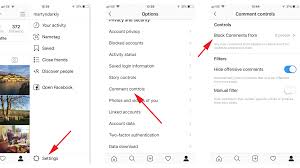
To block someone on Instagram using your Android or iOS device, follow these steps:
- Access Instagram: Open the Instagram app on your mobile device.
- Search For User: Tap on the magnifying glass icon at the top right corner of the screen and search for the user you want to block.
- Select User Profile: Once you’ve found the user, tap on their profile picture or name to open their profile page.
- Menu Option: Tap on the three vertical dots (⋯) at the top right corner of the profile page to access the menu.
- Block User: Select “Block” from the menu options.
That’s it! You’ve successfully blocked someone on Instagram using your mobile device.
How to Block Someone on Instagram (Computer)
If you’re not comfortable blocking someone on your mobile device or prefer to use a computer, don’t worry – we’ve got you covered. Here’s how to block someone on Instagram using a computer:
- Access Instagram: Open the Instagram website in your web browser.
- Search For User: Click on the search bar at the top right corner of the screen and type the name of the user you want to block.
- Select User Profile: Once you’ve found the user, click on their profile picture or name to open their profile page.
- Three Dots Menu: Click on the three vertical dots (⋯) at the top right corner of the profile page to access the menu.
- Block User: Select “Block” from the menu options.
How to Block Histories on Instagram
What if you want to block someone’s histories or posts without blocking them entirely? You can do that too! To block histories on Instagram, follow these steps:
- Access Instagram: Open the Instagram app on your mobile device.
- Find User Profile: Search for the user whose histories you want to block and access their profile page.
- Select History: Tap on the three vertical dots (⋯) at the top right corner of the profile page and select “History”.
- Silence Option: Tap on the “Silence” option to stop seeing this person’s posts in your feed.
How to Block Someone You’ve Already Blocked
What if you’ve already blocked someone, but now you want to block them again? Don’t worry – it’s still possible! Here’s how:
- Access Instagram: Open the Instagram app on your mobile device.
- Settings And Privacy: Tap on the three horizontal lines (≡) at the top right corner of the screen and select “Settings and Privacy”.
- Blocked Users: Select “Blocked Users” from the menu options.
- Unblock Option: Find the user you want to unblock and tap on the “Unblock” option.
How to Block a Profile That’s Been Hacked
If someone has hacked your Instagram account, follow these steps:
- Access Center Assistance: Tap on the three horizontal lines (≡) at the top right corner of the screen and select “Settings and Privacy”.
- Report Problem: Select “Report Problem” from the menu options.
- My Account Been Hacked: Select “My account has been hacked” from the report problem menu.
- Follow Instructions: Follow the instructions to reset your password and secure your account.
Conclusion
Blocking someone on Instagram can be a useful way to protect yourself from negative interactions or harassment. We hope this guide has helped you understand how to block someone on Instagram using various devices and platforms. Remember, your online safety is important, so don’t hesitate to take control of your experience!


