
How to Contact Playstation Support: A Step-by-step Guide
Are you experiencing issues with your PlayStation console or accessories? Do you need help with a problem that’s been plaguing you? Look no further! In this article, we’ll guide you through the various ways to contact PlayStation support and get the assistance you need.
Why Contact Playstation Support?
Before we dive into the nitty-gritty of contacting PlayStation support, let’s quickly discuss why it’s essential to do so. Whether you’re experiencing technical issues with your console, accessories, or online services, the support team is there to help. They can assist you in resolving problems, answering questions, and providing guidance on how to use your PlayStation devices.
Contacting Playstation Support: A Guide
Now that we’ve covered the why, let’s move on to the how. There are several ways to contact PlayStation support, and we’ll break them down for you:
Using The Chat Service
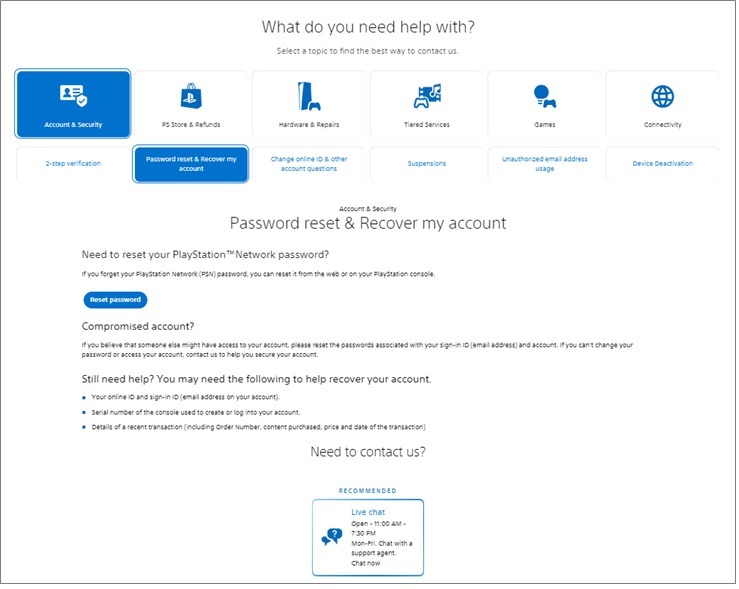
The first way to contact PlayStation support is through their chat service. This method is available 24/7 and allows you to communicate with a virtual assistant who can help resolve your issue or connect you with a human operator.
To access the chat service, follow these steps:
- Visit the PlayStation website (www.Playstation.Com).
- Click on the “Support” tab.
- Select the type of support you need (e.G., Console, accessories, online services).
- Choose the chat option and wait for a virtual assistant to connect with you.
Contacting Playstation Support by Phone
If you prefer speaking directly with an operator, you can contact PlayStation support by phone. This service is available Monday through Friday from 10:00 AM to 6:30 PM (CET).
To reach the support team via phone:
- Call the toll-free number +39 02 36009081.
- Follow the voice prompts and choose the option that best suits your needs.
Contacting Playstation Support Online
If you’re unable to access the chat service or prefer not to call, you can contact PlayStation support online through their website (www.Playstation.Com):
- Visit the PlayStation website.
- Click on the “Support” tab.
- Select the type of support you need (e.G., Console, accessories, online services).
- Choose the online contact form and fill it out with your details.
Contacting Playstation Support For Repairs
If your console or accessory requires repair or replacement, you can use the Repair Portal service:
- Visit the Repair Portal website.
- Select the type of device that needs repair (e.G., PlayStation 5, PlayStation 4).
- Follow the prompts and fill out the form with your details.
What Information Do You Need to Provide?
When contacting PlayStation support, it’s essential to provide the necessary information to help resolve your issue quickly and efficiently:
- Your console’s serial number (found on the back or bottom of the device)
- The type of problem you’re experiencing
- Your PlayStation Network account details (if applicable)
Conclusion
In this article, we’ve provided a comprehensive guide on how to contact PlayStation support. Whether you need help with technical issues, online services, or repairs, there are various ways to get in touch with the support team.
Remember, contacting PlayStation support is always free and available 24/7 through their chat service, phone, or online contact form. Don’t hesitate to reach out for assistance – they’re there to help!
Faqs
- How do I Contact Playstation Support?
You can contact PlayStation support via the chat service, phone, or online contact form. - What Are The Available Hours For Contacting Playstation Support by Phone?
Monday through Friday from 10:00 AM to 6:30 PM (CET). - Can I Get a Refund if I’m Experiencing Issues With my Purchase on The Playstation Store?
Yes, you can ask for a refund through the chat service or contact customer support directly. - How do I Repair or Replace my Console or Accessory?
Use the Repair Portal service to initiate the repair process and follow the prompts. - Do I Need an Account to Contact Playstation Support?
No, but having a PlayStation Network account can help with resolving issues more efficiently. - Can I Get Assistance For Problems Related to my Playstation VR or Controller?
Yes, you can contact PlayStation support for assistance with these devices. - Is The Chat Service Available 24/7?
Yes, the chat service is available 24/7 for your convenience. - What Should I do if I’m Experiencing Issues With my Console’s Hardware?
Consult the Repair Portal service or contact PlayStation support directly for assistance.
References:


