
Understanding Whatsapp Read Receipts: A Comprehensive Guide
Are you wondering how to know if someone has read your message on WhatsApp? You’re not alone! Many users have been curious about this feature, and in this article, we’ll delve into the world of WhatsApp read receipts.
What Are Whatsapp Read Receipts?
WhatsApp read receipts are a feature that indicates whether or not a recipient has read your message. This can be useful for various reasons, such as knowing if someone has received your message or if they’ve simply ignored it.
How to Enable Read Receipts on Whatsapp
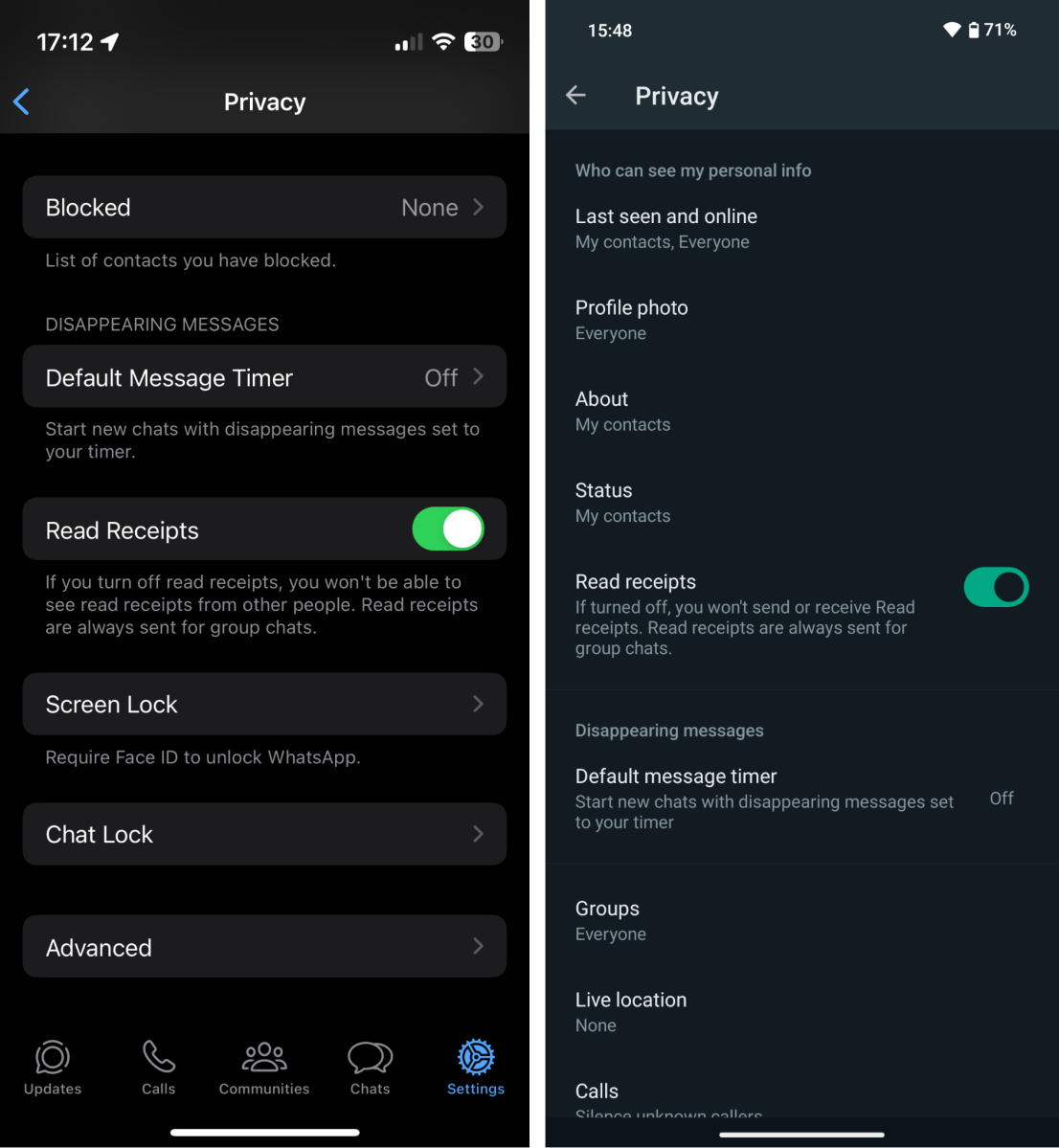
To enable read receipts on WhatsApp, follow these steps:
For Android Users:
- Open the WhatsApp app and go to the “Settings” menu.
- Tap on “Account” and then select “Privacy.”
- Toggle the switch next to “Read Receipts” to turn it on.
For Ios Users:
- Open the WhatsApp app and go to the “Settings” menu.
- Tap on “Privacy” and then toggle the switch next to “Read Receipts” to turn it on.
For Computer Users:
- Open WhatsApp Web and go to the settings menu.
- Click on “Account” and then select “Privacy.”
- Toggle the switch next to “Read Receipts” to turn it on.
How to Check if a Message Has Been Read on Whatsapp
Once you’ve enabled read receipts, here’s how to check if someone has read your message:
For Android Users:
- Open the chat with the person you sent the message to.
- Long press on the message and tap on the three dots that appear.
- Tap on “Info” to see a list of people who have seen or interacted with the message.
For Ios Users:
- Open the chat with the person you sent the message to.
- Long press on the message and tap on the three dots that appear.
- Tap on “Info” to see a list of people who have seen or interacted with the message.
For Computer Users:
- Open WhatsApp Web and go to the chat with the person you sent the message to.
- Click on the three dots next to the message and select “Info.”
- This will show you a list of people who have seen or interacted with the message.
Other Solutions to See if a Message Has Been Read on Whatsapp
If you’re having trouble seeing read receipts, there are other solutions to try:
Last Access Timestamp:
This feature shows when someone last accessed their WhatsApp account. If the timestamp is recent and matches the time when they should have seen your message, it’s likely that they’ve read it.
Online Status:
When someone is online on WhatsApp, you can see a blue dot next to their name in the chat window. This indicates that they’re active on the app and could have potentially seen your message.
Assessing Problems With Read Receipts on Whatsapp
Sometimes, messages may be read without sending a confirm receipt. Here are some reasons why:
Disabled Read Receipts:
If someone has disabled read receipts on their account, you won’t receive a confirm receipt even if they’ve read the message.
Technical Issues:
There could be technical issues with WhatsApp that prevent read receipts from being sent or received correctly.
Conclusion
WhatsApp read receipts can provide valuable insights into whether or not someone has read your messages. By understanding how to enable and check read receipts, you can communicate more effectively on WhatsApp.
Faqs:
- Q: Can I see if a message has been read on WhatsApp?
A: Yes, by enabling read receipts on your account and checking the “Info” menu. - Q: How do I enable read receipts on WhatsApp?
A: Follow the steps outlined in this article for Android, iOS, or computer users. - Q: Can I see if someone has read my message without using read receipts?
A: Yes, you can use other solutions like last access timestamp and online status to make an educated guess. - Q: Why are WhatsApp read receipts not working for me?
A: There could be technical issues or someone may have disabled read receipts on their account. - Q: Can I disable read receipts on my WhatsApp account?
A: Yes, by following the steps outlined in this article. - Q: How do I check if a message has been read on WhatsApp using a computer?
A: Follow the same steps as for Android or iOS users. - Q: Are there any other solutions to see if someone has read my message on WhatsApp?
A: Yes, you can use the last access timestamp and online status features. - Q: Why are some messages not showing a confirm receipt on WhatsApp?
A: There could be technical issues or someone may have disabled read receipts on their account.


