
How to Change Your Name on Clash of Clans: A Step-by-step Guide
Are you tired of using the same old name on Clash of Clans? Do you want to change your name to something more unique or clever? Look no further! In this article, we’ll show you how to change your name on Clash of Clans in just a few simple steps.
What You Need to Know Before Changing Your Name
Before you start changing your name, there are a few things you should know. First, you need to have a village level 5 or higher. This is because the first time you change your name, it’s free! However, each subsequent change will cost gems. So, if you’re planning on changing your name frequently, be prepared to shell out some gems.
Step 1: Check Your Village Level
To check your village level, simply tap on your village icon in the bottom right corner of your screen. If it says “Level 5” or higher, then you’re good to go!
Step 2: Access The Settings
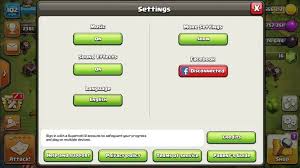
Tap on the settings icon (it looks like a gear) in the top left corner of your screen. From here, select “Other Settings.”
Step 3: Change Your Name
In the “Other Settings” menu, select “Change Name.” Here, you can enter your new name and confirm it.
What Happens When You Change Your Name?
When you change your name, your old name will be removed from your village icon. If someone has saved your old name, it will still appear in their game, but it won’t be linked to your new name.
Can I Change My Name Again?
Yes! But each subsequent change will cost gems. The second time you change your name, it will cost 500 gems. Each subsequent change will cost even more gems.
How Can I Get More Gems?
You can get more gems by completing special events or deleting trees and rocks in your village. You can also buy gems from the shop.
Can I Change My Clan Name?
Unfortunately, no! Clan names cannot be changed. However, you can create a new clan with a different name.
What If I Have Trouble Changing My Name?
If you have trouble changing your name, don’t worry! Just go to the Clash of Clans support section and ask for help.
How Much Does It Cost to Change My Clan Name?
It costs 40,000 coins to create a new clan with a different name. This is a one-time fee, so be prepared to shell out some coins!
Conclusion
Changing your name on Clash of Clans is a simple process that can be completed in just a few steps. Just remember to have a village level 5 or higher and be prepared to spend some gems each time you change your name. Happy gaming!
Frequently Asked Questions
- How do I Change my Name on Clash of Clans?
To change your name, tap on the settings icon (it looks like a gear), select “Other Settings,” and then choose “Change Name.”
- Can I Change my Clan Name?
Unfortunately, no! Clan names cannot be changed.
- How Much Does it Cost to Create a New Clan?
It costs 40,000 coins to create a new clan with a different name.
- Why Can’t I Change my Clan Name?
Clan names are permanent and cannot be changed.
- Can I Get More Gems?
Yes! You can get more gems by completing special events or deleting trees and rocks in your village.
- How do I Get Gems From The Shop?
To buy gems, tap on the shop icon (it looks like a treasure chest) and select the number of gems you want to purchase.
- What Happens When I Change my Name?
When you change your name, your old name will be removed from your village icon. If someone has saved your old name, it will still appear in their game, but it won’t be linked to your new name.
- Can I Change my Name Again?
Yes! But each subsequent change will cost gems. The second time you change your name, it will cost 500 gems. Each subsequent change will cost even more gems.


