
Understanding Iphone Blocks: A Guide to Help You Navigate The Situation
Are you aware that your iPhone might be blocked by an operator? This can happen due to various reasons, including theft or non-payment of subscription fees. In this article, we’ll guide you through the process of checking if your iPhone is blocked and provide tips on what to do next.
The Risks of a Blocked Iphone
When an iPhone is blocked by an operator, it cannot function on any national cellular network. This means that all its functionalities remain intact, but it will not be able to make or receive calls, send texts, or access the internet. The code IMEI (International Mobile Equipment Identity) has been inserted into a blacklist, making it impossible for the device to operate on any cellular network.
How to Check if Your Iphone is Blocked
There are several ways to check if your iPhone is blocked by an operator:
Using Ios
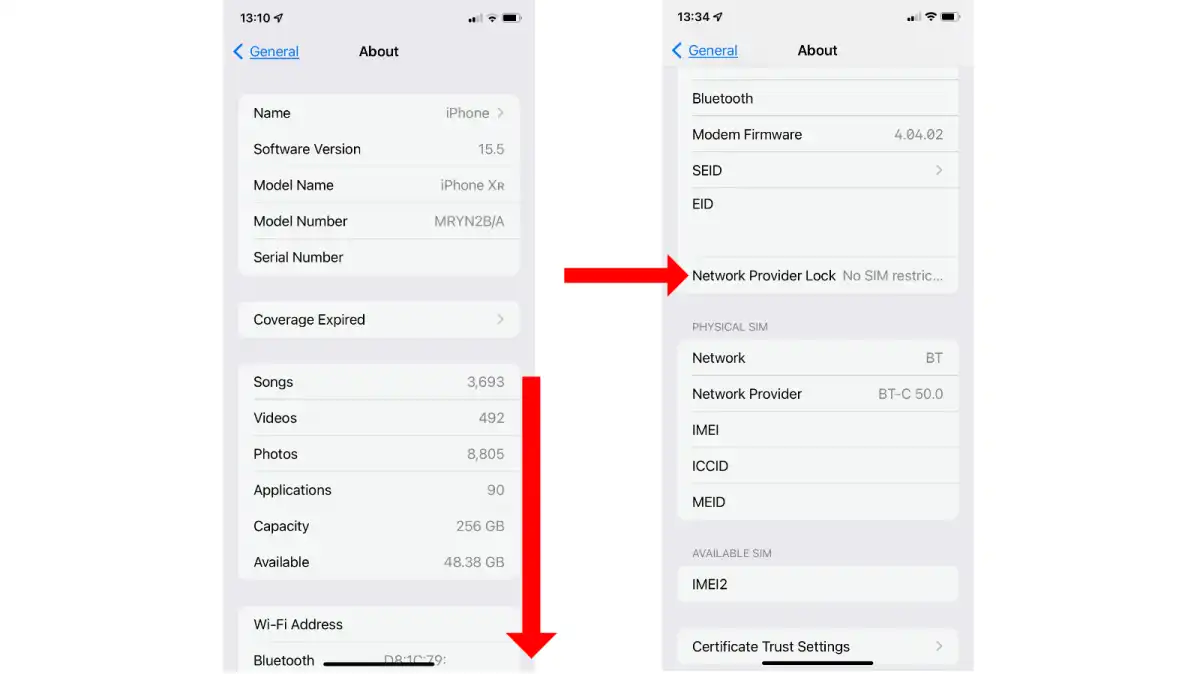
The first and most straightforward method is to access the Settings app on your iPhone. Go to General > Info, and look for the “Block Operator” section. If you see a message stating that there are no restrictions, then your iPhone is not blocked.
Using Online Services
Another way to check if your iPhone is blocked is by using online services such as IMEIPro or International Numbering Plans. These services allow you to enter the IMEI code of your device and check if it’s been blacklisted.
Using Cellular Networks
You can also try using cellular networks to check if your iPhone is working properly. Insert a valid SIM card, turn on your iPhone, and wait for all its functionalities to initialize. If your iPhone is able to connect to the network and make or receive calls, then it’s likely not blocked.
What to Do Next
If you’ve determined that your iPhone is indeed blocked, don’t panic! There are ways to unblock it, depending on the reason behind the blockage. If your phone was stolen, report it to the police and provide them with proof of ownership. If the previous owner failed to pay their subscription fees, contact the operator directly to resolve the issue.
Tips For Online Shoppers
If you’re planning to buy a used iPhone online, be cautious! Make sure to research the seller thoroughly and read reviews from other customers. Platforms like eBay or Amazon have built-in security measures in place, but it’s still essential to exercise vigilance when making purchases online.
Conclusion
In conclusion, understanding whether your iPhone is blocked by an operator is crucial for maintaining its functionality and avoiding potential issues. By following the steps outlined above, you’ll be able to determine if your device is blocked and take the necessary steps to unblock it or resolve any related problems.
Faqs
- What Does it Mean When an Iphone is Blocked?
An iPhone is considered blocked when its IMEI code has been inserted into a blacklist by an operator, preventing it from functioning on any national cellular network.
- How do I Check if my Iphone is Blocked?
You can use iOS settings, online services like IMEIPro or International Numbering Plans, or try using cellular networks to check if your iPhone is working properly.
- What Are The Risks of Buying a Used Iphone Online?
When purchasing a used iPhone online, be aware of the potential risks, including theft or non-payment of subscription fees, which can lead to the device being blocked by an operator.
- How do I Unblock my Iphone?
If your iPhone is blocked due to theft, report it to the police and provide proof of ownership. If the previous owner failed to pay their subscription fees, contact the operator directly to resolve the issue.
- What Should I do if I Suspect That my Iphone Was Stolen?
Report the incident to the police and provide them with evidence of ownership, including receipts, contracts, or other documents.
- How Can I Avoid Buying a Blocked Iphone Online?
Research the seller thoroughly, read reviews from other customers, and use reputable platforms like eBay or Amazon, which have built-in security measures in place.
- Can I Still Use my Iphone if It’s Blocked?
No, a blocked iPhone cannot function on any national cellular network, making it impossible to make or receive calls, send texts, or access the internet.
- How Can I Prevent my Iphone From Being Stolen or Blocked?
Be cautious when selling or buying used iPhones online, and always use secure payment methods and reputable platforms to minimize risks.


