
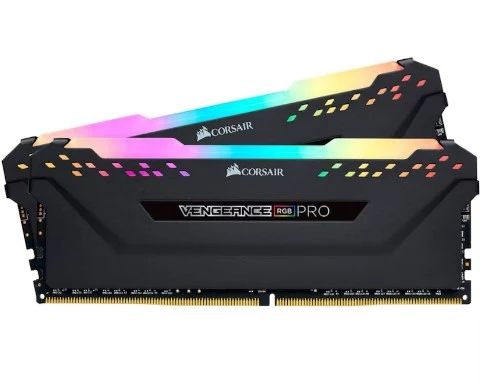
The Ultimate Guide to Choosing The Best Ram For Gaming
Are you tired of your gaming PC crashing or running slowly due to insufficient RAM? Look no further! In this comprehensive guide, we will walk you through the process of choosing the best RAM for gaming, covering everything from the basics to advanced technical details.
Understanding Ram Basics
Before we dive into the nitty-gritty, let’s cover some basic concepts. RAM (Random Access Memory) is a type of computer memory that temporarily stores data and applications while your CPU processes them. The more RAM you have, the more applications and games you can run simultaneously without experiencing performance issues.
Dimm or Know-dimm: Which One Do I Need?
When it comes to choosing the right RAM for gaming, one of the first things to consider is the type of RAM module you need. There are two main types:
- Dimm (Dual In-line Memory Module): This is the most common type of RAM module and is designed for desktop PCs.
- Know-dimm (Small Outline Dual In-line Memory Module): These modules are more compact than DIMMs and are often used in laptops or mobile devices.
Ddr3 Vs. Ddr4: Which Generation Do I Need?
RAM modules also come with different memory generations, including DDR3 and DDR4. While both types of RAM can work together, it’s essential to choose the right generation for your system.
- Ddr3: This is an older generation of RAM that was widely used in desktop PCs.
- Ddr4: This is a more modern generation of RAM that offers higher speeds and capacities than DDR3.
Capacity: How Much Ram Do I Need?
The amount of RAM you need depends on the type of games and applications you plan to run. Generally, it’s recommended to have at least 16GB of RAM for smooth gaming performance.
- 8GB: This is a good starting point for casual gamers who only play less demanding games.
- 16GB: This is ideal for more serious gamers who want to run multiple applications simultaneously.
- 32GB: This is the ultimate choice for heavy-duty gamers and content creators who need maximum RAM capacity.
Frequency And Latency: What Do I Need to Look For?
When choosing RAM, it’s essential to consider both frequency and latency. Frequency refers to how quickly the RAM can access data, while latency measures how long it takes for the RAM to retrieve data.
- Higher Frequencies: Generally, higher frequencies (such as 3200MHz or 3600MHz) are better than lower ones.
- Lower Latencies: Lower latencies (such as CL15 or CL16) indicate faster access times and improved performance.
Consumptions: What Do I Need to Consider?
While not a critical factor for most users, consumptions refer to the amount of power the RAM module consumes. If you’re an overclocker or have specific energy efficiency requirements, this might be something to consider.
The Best Brands For Gaming Ram
There are several reputable brands that offer high-quality gaming RAM, including:
- Corsair: A well-established brand with a wide range of RAM modules and excellent performance.
- Hyperx: A popular choice among gamers, offering fast speeds and reliable performance.
- Crucial: Known for their high-performance Ballistix line, which offers top-notch speed and capacity.
- G.Skill: A trusted brand that offers a variety of RAM modules with impressive speeds and capacities.
Conclusion
Choosing the best RAM for gaming requires careful consideration of several factors, including capacity, frequency, latency, consumptions, and brand reputation. By following this guide, you’ll be able to make an informed decision and find the perfect RAM module for your gaming needs.
Faqs
- What is The Minimum Amount of Ram I Need For Smooth Gaming?
- The minimum amount of RAM needed for smooth gaming varies depending on the game and system specifications. However, a general rule of thumb is to have at least 16GB of RAM.
- Can I Mix Different Types of Ram Modules (e.G., Ddr3 And Ddr4)?
- No, it’s not recommended to mix different types of RAM modules as this can cause compatibility issues and affect system performance.
- How Often Should I Update my Ram?
- While RAM upgrades are less frequent than CPU or GPU upgrades, it’s essential to stay up-to-date with the latest technology to ensure optimal performance.
- Can I Use a Faster Ram Module in an Older System?
- Yes, but you’ll need to ensure that your system supports the higher frequency and can handle the increased power consumption.
- What is The Difference Between Ddr3 And Ddr4 Ram Modules?
- DDR3 has lower speeds and capacities compared to DDR4, which offers faster speeds and higher capacities.
Additional Resources
For more information on choosing the best RAM for gaming, check out these resources:


