
How to Gain a Digital Signature: A Comprehensive Guide
Are you looking to obtain a digital signature but unsure where to start? In this article, we will guide you through the process of gaining a digital signature, exploring its characteristics, applications, and benefits.
What is a Digital Signature?
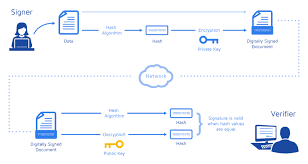
A digital signature is a specific type of qualified electronic signature that guarantees the authenticity of documents, ensuring the identity of the person or company signing them. It also provides assurance on the integrity and non-repudiation of documents signed using this technology.
Types of Digital Signatures
There are several types of digital signatures, including:
- Electronic Signature: The most common type of electronic signature, which assumes a legal value if it is certified by a judge.
- Advanced Electronic Signature (AdES): A more secure type of electronic signature that has a higher level of authentication and integrity.
- Qualified Electronic Signature (QES or Feq): A type of digital signature that uses asymmetric cryptography and is recognized as legally binding in Italy and the European Union.
How to Obtain a Digital Signature
To obtain a digital signature, you must acquire a kit from an accredited certification entity. The prices for these kits vary between €30 to €60 plus VAT, depending on the entity chosen and the specific requirements of the user.
Procedure For Obtaining a Digital Signature
The procedure for obtaining a digital signature involves several steps:
- Acquiring The Digital Signature Kit: You must purchase a kit from an accredited certification entity.
- Checking Your Identity And Activating The Kit: The next step is to check your identity and activate the kit, which can be done online or at a physical location.
- Activating The Service: After verifying your identity, you need to activate the service by connecting to the website of the certification entity and providing required information.
- Signing Documents: Once activated, you can use the digital signature to sign electronic documents.
How to Use a Digital Signature
Using a digital signature is relatively straightforward:
- Download and install any necessary drivers and software provided by your chosen certification entity.
- Prepare the document for signing by selecting the appropriate format (e.G., PDF).
- Choose the type of digital signature you want to apply (e.G., CAdES, PAdES).
- Enter the PIN code or password required to validate the signature.
Conclusion
A digital signature is a valuable tool for ensuring the authenticity and integrity of electronic documents. By following these steps, you can obtain a digital signature and start using it to sign and verify documents with confidence.


