
Exploring The Wonders of Google Earth: A Journey Through Time
As we navigate the vast expanse of the digital world, it’s not uncommon to find ourselves yearning for a more immersive experience – one that transports us to different times and places without ever leaving our computers or mobile devices. This is precisely where Google Earth comes in, an incredible tool that allows us to explore the globe as if we were standing right on its surface. In this article, we’ll embark on a fascinating journey through time using Google Earth, exploring its capabilities, functions, and the wonders it holds.
Why Explore Google Earth?
Google Earth has been a cornerstone of digital exploration since its inception. The service provides users with an unparalleled view of the world’s geography, allowing them to navigate through any place on Earth as if they were physically present there. With Google Earth, you can explore cities, landmarks, and natural wonders in stunning detail, all from the comfort of your own space.
How to Use Google Earth: A Step-by-step Guide
-
Accessing Google Earth: The first step to exploring Google Earth is accessing it on your device. If you’re using a computer, simply download Google Earth Pro onto your Windows or macOS system. For mobile users, download the official Google Earth app on Android or iOS.
-
Navigating The Interface: Once opened, navigate through the menu options. On desktop versions, type in the search bar to find specific locations. Mobile devices offer an interactive interface where you can explore and tap through different places.
-
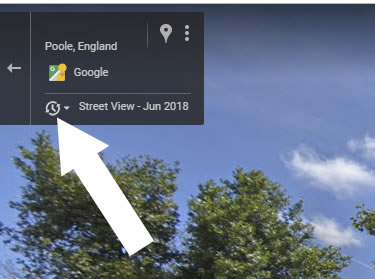
Using Time-lapse Functionality: The time-lapse feature is a unique aspect of Google Earth that allows users to observe how a place changes over time. This can be particularly engaging for those interested in the urban development, environmental changes, or historical context of specific locations.
Understanding The Time-lapse Feature
The time-lapse feature in Google Earth is a powerful tool for visualizing changes across various geographic areas. By selecting a location and activating the time-lapse mode, you can watch as buildings rise, landscapes change, or cities evolve over the years. This feature not only provides an educational experience but also serves as a captivating entertainment option.
Exploring Different Platforms
Google Earth’s capabilities extend beyond its desktop version. The service is accessible on both mobile devices and web browsers, offering a platform-agnostic experience that can be tailored to suit individual preferences.
- Desktop: For those who prefer the comfort of their computer screens, Google Earth Pro offers an in-depth exploration experience.
- Web Browser: Accessible through Google Chrome or similar browsers, the web version provides a straightforward and user-friendly interface for casual users.
- Mobile Devices: The official Google Earth app on Android and iOS devices transforms your smartphone into a personal globe-trotting companion.
Conclusion
Google Earth is more than just a mapping tool – it’s an immersive experience that takes you on a journey through the world, both past and present. By using its time-lapse feature, you can witness how the world changes over time, gaining insights into urban development, environmental changes, and historical events in an engaging and interactive manner.
Key Takeaways
- Google Earth is a powerful tool for exploring the world’s geography.
- The service offers a unique time-lapse feature that allows users to observe changes across various locations over time.
- Google Earth is accessible on desktops, web browsers, and mobile devices, providing an experience tailored to different user preferences.
Final Thoughts
In conclusion, Google Earth is a groundbreaking service that extends our capabilities for exploring the world. By navigating its interface, utilizing its powerful features, and adapting it to your preferred platform, you can unlock a wealth of information and experiences that not only educate but also entertain.


