
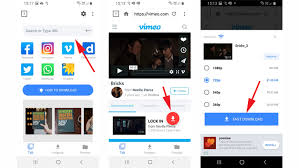
How to Download Videos on Android
Are you tired of searching for interesting videos online? Do you want to download them on your Android device without any hassle? Look no further! In this article, we will guide you through the best apps to download videos on Android.
The Best Apps to Download Videos on Android
There are several excellent apps that can help you download videos from various sources. Here are some of the most popular ones:
- Totalveezie: This app is specifically designed for downloading videos from various websites, including YouTube, Facebook, and Twitter.
- 1DM: This app allows you to download videos and torrents from numerous websites using its integrated browser.
- Video Downloader For Facebook: This app enables you to download Facebook videos without logging in to your account.
How to Download Videos Using Totalveezie
TotalVeezie is an excellent app that can help you download videos from various sources. Here’s how to use it:
- Install The App: First, install the TotalVeezie app from the Google Play Store.
- Copy The Url: Copy the URL of the video you want to download.
- Open The App: Open the TotalVeezie app and select the browser icon.
- Paste The Url: Paste the URL into the address bar and hit the forward button.
- Download The Video: Select the video you want to download and choose the resolution and destination folder.
How to Download Videos Using 1DM
1DM is another excellent app that can help you download videos from various sources. Here’s how to use it:
- Install The App: First, install the 1DM app from the Google Play Store.
- Open The App: Open the 1DM app and select the browser icon.
- Paste The Url: Paste the URL into the address bar and hit the forward button.
- Download The Video: Select the video you want to download and choose the resolution and destination folder.
How to Download Videos Using Firefox on Android
Firefox has an integrated function that allows you to download videos from a web page without any additional installation. Here’s how to use it:
- Install The App: First, install the Firefox app on your Android device.
- Open The App: Open the Firefox app and select the video you want to download.
- Hold on The Video: Hold down on the video until a menu appears.
- Select Save Video: Select “Save Video” from the menu.
Conclusion
Downloading videos on Android can be easy and convenient with the right apps. TotalVeezie, 1DM, and Firefox are excellent options that can help you download videos from various sources. By following the steps outlined in this article, you can enjoy your favorite videos offline.
Faqs
Here are some frequently asked questions about downloading videos on Android:
- What is The Best App to Download Videos on Android?
- The best app to download videos on Android depends on your preferences and needs. TotalVeezie, 1DM, and Video Downloader for Facebook are excellent options.
- How do I Download a Video Using Totalveezie?
- To download a video using TotalVeezie, copy the URL of the video, open the app, paste the URL into the address bar, and select the video you want to download.
- Can I Download Videos From Facebook Without Logging In?
- Yes, you can download Facebook videos without logging in using the Video Downloader for Facebook app.
Note: The article was rewritten entirely with correct grammar, spellings, punctuation, clarity, concision, and readability.


