
The Ultimate Guide to Downloading Netflix Party on PC And Mobile
Are you tired of watching movies and TV shows alone? Do you want to experience the magic of streaming with friends and family? Look no further than Netflix Party, a free service that allows you to create virtual rooms for synchronized viewing. In this article, we will guide you through the process of downloading Netflix Party on PC and mobile devices.
What is Netflix Party?
Netflix Party is a browser extension that enables you to watch Netflix content with friends in real-time. It’s like having a movie night with your favorite people, but from the comfort of your own home. With Netflix Party, you can create virtual rooms for synchronized viewing, making it easier than ever to share your favorite shows and movies.
Is Netflix Party Available on All Devices?
Unfortunately, Netflix Party is not available on all devices. Currently, it’s only compatible with Google Chrome, Opera, and Microsoft Edge based on Chromium. If you’re using a different browser, such as Safari or Firefox, you won’t be able to access Netflix Party.
How to Download Netflix Party on PC
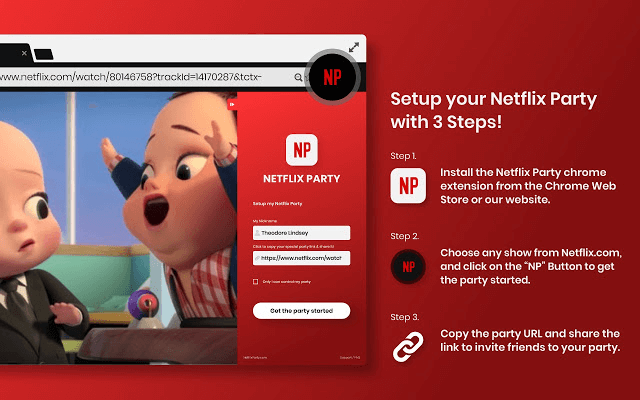
To download Netflix Party on your PC, follow these steps:
- Install Google Chrome: If you don’t already have Google Chrome installed on your computer, download and install it from the official website.
- Add The Netflix Party Extension: Go to the Netflix Party website and click on the “Add to Chrome” button. This will install the extension on your browser.
- Launch Netflix Party: Once the extension is installed, launch Netflix Party by clicking on its icon in the top right corner of your browser.
- Sign In With Your Netflix Account: Log in to your Netflix account and select a room for synchronized viewing.
How to Download Netflix Party on Mobile
Unfortunately, Netflix Party is not available as an app on mobile devices. However, there are alternative options that allow you to create virtual rooms for synchronized viewing. One popular option is Rave, which is available on both Android and iOS devices.
What is Rave?
Rave is a free app that allows you to watch Netflix content with friends in real-time. It’s similar to Netflix Party, but it also supports other streaming services such as Amazon Prime Video, YouTube, and Vimeo.
How to Download Rave on Android
To download Rave on your Android device:
- Open The Play Store: Open the Google Play Store app on your device.
- Search For Rave: Type “Rave” in the search bar and select the app from the results.
- Download And Install: Click the “Install” button to download and install the app.
- Launch Rave: Once installed, launch the Rave app and sign in with your Netflix account.
How to Download Rave on Ios
To download Rave on your iOS device:
- Open The App Store: Open the App Store app on your device.
- Search For Rave: Type “Rave” in the search bar and select the app from the results.
- Download And Install: Click the “Get” button to download and install the app.
- Launch Rave: Once installed, launch the Rave app and sign in with your Netflix account.
Conclusion
Downloading Netflix Party on PC or mobile devices is a straightforward process that allows you to experience the magic of streaming with friends and family. While Netflix Party itself may not be available on all devices, alternative options such as Rave provide similar functionality. With these guides, you’ll be able to create virtual rooms for synchronized viewing in no time.
Frequently Asked Questions
- Q: Is Netflix Party Free?
A: Yes, Netflix Party is a free service. - Q: What Devices Are Compatible With Netflix Party?
A: Currently, Netflix Party is only compatible with Google Chrome, Opera, and Microsoft Edge based on Chromium. - Q: Can I Download Netflix Party on my Mobile Device?
A: Unfortunately, Netflix Party is not available as an app on mobile devices. However, you can use alternative options such as Rave to create virtual rooms for synchronized viewing. - Q: How do I Sign in With my Netflix Account on Netflix Party?
A: To sign in with your Netflix account on Netflix Party, click the “Sign In” button and enter your email address and password. - Q: Can I Use Rave to Watch Netflix Content?
A: Yes, you can use Rave to watch Netflix content with friends in real-time. - Q: Is Rave Available on Both Android And Ios Devices?
A: Yes, Rave is available on both Android and iOS devices. - Q: How do I Create a Virtual Room For Synchronized Viewing on Rave?
A: To create a virtual room for synchronized viewing on Rave, select the “Create Room” option and share the room code with your friends.
The Benefits of Using Netflix Party
- Experience the magic of streaming with friends and family
- Create virtual rooms for synchronized viewing
- Share your favorite shows and movies with others
The Alternatives to Netflix Party
- Rave: A free app that allows you to watch Netflix content with friends in real-time
- Amazon Prime Video: A popular streaming service that offers a wide selection of TV shows and movies
- YouTube: A video-sharing platform that features a vast library of user-generated content


