
How to Delete a Whatsapp Account: A Step-by-step Guide
Are you tired of using WhatsApp but don’t know how to delete your account? Look no further! In this article, we’ll guide you through the process of deleting a WhatsApp account on both Android and iOS devices.
Why Delete a Whatsapp Account?
Before we dive into the step-by-step guide, let’s take a look at why someone might want to delete their WhatsApp account. Perhaps you’ve switched to a different messaging app or simply want to take a break from social media. Whatever your reason, deleting a WhatsApp account is a straightforward process that can be completed in just a few minutes.
Exporting Conversations: A Precautionary Measure
Before we proceed with the deletion process, it’s essential to export your conversations as a precautionary measure. This will ensure that you don’t lose any important messages or data. On Android devices:
- Open WhatsApp and navigate to the Chats section.
- Tap on the conversation you want to export and select the three dots in the top-right corner.
- Choose “Export chat” and select either “Include media” or “Exclude media.”
- Choose a location to save the exported file.
On iOS devices:
- Open WhatsApp and navigate to the Chats section.
- Tap on the conversation you want to export and select the three dots in the top-right corner.
- Choose “Export chat.”
Deleting a Whatsapp Account: Android Devices
Now that we’ve covered exporting conversations, let’s move on to deleting a WhatsApp account on Android devices:
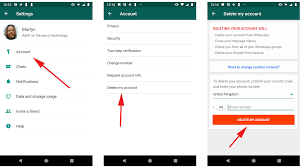
- Open WhatsApp and navigate to the Settings section (three vertical dots in the top-right corner).
- Tap on the “Account” option.
- Choose “Delete account” and follow the prompts to confirm deletion.
Deleting a Whatsapp Account: Ios Devices
If you’re using an iOS device, deleting a WhatsApp account is just as straightforward:
- Open WhatsApp and navigate to the Settings section (gear icon in the bottom-right corner).
- Tap on the “Account” option.
- Choose “Delete account” and follow the prompts to confirm deletion.
Transferring Your Account: A Useful Option
What if you want to transfer your WhatsApp account to a new device? No problem! On both Android and iOS devices:
- Open WhatsApp and navigate to the Settings section (three vertical dots or gear icon, respectively).
- Tap on the “Account” option.
- Choose “Transferring data” and follow the prompts to transfer your account.
Changing Phone Numbers: A Useful Feature
Have you switched phone numbers? Don’t worry! On both Android and iOS devices:
- Open WhatsApp and navigate to the Settings section (three vertical dots or gear icon, respectively).
- Tap on the “Account” option.
- Choose “Change number” and follow the prompts to update your account information.
Deleting a Whatsapp Business Account
What if you want to delete your WhatsApp Business account? No problem! On Android devices:
- Open WhatsApp and navigate to the Settings section (three vertical dots in the top-right corner).
- Tap on the “Account” option.
- Choose “Delete account” and follow the prompts to confirm deletion.
On iOS devices, you can also delete your WhatsApp Business account by navigating to the Settings section and tapping on the “Account” option.
Conclusion
Deleting a WhatsApp account is a straightforward process that can be completed in just a few minutes. Remember to export your conversations before deleting your account to ensure that you don’t lose any important messages or data. If you’re experiencing any issues, feel free to reach out to our support team for assistance.
Faqs:
-
Q: How do I export my WhatsApp conversations?
A: On Android devices, go to the Chats section and tap on the conversation you want to export. Choose “Export chat” and select either “Include media” or “Exclude media.” On iOS devices, go to the Chats section and tap on the conversation you want to export. -
Q: How do I delete my WhatsApp account?
A: On Android devices, navigate to the Settings section and tap on the “Account” option. Choose “Delete account” and follow the prompts to confirm deletion. On iOS devices, go to the Settings section and tap on the “Account” option. -
Q: Can I transfer my WhatsApp account to a new device?
A: Yes! On both Android and iOS devices, navigate to the Settings section and tap on the “Account” option. Choose “Transferring data” and follow the prompts to transfer your account. -
Q: How do I change phone numbers on WhatsApp?
A: On both Android and iOS devices, navigate to the Settings section and tap on the “Account” option. Choose “Change number” and follow the prompts to update your account information. -
Q: Can I delete my WhatsApp Business account?
A: Yes! On Android devices, navigate to the Settings section and tap on the “Account” option. Choose “Delete account” and follow the prompts to confirm deletion. -
Q: How do I export my WhatsApp conversations on a PC?
A: Unfortunately, it’s not possible to export your WhatsApp conversations directly from a PC. However, you can try using third-party apps or services that may be able to assist with this process. -
Q: Can I delete my WhatsApp account without deleting my WhatsApp Business account?
A: Yes! If you have both a personal and business account on WhatsApp, you can delete the personal account without affecting your business account. -
Q: How do I know if my WhatsApp account has been deleted successfully?
A: Once you’ve confirmed deletion of your WhatsApp account, you won’t be able to access the app or any data associated with that account.


