
The Ultimate Guide to Amazon Wishlists: Creating, Sharing, And Shopping
Are you tired of receiving gifts that don’t quite fit your style or preferences? Do you struggle to create a list of your desired gifts without the hassle of sharing it with others? Look no further than Amazon’s wishlist feature! In this article, we’ll guide you through the process of creating, sharing, and shopping from wishlists on Amazon.
What is an Amazon Wishlist?
An Amazon wishlist is a personalized list of products that can be created by any user. It allows users to add items they’d like to receive as gifts, making it easier for friends and family to purchase something they really want. Wishlists can be made public or private, depending on the user’s preference.
Creating an Amazon Wishlist
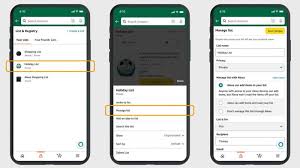
To create a wishlist on Amazon, follow these steps:
- Log in to your Amazon account.
- Click on “Account & Lists” at the top right corner of the page.
- Select “Lists” from the dropdown menu.
- Click on “Create a List.”
- Enter a list name and select the type of list you’d like to create (public, private, or shared).
- Add items to your wishlist by searching for products and clicking on the “Add to List” button.
Sharing Your Amazon Wishlist
Once you’ve created your wishlist, you can share it with others in various ways:
- Public Wishlist: Make your list public by selecting the “Public” option when creating the list. This will allow anyone who has access to the internet to view and purchase items from your list.
- Shared Wishlist: Create a shared list by selecting the “Shared” option when creating the list. You’ll receive an email with a link that you can share with others, allowing them to view and purchase items from your list.
- Private Wishlist: If you prefer to keep your wishlist private, select the “Private” option when creating the list.
Shopping From Amazon Wishlists
When shopping from a wishlist on Amazon, follow these steps:
- Click on the wishlist link provided by the owner.
- Browse through the list and add items to your cart as you would normally.
- Proceed to checkout and complete the payment process.
Amazon List Wedding And List Birth Features
Amazon offers two specialized features for creating wishlists: List Wedding and List Birth. These features allow users to create lists specifically tailored for wedding gifts or baby shower gifts.
- List Wedding: Create a list of gifts for your special day by selecting the “List Wedding” option when creating the list.
- List Birth: Create a list of gifts for a new baby by selecting the “List Birth” option when creating the list.
Benefits of Using Amazon Wishlists
Using Amazon wishlists offers several benefits, including:
- Easy Gift Giving: Friends and family can purchase gifts with ease, knowing exactly what you’d like to receive.
- Personalized Gifts: Wishlists allow users to add specific items they’ve been eyeing, making gift-giving more personalized.
- Convenience: Shopping from a wishlist is as easy as browsing Amazon’s vast product catalog.
Conclusion
Amazon wishlists are an innovative feature that simplifies the process of creating and sharing lists of desired gifts. Whether you’re shopping for yourself or gifting someone special, Amazon wishlists make it easy to find exactly what you need. By following this guide, you’ll be well on your way to creating and sharing your own wishlist.
Frequently Asked Questions (FAQs)
- Q: How do I Create a Wishlist on Amazon?
A: To create a wishlist on Amazon, log in to your account, click on “Account & Lists,” select “Lists,” and then click on “Create a List.” - Q: Can I Share my Wishlist With Others?
A: Yes, you can share your wishlist by selecting the “Public” or “Shared” option when creating the list. - Q: How do I Shop From an Amazon Wishlist?
A: To shop from an Amazon wishlist, click on the link provided by the owner and proceed to checkout as you normally would. - Q: What Are List Wedding And List Birth Features?
A: List Wedding and List Birth are specialized features that allow users to create lists specifically tailored for wedding gifts or baby shower gifts. - Q: Can I Access my Wishlist on Mobile Devices?
A: Yes, you can access your wishlist on mobile devices by downloading the Amazon app.
Commonly Used Terms
- Wishlist: A personalized list of products that can be created and shared on Amazon.
- Public Wishlist: A wishlist that is visible to anyone who has access to the internet.
- Shared Wishlist: A wishlist that can be accessed by users with a link provided by the owner.
- Private Wishlist: A wishlist that is only accessible by the owner.
I hope this article has been informative and helpful in understanding Amazon’s wishlist feature. If you have any further questions or concerns, please don’t hesitate to ask!


