
The Ultimate Guide to Opening Your Playstation 5 Controller
Are you a die-hard gamer looking to get under the hood of your PS5 controller? Look no further! In this article, we’ll guide you through the step-by-step process of opening your DualSense controller, so you can diagnose and fix any issues that might be plaguing your gaming experience.
Why Open Your Ps5 Controller?
Before we dive into the nitty-gritty details, let’s talk about why you might want to open your PS5 controller in the first place. Perhaps you’re experiencing some weird lag or input delay that just won’t go away, and you need to diagnose the issue yourself. Maybe you’re looking to clean out any dust or debris that might be accumulating inside the controller.
Whatever your reason, we’ve got you covered!
Important Precautions
Before you start taking apart your PS5 controller, there are a few things you should keep in mind:
- Make Sure You Have a Screwdriver of Precision: You’ll need this to remove the screws that hold the controller’s cover together.
- Be Careful Not to Damage Any Internal Components: The DualSense controller has some pretty delicate electronics inside, so be gentle when handling the various parts.
- Check Your Warranty: If your PS5 controller is still under warranty, it’s probably best to take it to a professional repair service rather than attempting to fix it yourself.
Tools Needed
To open your PS5 controller, you’ll need the following tools:
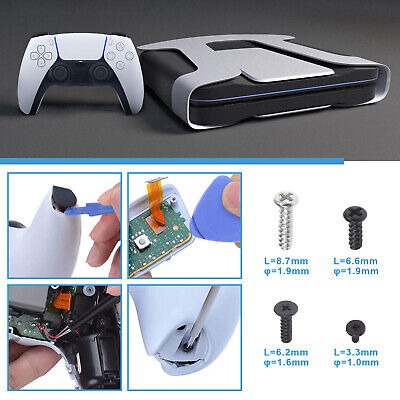
- A screwdriver of precision
- An instrument of plastic with a flat tip (for levering out the cover)
- A clip of precision for electronic and mechanical operations
- A compressed air bomblet and soft-bristled brush for cleaning
Step-by-step Instructions
Now that we’ve got the necessary precautions and tools covered, let’s move on to the fun part – disassembling your PS5 controller!
Removing The Cover
To remove the cover of your PS5 controller, you’ll need to lever out the four screws that hold it in place. Use your screwdriver of precision to carefully loosen these screws, then use your instrument of plastic with a flat tip to pry the cover open.
Removing The Battery
Once the cover is removed, you should be able to access the battery compartment. Remove the two screws that hold the battery in place and gently pull it out of its housing.
Disconnecting The Motherboard Components
With the battery removed, you’ll need to disconnect all the motherboard components connected to the controller’s circuit board. This includes the analog sticks, directional pad, and haptic motors.
Removing The Upper Shell
Now that all the electronics are disconnected, it’s time to remove the upper shell of your PS5 controller. Use your screwdriver of precision to loosen the screws that hold this part in place, then carefully pull it off.
Accessing The Motherboard
With the upper shell removed, you should now have access to the motherboard itself. Take care when handling this component, as it’s quite fragile.
Inspecting And Cleaning The Controller
Once you’ve accessed the motherboard, take some time to inspect the controller for any signs of dust or debris accumulation. Use your compressed air bomblet and soft-bristled brush to gently clean out any stubborn particles.
Reassembling Your Ps5 Controller
Now that you’ve cleaned out the controller, it’s time to put everything back together again! Follow these steps in reverse order:
- Reattach the upper shell using the screws provided.
- Reconnect all the motherboard components (analog sticks, directional pad, and haptic motors).
- Replace the battery compartment.
Tips And Tricks
Here are a few additional tips and tricks to keep in mind when disassembling your PS5 controller:
- Make sure you’re working on a stable surface before attempting to open up the controller.
- If you encounter any stubborn screws or parts, don’t be afraid to ask for help from a professional repair service.
- Keep in mind that opening up your PS5 controller will void its warranty.
Frequently Asked Questions (FAQs)
Q: What is the purpose of disassembling my PS5 controller?
A: Disassembling your PS5 controller allows you to diagnose and fix any issues with the device, such as input delay or hardware malfunction.
Q: Do I need special tools to open up my PS5 controller?
A: Yes, you’ll need a screwdriver of precision and an instrument of plastic with a flat tip to remove the cover. Additional tools may be required depending on the specific issue you’re trying to fix.
Q: Will disassembling my PS5 controller void its warranty?
A: Yes, attempting to repair or modify your PS5 controller yourself will void its warranty. If your device is still under warranty, it’s best to take it to a professional repair service instead.
Conclusion
Opening up your PS5 controller may seem daunting at first, but with the right tools and knowledge, you can easily diagnose and fix any issues that might be plaguing your gaming experience. Remember to always exercise caution when handling delicate electronics and follow proper safety procedures to avoid damaging your device further.
Whether you’re a seasoned gamer or just starting out, we hope this article has provided you with the necessary guidance to tackle even the toughest PS5 controller repair jobs!
The Top 8 Faqs About Opening Your Ps5 Controller
- What is The Best Way to Clean my Ps5 Controller?
Answer: Use compressed air and a soft-bristled brush to gently remove dust and debris. - Can I Use Any Type of Screwdriver to Open up my Ps5 Controller?
Answer: No, you’ll need a precision screwdriver specifically designed for electronics repair. - Will Opening up my Ps5 Controller Void Its Warranty?
Answer: Yes, attempting to repair or modify your device yourself will void its warranty. - What Should I do if I Encounter Any Stubborn Screws or Parts While Repairing my Ps5 Controller?
Answer: Don’t hesitate to ask for help from a professional repair service! - Can I Use a Generic Replacement Motherboard Component Instead of The Original One Provided With my Ps5 Controller?
Answer: No, it’s best to stick with the original components provided by Sony. - How do I Reassemble my Ps5 Controller After Disassembling it For Repairs?
Answer: Follow these steps in reverse order (reconnect electronics, replace battery compartment, etc.) - Can I Modify or Upgrade Any Internal Components of my Ps5 Controller?
Answer: No, modifying or upgrading your device’s internal components is not recommended and may void its warranty. - How do I Properly Dispose of Electronic Waste From my Ps5 Controller Repair Project?
Answer: Dispose of electronic waste responsibly by taking it to a recycling center or designated electronics disposal facility.
Hope this helps!


