
What is a Fototessera?
A fototessera is a digital or printed photo that meets the specific requirements for official identification documents in Italy. It must have a standard size, good quality, and a neutral expression. Understanding what makes a good fototessera is essential if you’re planning to travel to Italy or need an ID photo for any other reason.
Software Options For Creating And Printing a Fototessera
While there are paid software options available, we’ll focus on the free alternatives that can help you create and print a high-quality fototessera. Here are some of the best free software options:
1. Idphotostudio (Windows)
IDPhotoStudio is a popular free software for creating and printing ID photos, including the Italian fototessera. This user-friendly program allows you to select the desired dimensions, crop your photo, and print it directly.
Using Idphotostudio:
- Download and install IDPhotoStudio on your Windows PC.
- Select the “Italian” option from the menu bar.
- Choose the desired size for your fototessera (4×6 cm or 5×8 cm).
- Crop your photo using the built-in editor.
- Print your fototessera directly.
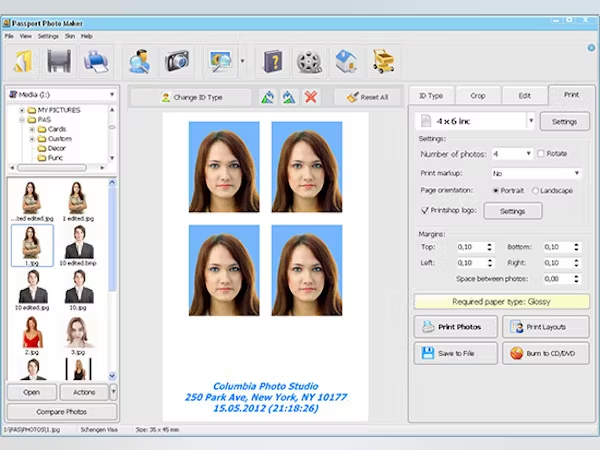
2. Passport Photo Maker (Windows)
Passport Photo Maker is another free software that allows you to create and print ID photos, including the Italian fototessera. This program offers a range of features, including automatic face detection and editing tools.
Using Passport Photo Maker:
- Download and install Passport Photo Maker on your Windows PC.
- Select the “Italian” option from the menu bar.
- Choose the desired size for your fototessera (4×6 cm or 5×8 cm).
- Crop your photo using the built-in editor.
- Print your fototessera directly.
3. Fototessera (Mac)
If you’re a Mac user, you can use the Fototessera app to create and print ID photos, including the Italian fototessera. This user-friendly program allows you to select the desired dimensions, crop your photo, and print it directly.
Using Fototessera:
- Download and install Fototessera on your Mac from the App Store.
- Select the “Italian” option from the menu bar.
- Choose the desired size for your fototessera (4×6 cm or 5×8 cm).
- Crop your photo using the built-in editor.
- Print your fototessera directly.
4. Online Services
If you don’t have access to a computer or prefer not to install software, there are online services available that can help you create and print a fototessera. One such service is Created Photo ID, which allows you to upload your photo and create a printable fototessera in just a few minutes.
Using Created Photo Id:
- Visit the Created Photo ID website.
- Select the “Italian” option from the menu bar.
- Upload your photo.
- Crop and edit your photo using the online editor.
- Download and print your fototessera.
In conclusion, creating and printing a high-quality fototessera is easier than ever with these free software options and online services. By following the steps outlined in this article, you can create and print a professional-looking fototessera without breaking the bank.
Additional Tips:
- Ensure your photo meets the required dimensions and quality standards.
- Use a neutral expression and avoid smiling or making funny faces.
- Crop your photo carefully to ensure it is correctly sized and proportioned.
- Print your fototessera on high-quality paper using a good printer.


