
Configuring Wifi Repeater: A Step-by-step Guide
Are you tired of dealing with weak or non-existent Wi-Fi signals in your home? Do you struggle to get a reliable internet connection throughout your house? Configuring a WiFi repeater can be the solution to your problems. In this article, we will guide you through the process of configuring a WiFi repeater, including the different types available and how to set them up.
Types of Wifi Repeaters
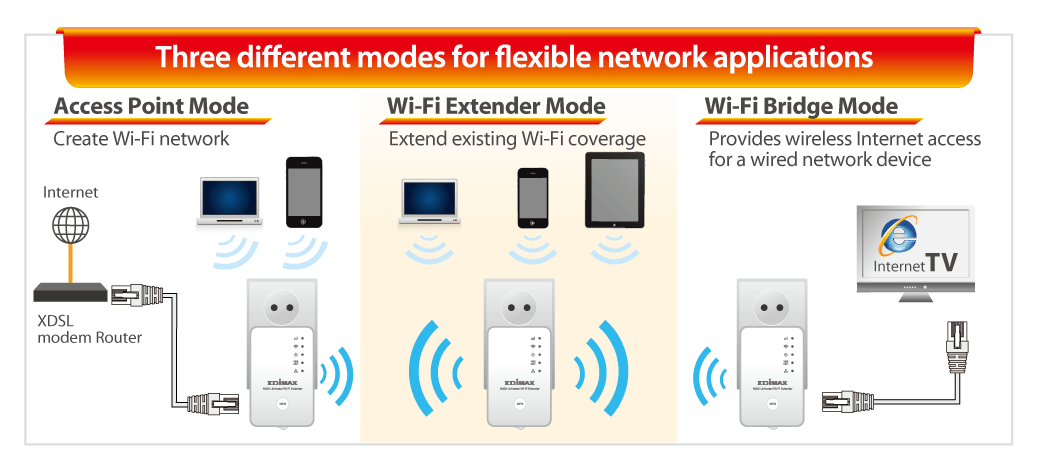
There are several types of WiFi repeaters available in the market, each with its own unique features and capabilities. Here are some of the most common ones:
- Range Extender: A range extender is a device that connects to your existing router and extends the Wi-Fi signal to cover more areas.
- Powerline Wifi: Powerline WiFi uses your home’s electrical wiring to create a network, allowing you to extend your Wi-Fi coverage without needing additional cables.
- Mesh Repeater: A mesh repeater is a type of range extender that creates a mesh network, allowing devices to connect directly to each other and extending the Wi-Fi signal in a more efficient way.
Choosing The Right Wifi Repeater
Before you start configuring your WiFi repeater, it’s essential to choose the right one for your needs. Here are some factors to consider:
- Type of Device: Consider what type of devices you want to connect to your network (e.G., Smartphones, laptops, smart TVs).
- Coverage Area: Determine how much coverage area you need.
- Power Consumption: If you’re concerned about power consumption, look for devices with low energy usage.
Configuring a Wifi Repeater
Once you’ve chosen the right device, it’s time to configure it. Here are the general steps:
- Positioning: Place the repeater in an optimal location, usually between the router and the area where you want to extend the Wi-Fi signal.
- Powering On: Turn on the repeater and make sure it’s connected to a power source.
- Initial Configuration: Follow the manufacturer’s instructions for initial setup, which may involve pressing a WPS button or configuring settings using a browser app.
Configuring a Range Extender
Here are some specific steps to configure a range extender:
- Connect to The Repeater: Connect your device to the repeater’s network.
- Access The Web Interface: Open a web browser and access the repeater’s web interface (usually by typing in its IP address).
- Configure Settings: Follow the on-screen instructions to configure settings, such as choosing the Wi-Fi frequency and password.
Configuring a Powerline Wifi Repeater
Here are some specific steps to configure a powerline WiFi repeater:
- Connect The Repeater: Connect the repeater to your home’s electrical wiring.
- Configure Settings: Follow the manufacturer’s instructions for configuring settings, such as choosing the Wi-Fi frequency and password.
Configuring a Mesh Repeater
Here are some specific steps to configure a mesh repeater:
- Connect The Repeater: Connect the repeater to your existing router.
- Configure Settings: Follow the manufacturer’s instructions for configuring settings, such as choosing the Wi-Fi frequency and password.
Common Issues And Troubleshooting
Some common issues that may arise during configuration include:
- Weak Signal Strength: Check if the repeater is placed in an optimal location and if there are any physical barriers blocking the signal.
- Difficulty Connecting to The Network: Ensure that your device is configured correctly and that you’re using the correct Wi-Fi frequency.
Conclusion
Configuring a WiFi repeater can be a straightforward process, but it requires some planning and understanding of the different types available. By choosing the right device for your needs and following the manufacturer’s instructions, you can extend your Wi-Fi coverage and enjoy a more reliable internet connection throughout your home.
Frequently Asked Questions (FAQs)
-
Q: What is The Difference Between a Range Extender And a Mesh Repeater?
A: A range extender connects to your existing router and extends the Wi-Fi signal, while a mesh repeater creates a mesh network that allows devices to connect directly to each other. -
Q: Can I Use Multiple Wifi Repeaters in my Home?
A: Yes, you can use multiple WiFi repeaters in your home, but ensure that they are configured correctly and that there is no overlap between their coverage areas. -
Q: How do I Configure a Powerline Wifi Repeater?
A: To configure a powerline WiFi repeater, connect it to your home’s electrical wiring and follow the manufacturer’s instructions for configuring settings. -
Q: Can I Use a Wifi Repeater With my Existing Router?
A: Yes, you can use a WiFi repeater with your existing router by connecting them using an Ethernet cable or wirelessly. -
Q: How do I Troubleshoot Issues With my Wifi Repeater?
A: Troubleshooting issues with your WiFi repeater may involve checking the signal strength, ensuring that devices are configured correctly, and resetting the device if necessary. -
Q: Can I Use a Wifi Repeater to Boost my Internet Speed?
A: While a WiFi repeater can extend the coverage area of your Wi-Fi network, it cannot increase the actual internet speed. -
Q: What is The Range of a Wifi Repeater?
A: The range of a WiFi repeater depends on several factors, including the device’s specifications and the presence of physical barriers in the environment. -
Q: Can I Use a Wifi Repeater With my Smartphone or Tablet?
A: Yes, you can use a WiFi repeater with your smartphone or tablet by connecting to its network and following the manufacturer’s instructions for configuring settings.


