
How to Do a Prime Video on Youtube: A Step-by-step Guide
Are you excited to create your first video on YouTube, but not sure where to start? Look no further! In this article, we will guide you through the process of creating a prime video on YouTube, from choosing a style and location to publishing your video and promoting it to your audience.
Understanding Your Channel’s Identity
Before creating your prime video, it’s essential to understand your channel’s identity. What is your channel about? What topics do you plan to cover? What tone do you want to convey? Answering these questions will help you create a clear and concise introduction that sets the stage for future videos.
Presenting Your Channel
Your prime video should serve as an introduction to your channel, showcasing your personality and style. It’s essential to be yourself and not try to mimic someone else. Be authentic, and your audience will appreciate it.
Choosing The Right Style
The style of your prime video is crucial in setting the tone for future videos. Choose a style that reflects your channel’s theme and appeals to your target audience. For example, if you’re creating a travel vlog, use a fun and adventurous tone, while a finance-focused channel might require a more serious and professional approach.
Using The Right Location
The location of your prime video can make or break its success. Choose a location that is visually appealing and relevant to your channel’s theme. If you’re creating a travel vlog, choose a beautiful and exotic location, while a cooking show might require a well-equipped kitchen.
Attention to Quality
Quality is key when it comes to YouTube videos. Use high-quality equipment, such as a good camera and microphone, to ensure that your video looks and sounds professional. Avoid using low-quality footage or background noise that can distract from the main message.
Other Helpful Tips
Here are some additional tips to help you create a prime video on YouTube:
- Be yourself and have fun
- Use a script or outline to keep your video organized
- Engage with your audience by responding to comments and creating a community around your channel
- Promote your video through social media and other online platforms
Publishing Your Prime Video
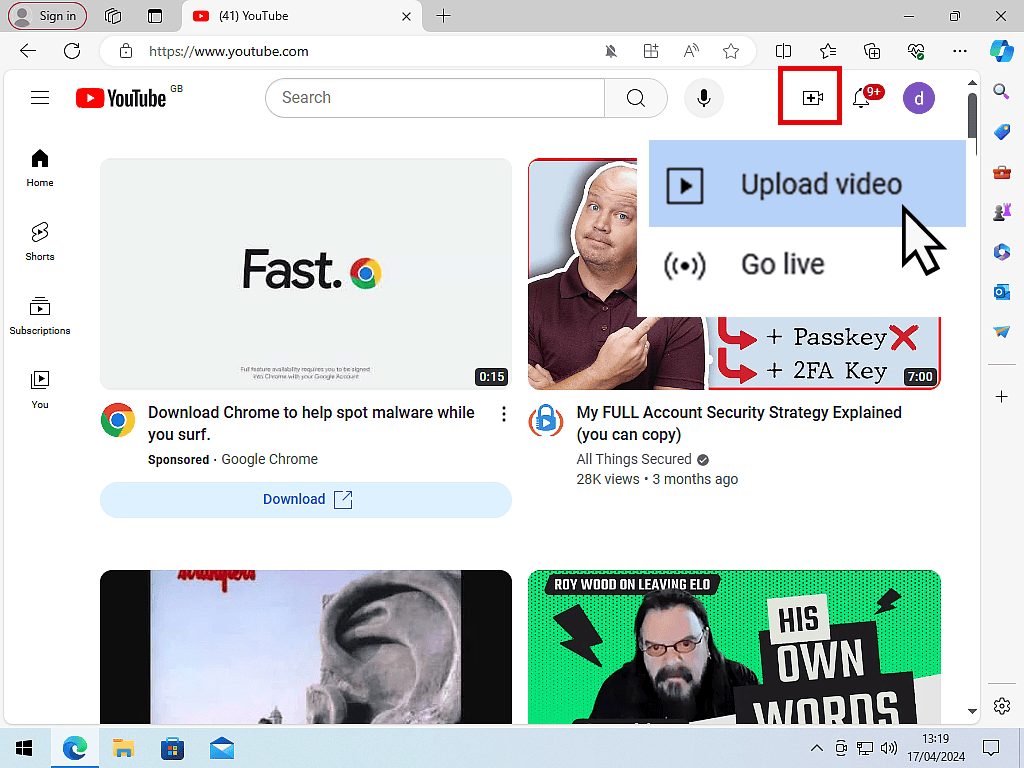
Once you’ve created your prime video, it’s time to publish it on YouTube. Follow these steps:
- Open the YouTube app or website and sign in with your Google account.
- Click on the “Upload” button and select the file you want to upload.
- Add a title, description, and tags to your video.
- Choose a thumbnail that represents your video.
- Set the video’s visibility to public or private, depending on your preference.
- Click on the “Publish” button to make your video live.
Conclusion
Creating a prime video on YouTube can be an exciting and rewarding experience. By following these steps and tips, you can create a high-quality video that showcases your channel’s identity and appeals to your target audience. Remember to always be yourself, have fun, and engage with your audience to build a loyal community around your channel.
Frequently Asked Questions
- What is The Best Way to Promote my Prime Video?
Promote your video through social media, online communities, and other platforms where your target audience hangs out. - How Long Should my Prime Video Be?
Keep it short and sweet – 5-10 minutes is a good starting point. - What Equipment do I Need to Create a High-quality Video?
Use a good camera, microphone, and editing software to ensure that your video looks and sounds professional. - How Often Should I Upload Videos on Youtube?
Upload at least once a week, but consistency is key – aim for 1-3 times a week. - Can I Monetize my Prime Video?
Yes, if you have more than 1,000 subscribers and 4,000 watch hours in the past 12 months, you can apply for YouTube’s Partner Program. - How do I Engage With my Audience on Youtube?
Respond to comments, create a community around your channel, and interact with your viewers through social media and other online platforms. - What is The Best Way to Optimize my Video For Search?
Use relevant keywords in your title, description, and tags to help your video rank higher in search results. - Can I Use Music or Sounds in my Prime Video?
Yes, but make sure you have the necessary permissions and follow YouTube’s guidelines on using copyrighted material.
Table 1: Tips For Creating a Prime Video
| Tip | Description |
|---|---|
| Be yourself | Authenticity is key when creating a prime video. Be true to yourself and your channel’s identity. |
| Use a script or outline | Keep your video organized and engaging with a clear structure and storyline. |
| Engage with your audience | Respond to comments, create a community around your channel, and interact with your viewers through social media and other online platforms. |
| Promote your video | Share your video on social media, online communities, and other platforms where your target audience hangs out. |
Table 2: Equipment Needed For High-quality Video
| Equipment | Description |
|---|---|
| Camera | Use a good camera with high-quality resolution (1080p or higher) and stabilization features. |
| Microphone | Invest in a good quality microphone that can capture clear and crisp audio. |
| Editing software | Use professional-grade editing software, such as Adobe Premiere Pro or Final Cut Pro, to edit your video. |
Table 3: Tips for Optimizing Your Video for Search**
| Tip | Description |
|---|---|
| Use relevant keywords | Include relevant and specific keywords in your title, description, and tags to help your video rank higher in search results. |
| Optimize your title | Make sure your title accurately reflects the content of your video and includes relevant keywords. |
| Add a compelling description | Write a clear and concise description that summarizes the content of your video and includes relevant keywords. |


