
Creating Lists For Iptv: A Step-by-step Guide
Are you tired of searching for IPTV channels online? Do you want to create a personalized list of your favorite TV stations without worrying about the hassle of navigating through various websites? Look no further! In this article, we’ll show you how to create lists for IPTV using various methods, including online services, multimedia reproduction software, and even text editors.
Why Create Lists For Iptv?
Creating a list of your preferred IPTV channels can save you time and effort. With a personalized list, you can easily access the channels you want without having to search through numerous websites or navigate through complicated menus. This is especially useful if you have multiple devices connected to your home network, such as smart TVs, streaming boxes, or gaming consoles.
Method 1: Using Online Services
One of the easiest ways to create a list for IPTV is by using online services. These platforms often provide a user-friendly interface and a wide range of channels to choose from. Some popular options include:
- Scriptun: A web portal that allows you to search and add TV channels to your list.
- VLC: A free multimedia player that can create playlists for IPTV.
Step 1: Choosing The Right Online Service
Select an online service that suits your needs. Some platforms may have more channels or features than others, so be sure to research before making a decision.
Step 2: Adding Channels to Your List
Once you’ve chosen an online service, follow these steps:
- Browse through the available channels and select the ones you want to add.
- Copy the URL of each channel and paste it into your playlist.
- Save your list as an M3U file.
Method 2: Using Multimedia Reproduction Software
Another option is to use multimedia reproduction software, such as VLC or iTunes. These programs can create playlists for IPTV and are often more customizable than online services.
Step 1: Downloading The Right Software
Choose a multimedia player that suits your needs, such as VLC or iTunes.
Step 2: Creating a Playlist
Follow these steps to create a playlist:
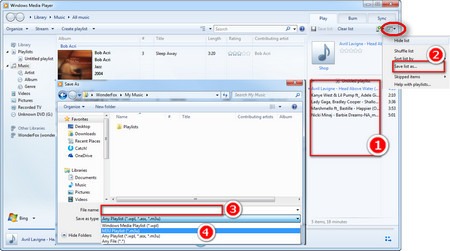
- Open the software and select the “New” option.
- Choose the type of playlist you want to create (e.G., M3U).
- Add channels to your list by copying their URLs and pasting them into the playlist.
Step 3: Saving Your Playlist
Save your playlist as an M3U file. This will allow you to import it into other software or devices that support IPTV.
Method 3: Using Text Editors
If you’re comfortable with editing code, you can also create a list for IPTV using text editors like Notepad++ or Atom. However, this method is not recommended unless you have experience with coding.
Step 1: Choosing The Right Text Editor
Select a text editor that suits your needs, such as Notepad++ or Atom.
Step 2: Creating Your Playlist Code
Follow these steps to create your playlist code:
- Open the text editor and enter the following line of code:
#EXTM3U - Add channels to your list by entering their URLs and names in the format specified above.
- Save your file as an M3U file.
Conclusion
Creating a list for IPTV can be a simple process if you follow these steps. Whether you choose online services, multimedia reproduction software, or text editors, remember to save your playlist as an M3U file to ensure compatibility with other devices and software. By following this guide, you’ll have a personalized list of your favorite TV channels in no time.
Frequently Asked Questions (FAQs)
Here are some frequently asked questions related to creating lists for IPTV:
Q: What is the difference between online services and multimedia reproduction software?
A: Online services typically provide a user-friendly interface and a wide range of channels, while multimedia reproduction software can create playlists and often offer more customization options.
Q: How do I add channels to my list using online services?
A: Browse through the available channels, select the ones you want to add, copy their URLs, and paste them into your playlist.
Q: Can I use text editors to create a list for IPTV?
A: Yes, but this method is not recommended unless you have experience with coding. Text editors can be used to create playlists, but it’s often more complicated than using online services or multimedia reproduction software.
Q: What file format should I save my playlist in?
A: Save your playlist as an M3U file to ensure compatibility with other devices and software.
Q: Can I import my IPTV list into other software or devices?
A: Yes, most IPTV software and devices support importing playlists from M3U files.


