
How to Extract Mp3 From Youtube: A Step-by-step Guide
Are you tired of watching YouTube videos on your phone or computer, only to have them stop playing after a few minutes? Do you wish you could download your favorite music videos and listen to them offline? Look no further! In this article, we will show you how to extract MP3 from YouTube using various methods.
Why Download Mp3s From Youtube?
Before we dive into the nitty-gritty of extracting MP3s from YouTube, let’s talk about why you might want to do so in the first place. Here are a few reasons:
- You can listen to your favorite music videos offline without worrying about internet connectivity.
- You can save storage space on your device by not having to store entire video files.
- You can easily access and play your downloaded MP3s using any media player or app.
Method 1: Using Youtube Music
One of the simplest ways to download MP3s from YouTube is by using the official YouTube Music app. Here’s how:
- Install the YouTube Music app on your device (available for both Android and iOS).
- Sign in with your Google account, if prompted.
- Search for the song or video you want to download.
- Select the “Save” option from the three-dot menu.
- Choose the quality of the MP3 file you want to download.
Method 2: Using PC And Mac Software
If you’re using a computer, you can use software like 4K Video Downloader or MediaHuman YouTube to MP3 Converter to extract MP3s from YouTube videos. Here’s how:
- Download and install the software of your choice.
- Copy the URL of the YouTube video you want to download.
- Paste the URL into the software, and select the desired output format (MP3).
- Choose the quality of the MP3 file you want to download.
- Click “Download” to start the extraction process.
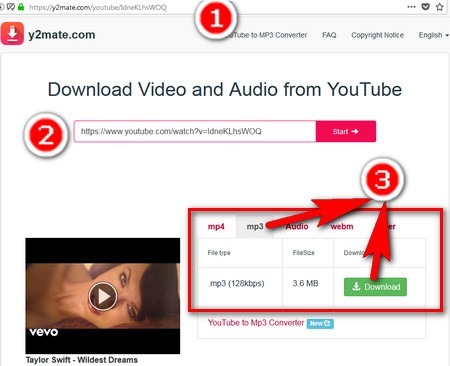
Method 3: Using Online Services
If you don’t want to install any software or apps, there are online services like noTube that can help you extract MP3s from YouTube videos. Here’s how:
- Go to the noTube website.
- Copy the URL of the YouTube video you want to download.
- Paste the URL into the text field on the website.
- Select the desired output format (MP3).
- Click “Download” to start the extraction process.
Method 4: Using Android Apps
If you’re using an Android device, there are several apps available that can help you extract MP3s from YouTube videos. Here’s how:
- Download and install an app like TubeMate.
- Open the app and select the “Search” option.
- Paste the URL of the YouTube video you want to download into the search field.
- Select the desired output format (MP3).
- Click “Download” to start the extraction process.
Method 5: Using Ios Apps
If you’re using an iOS device, there are also several apps available that can help you extract MP3s from YouTube videos. Here’s how:
- Download and install an app like Command.
- Open the app and select the “Search” option.
- Paste the URL of the YouTube video you want to download into the search field.
- Select the desired output format (MP3).
- Click “Download” to start the extraction process.
In conclusion, extracting MP3s from YouTube videos is a straightforward process that can be achieved using various methods. Whether you’re using software, online services, or mobile apps, there’s an option available for everyone. Just remember to always check the copyright laws in your country before downloading any copyrighted content.


