
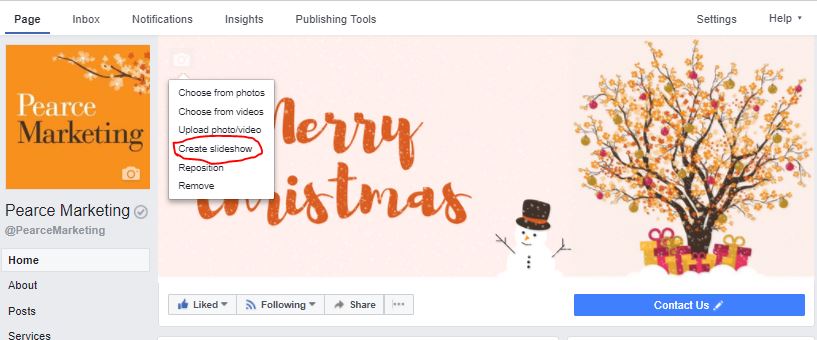
How to Create a Stunning Facebook Cover: A Step-by-step Guide
Are you tired of having a boring Facebook profile or page? Do you want to stand out from the crowd and make a lasting impression on your friends and followers? Look no further! In this article, we will show you how to create a stunning Facebook cover that reflects your personality and style.
Why is a Great Facebook Cover Important?
Before we dive into the nitty-gritty of creating a great Facebook cover, let’s talk about why it’s so important. A great Facebook cover can:
- Help you stand out from the crowd and make a lasting impression on your friends and followers
- Reflect your personality and style, making it easier for people to get to know you
- Increase engagement and interaction with your content
- Improve your online presence and reputation
Understanding The Basics of a Facebook Cover
Before we start creating our cover, let’s talk about what makes a great one. A good Facebook cover should:
- Be visually appealing and eye-catching
- Reflect your personality and style
- Comply with Facebook’s guidelines and dimensions (more on that later)
- Be easy to create and customize
Creating a Facebook Cover: The Ultimate Guide
Now that we’ve covered the basics, let’s get started on creating our stunning Facebook cover!
Option 1: Creating a Facebook Cover Online
If you’re not tech-savvy or don’t have design experience, fear not! There are many online tools and services that can help you create a stunning Facebook cover. One of the most popular options is Canva.
How to Use Canva to Create a Facebook Cover:
- Head over to Canva.Com and sign up for an account.
- Click on “Create a Design” and select “Facebook Cover” from the template gallery.
- Choose a template that suits your style and interests, or start from scratch.
- Upload your own photos, graphics, and text to customize your cover.
- Experiment with different fonts, colors, and layouts until you find one that works for you.
- Download your final design in PNG or JPEG format.
Option 2: Creating a Facebook Cover With Adobe Photoshop
If you have Adobe Photoshop installed on your computer, you can use it to create a stunning Facebook cover. Here’s a step-by-step guide:
- Open Adobe Photoshop and create a new document.
- Set the dimensions to 820 x 315 pixels (Facebook’s recommended size).
- Add a background image or color to your canvas.
- Insert text, graphics, or other elements to customize your cover.
- Experiment with different fonts, colors, and layouts until you find one that works for you.
- Save your final design as a JPEG or PNG file.
Option 3: Creating a Facebook Cover With Mobile Apps
If you’re on-the-go and don’t have access to a computer, there are many mobile apps available that can help you create a stunning Facebook cover. Some popular options include:
- Canva (iOS, Android)
- Cover Photo (Android)
- Lid Photo Maker (iOS)
How to Create a Facebook Video Cover: A Step-by-step Guide
Want to take your Facebook cover to the next level? Creating a video cover is a great way to showcase your personality and style. Here’s a step-by-step guide:
- Choose a video editing software like Adobe Premiere Pro, iMovie, or Avidemux.
- Create a new project and set the dimensions to 820 x 312 pixels (Facebook’s recommended size).
- Import your footage and experiment with different edits, transitions, and effects.
- Add text, graphics, or other elements to customize your video cover.
- Export your final design as a MP4 file.
Tips And Tricks:
- Make sure your Facebook cover complies with Facebook’s guidelines and dimensions (640 x 360 pixels for smartphones and 820 x 315 pixels for desktops).
- Use high-quality images and graphics that are visually appealing and eye-catching.
- Experiment with different fonts, colors, and layouts until you find one that works for you.
- Don’t be afraid to get creative and try out new ideas!
Conclusion:
Creating a stunning Facebook cover is easier than ever! With these step-by-step guides and tips, you can create a visually appealing and eye-catching cover that reflects your personality and style. Remember to experiment with different fonts, colors, and layouts until you find one that works for you.
Faqs:
- What Are The Dimensions of a Facebook Cover?
A: The recommended size is 820 x 315 pixels for desktops and 640 x 360 pixels for smartphones. - Can I Create a Video Cover on Facebook?
A: Yes, but only for pages and not personal profiles. Make sure your video cover complies with Facebook’s guidelines (20-90 seconds long and at least 820×312 pixels). - How do I Upload my Facebook Cover?
A: Simply click on the “Cover” button in your Facebook profile or page settings. - Can I Use a Third-party App to Create my Facebook Cover?
A: Yes, there are many mobile apps available that can help you create a stunning Facebook cover (e.G., Canva, Cover Photo). - What if I’m Not Tech-savvy? Can I Still Create a Great Facebook Cover?
A: Absolutely! There are many online tools and services that can help you create a stunning Facebook cover without requiring design experience.
Bonus Tip: Don’t forget to save your final design in the correct format (PNG or JPEG) and compress it for faster loading times!
We hope this ultimate guide has helped you create a stunning Facebook cover that reflects your personality and style!


