
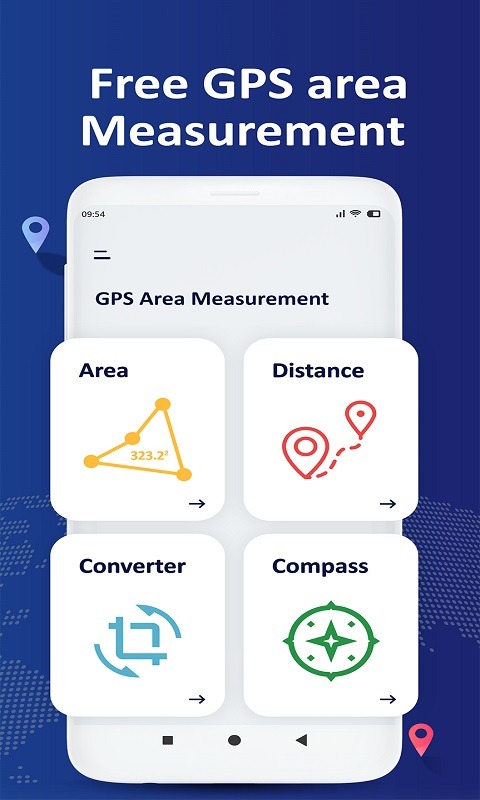
The Ultimate Guide to Measuring Terrains With Mobile Apps
Are you a landowner looking to sell or rent out your property, but struggling to measure its dimensions? Or perhaps you’re an agricultural enthusiast wanting to optimize your farm’s layout? Whatever your reason, measuring terrains can be a daunting task. But fear not! In this article, we’ll explore the world of mobile apps designed specifically for terrain measurement.
The Challenge of Measuring Terrains
As a landowner, it’s essential to have an accurate measure of your property’s dimensions. This information is crucial for potential buyers or renters, as well as for agricultural purposes such as crop planning and irrigation management. However, measuring terrains can be a time-consuming and error-prone process, especially if you don’t have access to professional surveying equipment.
Mobile Apps to The Rescue
Fortunately, there are several mobile apps available that can help you measure terrains with ease. These apps utilize your device’s GPS capabilities, along with maps and other features, to provide accurate measurements of your property’s dimensions.
Top Mobile Apps For Measuring Terrains
Here are some of the top mobile apps for measuring terrains:
1. Gps Measure The Area of The Countryside (Android/iOS/iPadOS)
The first app on our list is GPS Measure the Area of the Countryside, available for both Android and iOS devices. This app allows you to measure the dimensions of a terrain using a map of your selected zone.
How it Works:
- Download and install the app from the Google Play Store or Apple App Store.
- Tap on the “Consent” button to grant access to your location.
- Select the area you want to measure by zooming in on the map.
- Tap on the “+” button to start measuring, then select the type of measurement (manual or GPS).
- Place markers along the perimeter to outline the area.
- The app will display the measurements, including the perimeter and area.
2. Andmeasure (Android)
AndMeasure is another popular app for measuring terrains on Android devices. This app offers a similar experience to GPS Measure the Area of the Countryside.
How it Works:
- Download and install the app from the Google Play Store.
- Tap on the “Consent” button to grant access to your location.
- Select the area you want to measure by zooming in on the map.
- Tap on the “Add” button to start measuring, then select the type of measurement (manual or GPS).
- Place markers along the perimeter to outline the area.
- The app will display the measurements, including the perimeter and area.
3. Measure Map Pro (Android/iOS/iPadOS)
Measure Map Pro is a user-friendly app available for both Android and iOS devices. This app allows you to measure terrains using a map of your selected zone.
How it Works:
- Download and install the app from the Google Play Store or Apple App Store.
- Tap on the “Consent” button to grant access to your location.
- Select the area you want to measure by zooming in on the map.
- Use the built-in compass to place markers along the perimeter.
- The app will display the measurements, including the perimeter and area.
4. Planimeter For Map Measure (iOS/iPadOS)
Planimeter for Map Measure is a specialized app designed specifically for measuring terrains on iOS devices. This app offers advanced features such as multiple marker placement and export options.
How it Works:
- Download and install the app from the Apple App Store.
- Tap on the “Yes or No” button to grant access to your location.
- Select the area you want to measure by zooming in on the map.
- Use the built-in compass to place markers along the perimeter.
- The app will display the measurements, including the perimeter and area.
5. Planimeter For Map Measure (Android)
While not as widely available as some of the other apps on this list, Planimeter for Map Measure is also available on Android devices.
How it Works:
- Download and install the app from the Google Play Store.
- Tap on the “Yes or No” button to grant access to your location.
- Select the area you want to measure by zooming in on the map.
- Use the built-in compass to place markers along the perimeter.
- The app will display the measurements, including the perimeter and area.
Conclusion
Measuring terrains can be a daunting task, but with the right mobile apps, it’s easier than ever. These five apps offer advanced features and accurate measurements, making them ideal for landowners, agricultural enthusiasts, and anyone in need of terrain measurement solutions.
Frequently Asked Questions (FAQs)
- What is The Most Accurate App For Measuring Terrains?
GPS Measure the Area of the Countryside and AndMeasure are two of the most popular apps on this list, offering high accuracy rates.
- Do These Apps Require Internet Access?
Yes, all five apps require internet access to function properly.
- Can I Export Measurements From These Apps?
Yes, most of these apps offer export options in various formats (KML, CSV, PDF, PNG, GPX).
- Are These Apps Compatible With my Device?
Please check the app’s compatibility with your device before downloading.
- Do I Need to Have a Professional Surveyor Measure my Property?
While these apps can provide accurate measurements, it’s always recommended to consult with a professional surveyor for precise and official documentation.


