
How to Block Someone on Snapchat: A Step-by-step Guide
Are you tired of dealing with annoying people on Snapchat? Do you want to know how to block someone who’s been bothering you? Look no further! In this article, we’ll show you how to block someone on Snapchat in a few simple steps.
What is Blocking on Snapchat?
Blocking on Snapchat means that the person you’re blocking won’t be able to see your stories or messages, and you won’t receive any notifications from them. It’s like hitting the “mute” button – it’ll help you avoid all interactions with that person until you choose to unblock them.
How to Block Someone on Snapchat
To block someone on Snapchat, follow these steps:
- Open The Snapchat App: First, open the Snapchat app on your phone or tablet.
- Go to The Profile Section: Tap on the icon of your profile picture in the top left corner of the screen.
- Select “My Friends”: Tap on the word “My Friends” at the bottom of the screen.
- Find The Person You Want to Block: Scroll through your list of friends and find the person you want to block.
- Tap on Their Name: Tap on the name of the person you want to block.
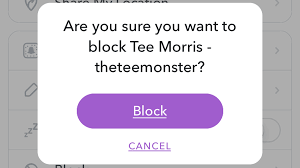
- Select “Block”: Tap on the word “Block” at the bottom of the screen.
- Confirm The Action: Tap on “Block” again to confirm that you want to block this person.
How to Block a Stranger on Snapchat
If someone is sending you unwanted messages or requests, you can also block them. To do this:
- Open The Chat With The Stranger: Open the chat with the person who’s been bothering you.
- Tap on Their Name: Tap on the name of the person at the top of the screen.
- Select “Block”: Tap on the word “Block” at the bottom of the screen.
- Confirm The Action: Tap on “Block” again to confirm that you want to block this person.
How to Block Someone’s Stories on Snapchat
If you don’t want to see someone’s stories, but still want to keep them as a friend, you can block their stories instead. To do this:
- Go to The Profile Section: Tap on the icon of your profile picture in the top left corner of the screen.
- Select “Settings”: Tap on the gear icon at the top right of the screen.
- Scroll Down to “Who Can…”: Scroll down to the section that says “Who Can…”
- Select “Only Friends”: Select the option that says “Only Friends”.
- Confirm The Action: Confirm that you want to block this person’s stories.
How to Unblock Someone on Snapchat
If you change your mind and want to unblock someone, follow these steps:
- Open The Snapchat App: Open the Snapchat app.
- Go to The Profile Section: Tap on the icon of your profile picture in the top left corner of the screen.
- Select “My Friends”: Tap on the word “My Friends” at the bottom of the screen.
- Find The Person You Want to Unblock: Scroll through your list of friends and find the person you want to unblock.
- Tap on Their Name: Tap on the name of the person you want to unblock.
- Select “Unblock”: Tap on the word “Unblock” at the bottom of the screen.
Frequently Asked Questions
Q: How do I block someone who’s not my friend?
A: To block someone who’s not your friend, go to their profile page and tap on the three dots in the top right corner. Select “Block” from the menu that appears.
Q: Can I still see someone’s stories if I’ve blocked them?
A: No, if you’ve blocked someone, you won’t be able to see their stories or messages.
Q: How do I unblock someone?
A: To unblock someone, go to your list of friends and find the person you want to unblock. Tap on their name and select “Unblock”.
Q: Can I block someone from seeing my stories?
A: Yes, if you don’t want someone to see your stories, you can block them instead of blocking their stories.
Conclusion
Blocking someone on Snapchat is a simple process that can help you avoid unwanted interactions. Whether it’s a friend or a stranger who’s been bothering you, following the steps above will ensure that they won’t be able to see your stories or messages. Remember, if you need any more assistance, our team of experts are always here to help.
What’s Next?
If you’re looking for more tips and tricks on how to use Snapchat effectively, we’ve got you covered! Our blog is filled with useful guides and tutorials that can help you become a master snapper. So what are you waiting for?


