
Mastering Mirc: A Comprehensive Guide
As a seasoned internet user, you’ve likely stumbled upon various online communities and chat platforms. One such platform is mIRC, an old yet still-used program for Windows that allows users to communicate with others on the Internet Relay Chat (IRC) network.
What is Mirc?
MIRC is a client software specifically designed for operating systems like Windows. It enables users to connect to IRC servers, join channels, and engage in real-time conversations with other users. The software has been around since the early 1990s and remains popular among certain communities.
The History of Mirc
Developed by Mirage Studios, mIRC was first released in 1995 as a free download. Initially, it gained popularity for its user-friendly interface and robust features. Over time, the program evolved to include new functionality, such as support for multiple protocols and improved security measures.
Key Features of Mirc
- User-friendly Interface: MIRC boasts an intuitive design that makes it easy for users to navigate and find their way around.
- Multi-protocol Support: The software supports various IRC protocols, allowing users to connect to different servers and channels.
- Customization Options: Users can personalize their experience with customizable themes, scripts, and plugins.
- Advanced Security Features: MIRC includes robust security measures, such as password protection and encryption, to safeguard user data.
Installing And Configuring Mirc
To get started with mIRC, follow these steps:
- Download The Software: Visit the official mIRC website and download the program.
- Install The Software: Run the installation file and follow the prompts to complete the setup process.
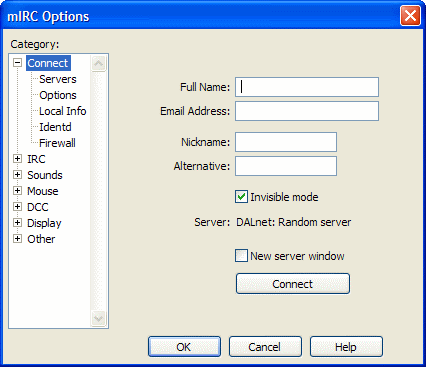
- Configure Your Settings: Launch the software and adjust your settings, including choosing a nickname, configuring your connection options, and selecting your preferred servers.
Connecting to an Irc Server
To connect to an IRC server using mIRC:
- Launch The Software: Start mIRC and configure your settings as desired.
- Connect to a Server: Choose a server from the list or add a new one by clicking on the “Add” button.
- Join a Channel: Once connected, join a channel by typing the channel name in the input box and pressing Enter.
Understanding Irc Servers And Channels
IRC servers are the backbone of the IRC network, allowing users to connect and communicate with others. Each server has its own set of channels, which can be public or private. Channels are like online rooms where users can discuss topics of interest.
Using Mirc For Private Conversations
To engage in a private conversation using mIRC:
- Find The User: Locate the user you want to chat with in the channel list.
- Initiate a Query: Right-click on the user’s name and select “Query” from the menu.
- Type Your Message: Enter your message in the input box and press Enter.
Alternative Irc Clients
While mIRC remains popular, there are other alternative clients available for different operating systems:
- Xchat For Macos: A feature-rich client with a user-friendly interface.
- Kvirc For Linux: A highly customizable client with support for multiple protocols.
- Androirc For Android: A mobile client designed specifically for Android devices.
Security And Privacy
When using mIRC or any other IRC client, it’s essential to prioritize security and privacy:
- Use Strong Passwords: Choose unique and complex passwords for your accounts.
- Be Cautious With Scripts And Plugins: Only use scripts and plugins from trusted sources to avoid potential security risks.
Conclusion
Mastering mIRC requires some practice, but with this comprehensive guide, you’ll be well on your way to becoming an expert user. Remember to stay safe online by following basic security best practices and being mindful of your virtual identity.
Frequently Asked Questions (FAQs)
- Q: What is The Purpose of Mirc?
A: MIRC is a client software designed for Windows that enables users to connect to IRC servers, join channels, and engage in real-time conversations. - Q: Is Mirc Still Supported by Its Developers?
A: While the original developer has discontinued support, the community continues to update and maintain the software. - Q: Can I Use Mirc on Other Operating Systems?
A: Unfortunately, mIRC is only available for Windows. However, there are alternative clients available for macOS, Linux, Android, and iOS. - Q: How do I Report a Security Vulnerability or Issue With Mirc?
A: Contact the developers or community members through their official channels or forums. - Q: Can I Use Mirc For Personal or Business Purposes?
A: Yes, mIRC can be used for both personal and business purposes, but always follow local laws and regulations regarding online activities. - Q: How do I Configure Mirc to Work With my Favorite Irc Server?
A: Follow the setup guide provided by the developers or community members to configure mIRC for your preferred IRC server. - Q: What Are The System Requirements For Running Mirc?
A: Check the official website for the latest system requirements and recommended specifications. - Q: Can I Use Mirc With a Proxy Server?
A: Yes, mIRC supports proxy servers; consult the user manual or community resources for configuration instructions.


