
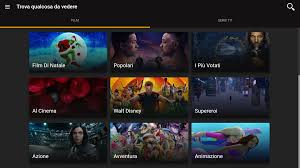
The Ultimate Guide to Veezie: How to Use This Revolutionary Media Platform
Are you tired of being limited by traditional media platforms? Do you want to experience the freedom of accessing your favorite contents on multiple devices? Look no further than Veezie, the revolutionary media platform that’s taking the world by storm.
In this article, we’ll delve into the world of Veezie and explore its features, benefits, and uses. We’ll also provide step-by-step guides on how to use Veezie on various devices, including smartphones, tablets, PCs, and Smart TVs.
What is Veezie?
Veezie is a media platform that allows users to organize, manage, and reproduce contents from their devices or from specific URLs. It’s like having a personal media center at your fingertips, where you can access all your favorite contents in one place.
How Does Veezie Work?
To use Veezie, you need to download the application on your device (smartphone, tablet, PC, or Smart TV) and register an account. Once you’ve done that, you can start adding sources (websites or folders) where Veezie will retrieve contents for you.
You can search for specific titles, actors, directors, or genres using Veezie’s powerful search engine. You can also add your favorite contents to a wishlist, which makes it easy to access them later.
Using Veezie on Your Smartphone And Tablet
To download Veezie on your smartphone or tablet, simply go to the Play Store (for Android devices) or App Store (for iOS devices), search for Veezie, and install the app. Once installed, follow these steps:
- Open the Veezie app and sign in with your Google account.
- Tap on “My channels” and add a new channel by entering the URL of your preferred source.
- Search for contents using Veezie’s search engine or browse through your wishlist.
Using Veezie on Your PC
To download Veezie on your PC, visit the official website and click on the download button. Choose the version that matches your operating system (Windows or macOS). Follow these steps:
- Install Veezie by following the installation wizard.
- Open Veezie and sign in with your Google account.
- Tap on “My channels” and add a new channel by entering the URL of your preferred source.
- Search for contents using Veezie’s search engine or browse through your wishlist.
Using Veezie on Your Smart TV
To download Veezie on your Smart TV, simply go to the Play Store (for Android TVs) and install the app. Follow these steps:
- Open the Veezie app and sign in with your Google account.
- Tap on “My channels” and add a new channel by entering the URL of your preferred source.
- Search for contents using Veezie’s search engine or browse through your wishlist.
Troubleshooting: Why Won’t Veezie Work?
Sometimes, you may encounter issues with Veezie not working properly. If this happens, don’t worry! Here are some tips to troubleshoot the problem:
- Check if the source is online and correctly inserted.
- Remove any faulty channels from your list of sources.
- Reboot Veezie and try again.
The Benefits of Using Veezie
Using Veezie offers many benefits, including:
- Accessing contents across multiple devices
- Managing all your favorite contents in one place
- Searching for specific titles, actors, or genres
- Adding contents to a wishlist for easy access later
Conclusion
In conclusion, Veezie is an innovative media platform that allows users to experience the freedom of accessing their favorite contents on multiple devices. With its user-friendly interface and powerful search engine, Veezie makes it easy to manage all your contents in one place.
Whether you’re using Veezie on your smartphone, tablet, PC, or Smart TV, this guide has shown you how to get started with this revolutionary media platform. So why wait? Download Veezie today and start enjoying the world of limitless entertainment!
Frequently Asked Questions (FAQs)
- What is Veezie?
Veezie is a media platform that allows users to organize, manage, and reproduce contents from their devices or from specific URLs.
- How Does Veezie Work?
To use Veezie, you need to download the application on your device (smartphone, tablet, PC, or Smart TV) and register an account. Once you’ve done that, you can start adding sources (websites or folders) where Veezie will retrieve contents for you.
- Can I Use Veezie on Multiple Devices?
Yes! Veezie allows you to access your favorite contents across multiple devices, including smartphones, tablets, PCs, and Smart TVs.
- Is Veezie Free?
Yes! Veezie is a free media platform that offers many features and benefits without any subscription or registration fees.
- Can I Add my Own Sources to Veezie?
Yes! You can add your own sources (websites or folders) to Veezie, which allows you to access contents from multiple platforms in one place.
- How do I Troubleshoot Issues With Veezie?
If you encounter any issues with Veezie not working properly, try checking if the source is online and correctly inserted, removing any faulty channels, or rebooting the app.
- Can I Use Veezie Without a Google Account?
Yes! You can use Veezie without a Google account by opting for the “Continuous without account” option during setup.
- Is my Data Safe With Veezie?
Yes! Veezie takes your security and privacy seriously, ensuring that all your data is protected and secure.


