
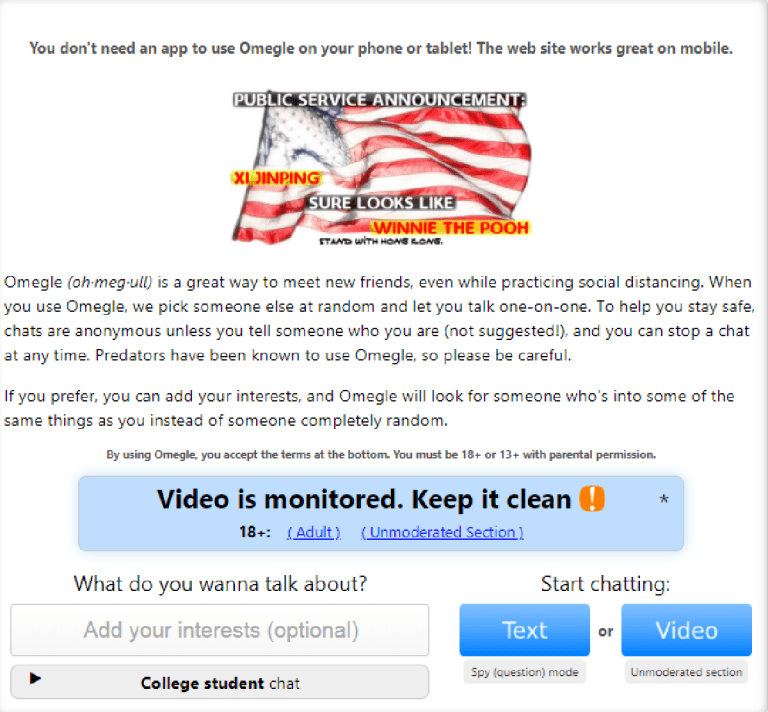
How Omegle Works: A Step-by-step Guide
Are you curious about how Omegle works? Do you want to know the ins and outs of this popular video chat platform? Look no further! In this article, we’ll take a deep dive into the world of Omegle, covering everything from its basic functionality to advanced features and tips.
What is Omegle?
Omegle is a free online chat service that allows users to have text or video chats with strangers from all over the world. It’s a platform where you can meet new people, make friends, and engage in conversations on various topics.
Using Omegle on Pc: A Beginner’s Guide
Before we dive into the nitty-gritty details, let’s cover the basics of using Omegle on your PC. To get started:
- Visit the official website of Omegle.
- Click on the “Text” button to initiate a text chat.
- Enter your interests and hobbies in the chat window.
- Click on the “Text” button again to start chatting with someone who shares similar interests.
How to Chat on Omegle
Chatting on Omegle is simple and easy. Here’s a step-by-step guide:
- Connect to the official website of Omegle.
- Click on the “Text” button to initiate a text chat.
- Enter your message in the chat window.
- Click on the “Forward” button to send your message.
- To end the conversation, click on the “Stop” button.
How to Video Chat on Omegle
Video chatting on Omegle is just as easy as texting! Here’s how:
- Connect to the official website of Omegle.
- Click on the “Video” button to initiate a video chat.
- Allow access to your webcam and microphone.
- Click on the “Video” button again to start chatting with someone.
Using Omegle on Smartphone
Want to use Omegle on your smartphone? No problem! Here’s how:
- Visit the official website of Omegle using a web browser (e.G., Google Chrome or Safari).
- Tap on the “Text” or “Video” button to initiate a chat.
- Follow the same steps as on PC.
Using Omegle With Vpn
Are you concerned about your safety and security while using Omegle? Using a VPN is a great idea! Here’s why:
- A VPN creates a secure and encrypted connection between your device and the internet.
- It conceals your IP address, making it difficult for others to track your online activities.
Tips For Using Omegle Safely
To ensure a safe and enjoyable experience on Omegle, follow these tips:
- Be respectful and kind in your interactions with others.
- Avoid sharing personal or sensitive information.
- Use a VPN to protect your identity and security.
- Report any suspicious or harassing behavior.
How to Unban Yourself From Omegle
If you’ve been banned from Omegle, don’t worry! Here’s how to unban yourself:
- Use a different device with a new IP address.
- Try using a VPN to change your IP address.
- Wait for the ban period to expire (up to 6 months).
Conclusion
Omegle is a fun and interactive platform where you can meet new people, make friends, and engage in conversations on various topics. By following this guide, you’ll be able to use Omegle safely and confidently.
Frequently Asked Questions (FAQs)
Here are some frequently asked questions about Omegle:
- What is Omegle?
Omegle is a free online chat service that allows users to have text or video chats with strangers from all over the world. - Is Omegle Safe?
Yes, Omegle is generally safe to use, but it’s essential to be respectful and kind in your interactions with others. - Can I Use Omegle on my Smartphone?
Yes, you can use Omegle on your smartphone by visiting the official website using a web browser. - Do I Need a Vpn to Use Omegle?
While not necessary, using a VPN is recommended to protect your identity and security while using Omegle. - How do I Unban Myself From Omegle?
To unban yourself from Omegle, try using a different device with a new IP address or wait for the ban period to expire (up to 6 months). - Can I Use Omegle on my Tv?
Yes, you can use Omegle on your TV by connecting it to the internet and visiting the official website. - Is Omegle Available in All Countries?
Omegle is available worldwide, but some countries may have restrictions or limitations on its use.
Additional Resources
For more information about using Omegle safely and confidently, check out our additional resources:


