
The Ultimate Guide to Video Editing on Instagram
Are you tired of creating boring videos that don’t showcase your personality? Look no further! In this comprehensive guide, we’ll show you how to create stunning videos using the built-in video editing features on Instagram.
Getting Started
Before we dive into the nitty-gritty details, let’s take a look at what’s possible with Instagram’s video editing features. From adding music and effects to trimming and splitting clips, Instagram has everything you need to create engaging videos that will captivate your audience.
Basic Editing Features on Instagram
When creating a new post or story, tap the “+” icon in the bottom left corner of the screen. Choose either “Post” or “Story” from the menu, then select a video from your gallery or record one using the camera app. Once you’ve chosen your video, tap the edit button (looks like a pen) to access Instagram’s built-in editing features.
Adding Music And Effects
One of the most fun aspects of video editing on Instagram is adding music and effects to your videos. Tap the “Audio” tab to browse through various sounds and songs that you can add to your video. You can also use the built-in effects, like filters and stickers, to give your video a unique touch.
Trimming And Splitting Clips
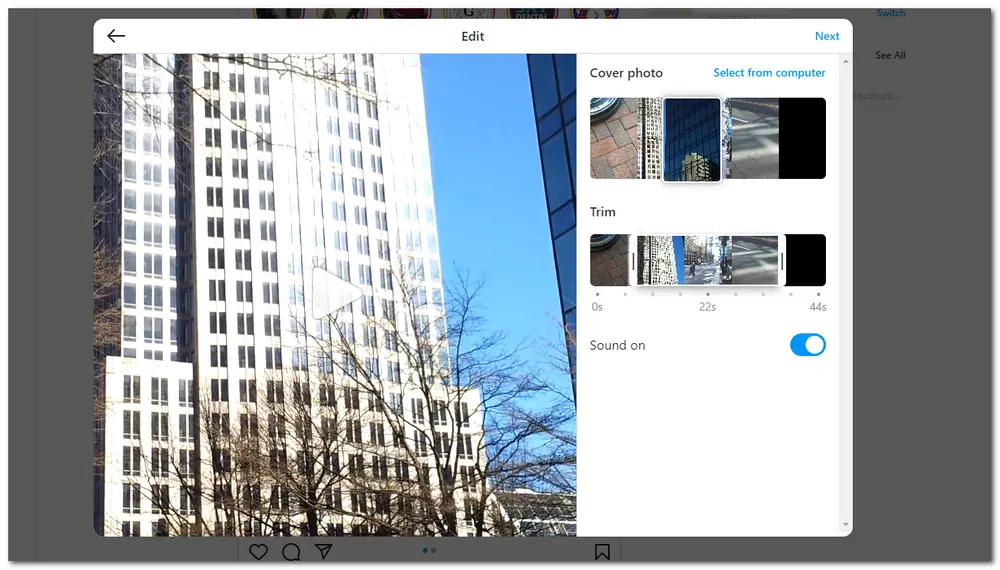
Sometimes, you might want to trim or split a clip to make it more interesting. Tap the “Edit” button again and select the “Split” option to divide the video into two parts. You can also use the trimming feature to cut out unwanted parts of your video.
Superimposing Text And Stickers
Adding text and stickers to your videos is a great way to convey messages or highlight important points. Tap the “Text” tab to add a typed message, and choose from various fonts and colors. You can also select from a range of pre-made stickers that you can place on top of your video.
Filters And Special Effects
Instagram’s filters and special effects are another great way to give your videos an extra boost. Browse through the various options in the “Filters” tab, or tap the “Effects” button to add something more dynamic to your video.
Working With Multiple Clips
Sometimes, you might want to create a video that incorporates multiple clips. Instagram allows you to do just that! Tap the “Add” button and select another clip from your gallery, then arrange them in the order you prefer.
Exporting Your Video
Once you’re happy with your edits, tap the “Share” button to export your video directly onto Instagram. Choose whether to share it as a post, story, or both!
Using Third-party Apps For Advanced Editing
While Instagram’s built-in editing features are great, sometimes you might need more advanced tools to create complex videos. Consider using third-party apps like CapCut, InShot, Splice, and Clipchamp to take your video editing skills to the next level.
Conclusion
Video editing on Instagram is easier than ever! With these tips and tricks, you’ll be able to create stunning videos that showcase your personality and style. Don’t forget to experiment with different features and effects to make your videos stand out from the crowd!
Faqs
- What Are The Best Third-party Apps For Video Editing on Instagram?
CapCut, InShot, Splice, and Clipchamp are some of the most popular options. - How do I Add Music to my Video on Instagram?
Tap the “Audio” tab and browse through various sounds and songs that you can add to your video. - Can I Split a Clip Into Multiple Parts on Instagram?
Yes, tap the “Edit” button and select the “Split” option to divide the video into two parts. - How do I Add Text And Stickers to my Video on Instagram?
Tap the “Text” tab or select a sticker from the options in the “Stickers” tab. - Can I Use Filters And Special Effects on Instagram?
Yes, browse through the various options in the “Filters” tab, or tap the “Effects” button to add something more dynamic to your video. - How do I Export my Edited Video Onto Instagram?
Tap the “Share” button and choose whether to share it as a post, story, or both! - Can I Use Instagram’s Built-in Editing Features on Pc?
Yes, you can use Instagram’s web version to edit videos directly from your computer. - What Are Some Other Video Editing Apps That I Can Use For Instagram?
Besides CapCut and InShot, Splice and Clipchamp are also popular options!


