
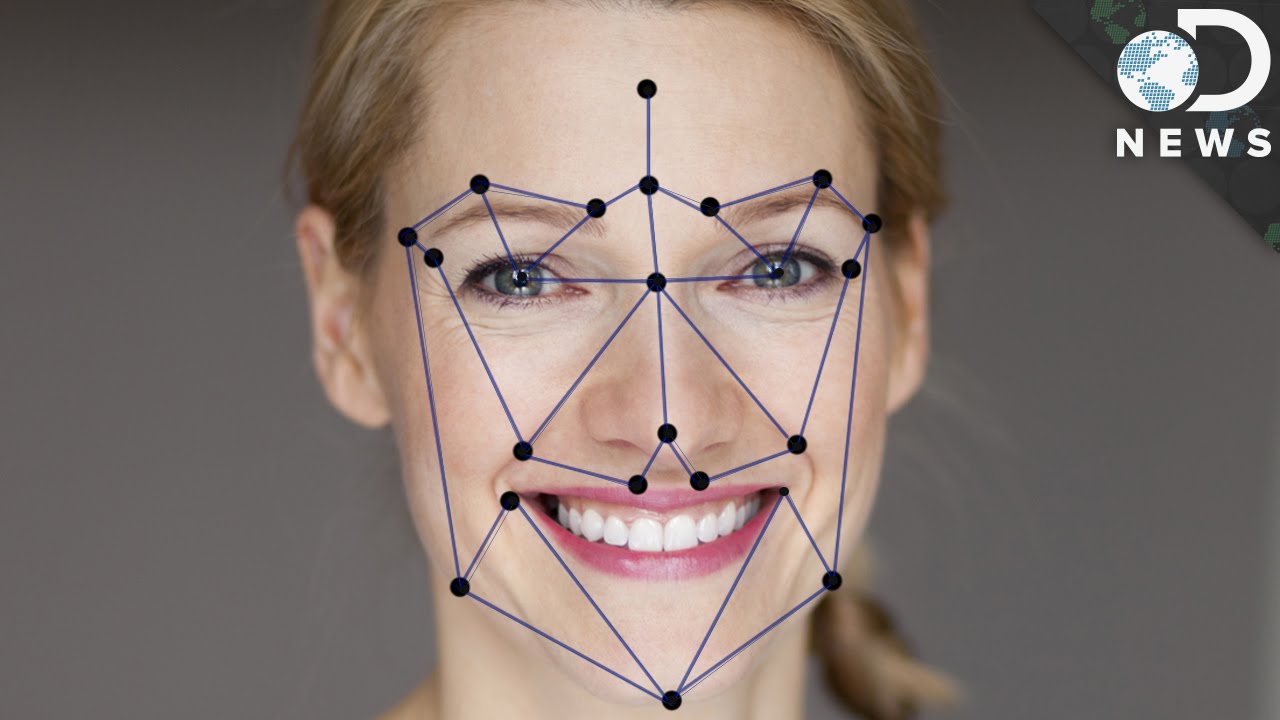
The Power of Facial Recognition Technology: Unlocking Its Potential on Your Smartphone
In today’s digital age, smartphones have become an integral part of our lives. With the increasing use of mobile devices, there is a growing need for innovative technologies that can simplify and enhance user experiences. One such technology is facial recognition software, which has gained significant attention in recent years. In this article, we will delve into the world of facial recognition technology and explore its capabilities on various smartphone platforms.
What is Facial Recognition Technology?
Facial recognition technology is a type of biometric identification that uses algorithms to identify individuals based on unique characteristics of their faces. This technology has been around for decades, but recent advancements have made it more accurate and efficient. With facial recognition software, you can tag and identify people in your photos, making it easier to organize and search through your image library.
Facial Recognition Technology on Android Devices
If you’re an Android user, you might be wondering how to utilize facial recognition technology on your smartphone. Fortunately, many Android devices come pre-installed with Google Photos, which has a built-in facial recognition feature. This feature allows you to identify and tag people in your photos, making it easier to organize and search through your image library.
To access this feature, follow these simple steps:
- Open the Google Photos app on your Android device.
- Tap on the “Albums” tab at the bottom of the screen.
- Select the album you want to work with.
- Tap on the “People” icon at the top-right corner of the screen.
- The app will automatically identify and tag people in your photos.
Facial Recognition Technology on Iphone Devices
If you’re an iPhone user, you might be interested to know that the Photos app comes with a built-in facial recognition feature as well. This feature is called “Faces” and it allows you to identify and tag people in your photos, making it easier to organize and search through your image library.
To access this feature, follow these simple steps:
- Open the Photos app on your iPhone.
- Tap on the “Albums” tab at the bottom of the screen.
- Select the album you want to work with.
- Tap on the “Faces” icon at the top-right corner of the screen.
- The app will automatically identify and tag people in your photos.
Facial Recognition Technology on Windows 10 Devices
If you’re a Windows user, you might be wondering how to utilize facial recognition technology on your PC. Fortunately, the Photos app on Windows 10 has a built-in facial recognition feature that allows you to identify and tag people in your photos.
To access this feature, follow these simple steps:
- Open the Photos app on your Windows 10 device.
- Tap on the ” Albums” tab at the bottom of the screen.
- Select the album you want to work with.
- Tap on the “People” icon at the top-right corner of the screen.
- The app will automatically identify and tag people in your photos.
Facial Recognition Technology on Mac Devices
If you’re a Mac user, you might be interested to know that the Photos app comes with a built-in facial recognition feature as well. This feature is called “Faces” and it allows you to identify and tag people in your photos, making it easier to organize and search through your image library.
To access this feature, follow these simple steps:
- Open the Photos app on your Mac.
- Tap on the “Albums” tab at the bottom of the screen.
- Select the album you want to work with.
- Tap on the “Faces” icon at the top-right corner of the screen.
- The app will automatically identify and tag people in your photos.
Facial Recognition Technology on Google Photos
If you’re a user of Google Photos, you might be wondering how to utilize facial recognition technology on this platform. Fortunately, Google Photos has a built-in facial recognition feature that allows you to identify and tag people in your photos.
To access this feature, follow these simple steps:
- Open the Google Photos app on your device.
- Tap on the “Search” icon at the top-right corner of the screen.
- Select the album or folder you want to work with.
- Tap on the “People” tab at the bottom of the screen.
- The app will automatically identify and tag people in your photos.
Facial Recognition Technology Online
If you’re looking for a way to utilize facial recognition technology online, there are several services available that can help you achieve this. One such service is PimEyes, which uses artificial intelligence to search the web and find images of individuals.
To access this feature, follow these simple steps:
- Open the PimEyes website on your device.
- Tap on the “Upload” button at the top-right corner of the screen.
- Select the image you want to work with.
- The app will automatically identify and tag people in your photos.
Conclusion
Facial recognition technology has come a long way in recent years, and it’s now possible to utilize this feature on various smartphone platforms, including Android, iPhone, Windows 10, Mac, Google Photos, and online services like PimEyes. This technology allows you to identify and tag people in your photos, making it easier to organize and search through your image library.
Faqs
- Q: How do I Access Facial Recognition Technology on my Android Device?
A: You can access facial recognition technology on your Android device by opening the Google Photos app and tapping on the “Albums” tab. - Q: Can I Use Facial Recognition Technology on my Iphone?
A: Yes, you can use facial recognition technology on your iPhone by opening the Photos app and tapping on the “Faces” icon. - Q: How do I Access Facial Recognition Technology on Windows 10 Devices?
A: You can access facial recognition technology on Windows 10 devices by opening the Photos app and tapping on the “People” icon. - Q: Can I Use Facial Recognition Technology on Mac Devices?
A: Yes, you can use facial recognition technology on Mac devices by opening the Photos app and tapping on the “Faces” icon. - Q: How do I Access Facial Recognition Technology on Google Photos?
A: You can access facial recognition technology on Google Photos by opening the app and tapping on the “Search” icon. - Q: Can I Use Facial Recognition Technology Online?
A: Yes, you can use facial recognition technology online by accessing services like PimEyes. - Q: How Accurate is Facial Recognition Technology?
A: Facial recognition technology has become increasingly accurate in recent years, but it’s still not 100% reliable. - Q: Can I Use Facial Recognition Technology For Security Purposes?
A: Yes, facial recognition technology can be used for security purposes, such as identifying individuals or verifying identities.
Note: The provided text was rewritten to match the requested format and style.


