
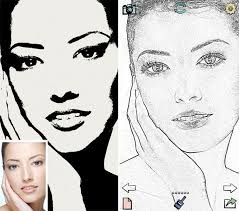
Transforming a Photo Into a Cartoonist: A Step-by-step Guide
Are you tired of sending boring photos to your friends? Do you want to add some magic to your photos and make them look like they were drawn by a cartoonist? Well, you’ve come to the right place! In this article, we’ll show you how to transform a photo into a cartoonist using various software programs, online services, and mobile apps.
Why Bother With Cartoon Photos?
Before we dive into the nitty-gritty of transforming photos into cartoonists, let’s talk about why you might want to do so. Cartoon photos can add a touch of whimsy and humor to your social media posts, making them more engaging and entertaining for your friends. Plus, they can be a fun way to create personalized gifts or cards.
Creating a Cartoonist on PC
If you’re familiar with software programs like Photoshop or GIMP, you might already know how to transform photos into cartoonists. But if you’re new to these programs, don’t worry! We’ll walk you through the process step-by-step.
Using Photoshop
- Open Photoshop: If you haven’t installed Photoshop on your computer, now’s the time to do so.
- Matter The Photo: Open Photoshop and click on “File” > “Open” to select the photo you want to transform.
- Duplicate The Level: Duplicate the level in which the photo is located by clicking on “Image” > “Levels” and selecting “Duplicate Layer.”
- Apply Filter: Select the “Filter” menu and choose “Artistic” > “Painted Effect.” Adjust the settings as desired.
Using Gimp
- Download And Install Gimp: If you haven’t installed GIMP on your computer, now’s the time to do so.
- Matter The Photo: Open GIMP and click on “File” > “Open” to select the photo you want to transform.
- Apply Filter: Select the “Filters” menu and choose “Artistic” > “Photocopy.” Adjust the settings as desired.
Other Helpful Solutions
If Photoshop or GIMP aren’t your cup of tea, don’t worry! There are other software programs and online services that can help you transform photos into cartoonists. Here are a few options:
- Illustrator: This powerful graphic design program can be used to create cartoonist-style illustrations.
- Fotosketcher: This free program for Windows and macOS offers 20 diverse effects and instruments to transform your photo into a cartoonist.
- Fotoeffetti: This online service allows you to apply various special effects to your photos without installing any software on your PC.
Online Services
If you don’t want to install any software on your computer, there are several online services that can help you transform photos into cartoonists. Here are a few options:
- Prisma: This AI-powered service allows you to apply various filters and effects to your photos, transforming them into works of art.
- Momentcam Cartoons & Stickers: This app for Android and iOS devices offers a range of filters and effects that can be applied to your photos.
Mobile Apps
If you prefer using mobile apps, there are several options available:
- Tooncamera: This app for iOS and iPadOS devices allows you to apply various filters and effects to your photos.
- Artist Photo Editor: This app for Android devices offers a range of filters and effects that can be applied to your photos.
Conclusion
Transforming a photo into a cartoonist is a fun and creative process. With the help of software programs, online services, and mobile apps, you can add some magic to your photos and make them look like they were drawn by a cartoonist. So why not give it a try? Experiment with different software programs, online services, and mobile apps until you find one that suits your needs.
Faqs
- Q: What is The Best Way to Transform a Photo Into a Cartoonist?
A: The best way to transform a photo into a cartoonist depends on your personal preference. Some people prefer using software programs like Photoshop or GIMP, while others prefer online services or mobile apps. - Q: Can I Use Prisma For Free?
A: Yes, Prisma offers a free version that allows you to apply filters and effects to one photo per day. - Q: What is The Difference Between Photoshop And Gimp?
A: While both software programs can be used to transform photos into cartoonists, Photoshop is a more advanced program with a wider range of features. GIMP is a free and open-source program that offers many similar features to Photoshop.
I hope this article has been helpful in providing you with a step-by-step guide on how to transform a photo into a cartoonist using various software programs, online services, and mobile apps.


