
The Ultimate Guide to Using Your Phone as a Remote Control
Are you tired of losing your remote control or having it run out of batteries? Do you want to take your entertainment experience to the next level without breaking the bank? Look no further! In this article, we will explore the possibilities of using your smartphone as a remote control for various devices, including TVs, computers, and more.
The Benefits of Using Your Phone as a Remote Control
Using your phone as a remote control offers several benefits. Firstly, it eliminates the need to carry around multiple remotes, making it easier to manage your entertainment experience. Secondly, it allows you to control your devices from anywhere in the room, without having to physically get up or use a separate remote. Finally, many apps are available that can be downloaded for free, making this option accessible and affordable.
Apps For Using Your Phone as a Remote Control
There are several apps available that allow you to use your phone as a remote control. Some of the most popular ones include:
- LG Thinq: This app allows you to control your LG TV from your smartphone, using features such as voice commands and gesture recognition.
- Telecomando Universal TV: This app enables you to control your TV from your phone, using infrared technology to communicate with your device.
- Remote Mouse: This app turns your phone into a wireless mouse, allowing you to control your computer or laptop from anywhere in the room.
Using Your Phone as a Keyboard And Mouse
In addition to controlling devices remotely, some apps also allow you to use your phone as a keyboard and mouse. For example:
- Teamviewer: This app allows you to remote into another device, using features such as video and audio streaming.
- Vlc Remote: This app enables you to control VLC media player from your phone, using features such as playback controls and file navigation.
Using Your Phone as a Remote Control Without Wifi
Did you know that you can use your phone as a remote control without needing an internet connection? Many devices are equipped with infrared technology, which allows them to communicate with other devices wirelessly. For example:
- Telecomando Universal TV: This app uses infrared technology to enable you to control your TV from your phone.
- Remote Mouse: This app uses infrared technology to turn your phone into a wireless mouse.
Using Your Phone as a Remote Control For Apple TV
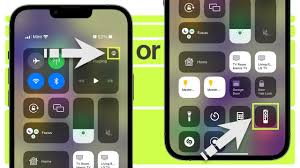
If you have an Apple TV, you can use your iPhone or iPad as a remote control using the Apple Remote TV feature. To do this:
- Make sure both devices are connected to the same WiFi network.
- Open the Settings app on your Apple device.
- Select the “General” tab and scroll down to the “Apple Remote TV” section.
- Tap the toggle switch to enable Apple Remote TV.
Using Your Phone as a Remote Control For Fire Stick
If you have an Amazon Fire Stick, you can use your phone as a remote control using the Amazon Fire TV app. To do this:
- Download and install the Amazon Fire TV app on your smartphone.
- Make sure both devices are connected to the same WiFi network.
- Open the app and select your Fire Stick from the list of available devices.
- Follow the instructions to complete the pairing process.
Conclusion
Using your phone as a remote control offers several benefits, including convenience, flexibility, and cost-effectiveness. With a wide range of apps available, it’s never been easier to take your entertainment experience to the next level without breaking the bank. Whether you’re looking to control your TV, computer, or other devices, there’s an app out there for you.
Frequently Asked Questions
- Q: What Are Some Popular Apps That Allow me to Use my Phone as a Remote Control?
A: Some of the most popular apps include LG ThinQ, Telecomando Universal TV, and Remote Mouse. - Q: Can I Use my Phone as a Remote Control Without Wifi?
A: Yes, many devices are equipped with infrared technology that allows them to communicate wirelessly. - Q: How do I Use my Iphone or Ipad as a Remote Control For Apple Tv?
A: To enable Apple Remote TV, make sure both devices are connected to the same WiFi network and follow the instructions in the Settings app. - Q: Can I Use my Phone as a Remote Control For Fire Stick?
A: Yes, you can use your phone as a remote control using the Amazon Fire TV app. Make sure both devices are connected to the same WiFi network and follow the instructions in the app. - Q: Are There Any Free Apps That Allow me to Use my Phone as a Remote Control?
A: Yes, many apps are available for download for free, including Remote Mouse and VLC Remote. - Q: What Are Some of The Benefits of Using my Phone as a Remote Control?
A: Some of the benefits include convenience, flexibility, and cost-effectiveness. - Q: Can I Use my Phone as a Keyboard And Mouse?
A: Yes, some apps allow you to use your phone as a keyboard and mouse, including TeamViewer and VLC Remote. - Q: What Are Some Other Uses For my Phone’s Infrared Technology?
A: Infrared technology can be used for various purposes, including remote control and wireless communication.


