
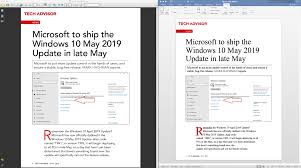
Converting Pdf Files to Word Documents: A Step-by-step Guide
Are you tired of dealing with uneditable PDF files? Do you wish you could convert them into Word documents that can be easily edited and modified? Look no further! In this article, we will guide you through the process of converting PDF files to Word documents using various online and offline tools.
Why Convert Pdf Files to Word Documents?
PDF files are often used for sharing and distributing documents, but they can be difficult to edit and modify. By converting them into Word documents, you can make changes and updates easily, which is especially useful for collaborative projects or when working with large datasets.
Offline Tools: Converting Pdf Files to Word Documents on Your Computer
There are several offline tools available that allow you to convert PDF files to Word documents on your computer. Here are a few options:
Microsoft Word (Windows/macOS)
If you have Microsoft Office installed on your computer, you can use the built-in Word program to convert PDF files to Word documents.
To do this, follow these steps:
- Open Microsoft Word and select “Open” from the menu.
- Choose the PDF file you want to convert and click “Open”.
- The document will be imported into Word, where you can edit it as needed.
- Save the document in a new format, such as DOCX.
Doxillion Document Converter (Windows/macOS)
Another offline tool that allows you to convert PDF files to Word documents is Doxillion Document Converter.
To use this program, follow these steps:
- Download and install Doxillion from their website.
- Open the program and select “Add Files” or drag and drop your PDF file into the interface.
- Choose the output format as DOCX and select the desired settings.
- Click “Convert” to begin the conversion process.
Naps2 (Windows)
NAPS2 is a free, portable program that allows you to convert PDF files to Word documents using OCR technology.
To use NAPS2, follow these steps:
- Download and extract the program from their website.
- Run the program and select “Add Files” or drag and drop your PDF file into the interface.
- Choose the output format as DOCX and select the desired settings.
- Click “Convert” to begin the conversion process.
Online Tools: Converting Pdf Files to Word Documents Online
If you don’t want to download any software on your computer, there are several online tools available that allow you to convert PDF files to Word documents directly from their websites.
Ilovepdf (Online)
One popular online tool for converting PDF files to Word documents is iLovePDF.
To use this service, follow these steps:
- Go to the iLovePDF website and click on “Select PDF” or drag and drop your PDF file into the interface.
- Choose the output format as DOCX and select the desired settings.
- Click “Convert” to begin the conversion process.
Cloudconvert (Online)
Another online tool that allows you to convert PDF files to Word documents is CloudConvert.
To use this service, follow these steps:
- Go to the CloudConvert website and click on “Select Files” or drag and drop your PDF file into the interface.
- Choose the output format as DOCX and select the desired settings.
- Click “Convert” to begin the conversion process.
Converting Pdf Files to Word Documents on Mobile Devices
If you want to convert PDF files to Word documents on your mobile device, there are several apps available that can help you do so.
Converter Pdf to Word (Android/iOS/iPadOS)
One popular app for converting PDF files to Word documents is Converter PDF to Word.
To use this app, follow these steps:
- Download and install the app from the App Store or Google Play.
- Open the app and select “Add Files” or drag and drop your PDF file into the interface.
- Choose the output format as DOCX and select the desired settings.
- Click “Convert” to begin the conversion process.
Able2doc Pdf to Word Converter (Android/iOS/iPadOS)
Another app that allows you to convert PDF files to Word documents is Able2Doc PDF to Word Converter.
To use this app, follow these steps:
- Download and install the app from the App Store or Google Play.
- Open the app and select “Add Files” or drag and drop your PDF file into the interface.
- Choose the output format as DOCX and select the desired settings.
- Click “Convert” to begin the conversion process.
Conclusion
Converting PDF files to Word documents is a relatively simple process that can be done using various offline and online tools. Whether you prefer to use Microsoft Office, Doxillion Document Converter, NAPS2, iLovePDF, CloudConvert, or mobile apps like Converter PDF to Word or Able2Doc PDF to Word Converter, there’s a solution available for everyone.
Remember to always check the compatibility of the tool with your operating system and the quality of the output before proceeding with the conversion process.
Frequently Asked Questions (FAQs)
- What is The Best Tool For Converting Pdf Files to Word Documents?
The best tool for converting PDF files to Word documents depends on your specific needs and preferences. Some popular options include Microsoft Office, Doxillion Document Converter, NAPS2, iLovePDF, CloudConvert, and mobile apps like Converter PDF to Word or Able2Doc PDF to Word Converter.
- How Long Does it Take to Convert a Pdf File to a Word Document?
The conversion time depends on the size of the PDF file and the complexity of the document. In general, smaller PDF files can be converted in a matter of seconds, while larger files may take several minutes or even hours.
- Can I Edit The Converted Word Document?
Yes, you can edit the converted Word document just like any other Microsoft Office document. You can make changes to the text, add new content, and modify the layout as needed.
- Is it Safe to Use Online Tools For Converting Pdf Files to Word Documents?
Most online tools for converting PDF files to Word documents are secure and reliable. However, always check the reputation of the tool and read reviews from other users before proceeding with the conversion process.
- Can I Convert Multiple Pdf Files at Once?
Yes, some offline and online tools allow you to convert multiple PDF files at once. This can be especially useful for large datasets or when working with multiple documents simultaneously.
- Do I Need to Install Any Software on my Computer to Convert Pdf Files to Word Documents?
No, there are several online tools available that allow you to convert PDF files to Word documents without installing any software on your computer.


