
How to Zip a Video: A Step-by-step Guide
Are you tired of struggling to share videos online due to their large file size? Look no further! In this article, we’ll show you how to zip a video using various methods, ensuring it’s easy to share with others.
Understanding The Importance of Zipping Videos
Zipping a video is essential when sharing it online. It reduces the file size, making it easier to send via email or upload to social media platforms. However, finding the right tool for zipping videos can be overwhelming, especially for those who are not tech-savvy.
Method 1: Using Built-in Tools
Most operating systems come with built-in tools that allow you to zip files, including videos. Here’s how to do it:
Windows:
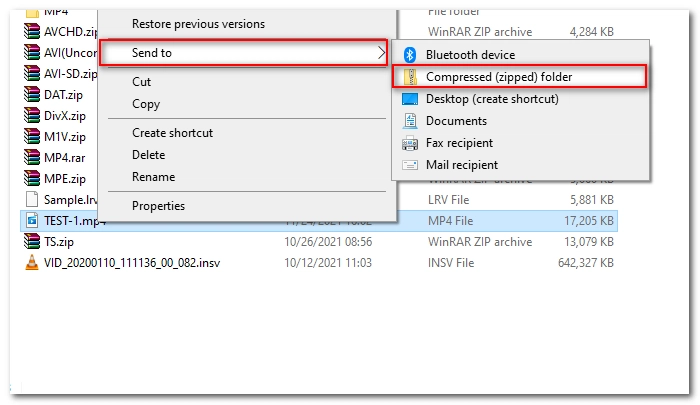
- Right-click on the video file and select “Send to” > “Compressed (zipped) folder.”
- Alternatively, you can use the “WinZip” or “7-Zip” software.
Macos:
- Select the video file and go to “File” > “Compress [file name].Zip”
- You can also use the “Archive Utility” tool to zip files.
Method 2: Using Third-party Software
There are various third-party software options available that can help you zip videos. Here are some popular ones:
Handbrake:
- A free and open-source video compressor that supports multiple formats.
- Download the HandBrake software from their official website.
Video to Video Converter:
- A free software for Windows that allows you to convert and compress videos.
- Download the software from its official website.
Method 3: Using Online Services
If you don’t want to download any software, there are online services that can help you zip your video. Here are some options:
Media.io:
- A free online service that allows you to compress videos.
- Upload your video and select the compression settings.
Videosmaller:
- Another online service that offers video compression and reduction.
- Select the file size and quality, then upload your video.
Method 4: Using Mobile Apps
If you’re using a smartphone or tablet, there are mobile apps available that can help you zip videos. Here are some options:
Androzip (Android):
- A free app developed by AVG that allows you to open, create, and manage ZIP files.
- Download the app from the Google Play Store.
Video Compress (Android):
- A free app that compresses video files.
- Download the app from the Google Play Store.
Method 5: Using Ios Apps
For iPhone users, there are also iOS apps available that can help you zip videos. Here are some options:
Documents by Readdle:
- A popular file manager app for iOS that allows you to open and create ZIP files.
- Download the app from the App Store.
Intelligent Video Manager:
- An app that helps you share big-sized videos on messaging apps, social media, or via email.
- Download the app from the App Store.
Conclusion
Zipping a video is an essential process when sharing it online. By using the methods outlined in this article, you can easily compress your videos and share them with others. Remember to choose the method that best suits your needs, whether it’s using built-in tools, third-party software, online services, or mobile apps.
Frequently Asked Questions
Here are some frequently asked questions related to zipping videos:
Q: What is the best way to zip a video?
A: The best way to zip a video depends on your operating system and personal preferences. You can use built-in tools, third-party software, online services, or mobile apps.
Q: How do I zip a video using Windows?
A: To zip a video using Windows, right-click on the file and select “Send to” > “Compressed (zipped) folder.”
Q: Can I compress videos using an online service?
A: Yes, there are various online services available that can help you compress videos. Some popular options include Media.Io and VideoSmaller.
Q: Are there any mobile apps for zipping videos?
A: Yes, there are mobile apps available for both Android and iOS devices that can help you zip videos.


