
How to Download Apps on Iphone: A Step-by-step Guide
Are you new to the world of iOS and wondering how to download apps on your iPhone? Look no further! This article will guide you through the process of downloading apps on your iPhone, including searching for apps, downloading and updating them, and even tips on how to download apps without a credit card or password.
Understanding The App Store
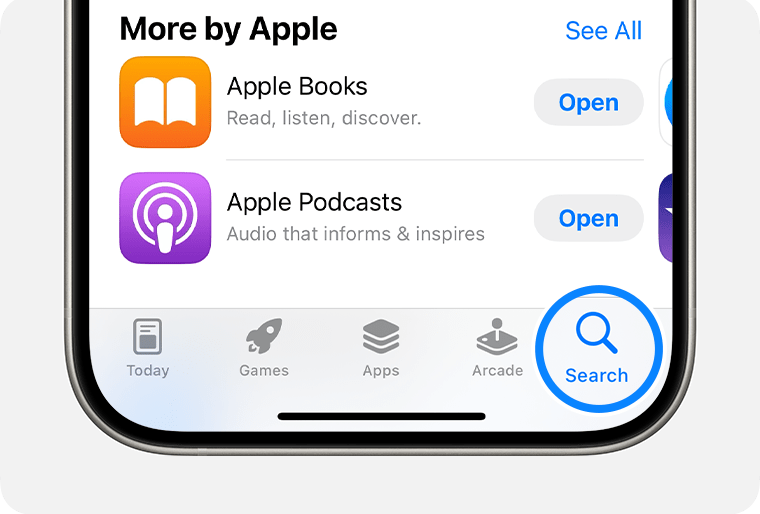
Before we dive into the nitty-gritty of downloading apps, it’s essential to understand the basics of the App Store. The App Store is a virtual marketplace where you can find and download various apps for your iPhone. It’s divided into several sections, including:
- Today: This section showcases featured articles and app recommendations based on current events or trends.
- Games: A list of popular games available for download.
- Apps: A collection of popular apps, categorized by type (e.G., Productivity, entertainment, etc.).
Searching For Apps
To find an app you’re interested in, follow these steps:
- Tap the App Store icon on your iPhone’s home screen.
- Select the “Search” tab at the bottom of the screen.
- Type the name of the app you’re looking for in the search bar.
- Browse through the results and select the app you want to download.
Downloading Apps
Once you’ve found an app you like, follow these steps to download it:
- Tap on the app’s icon to view its details page.
- Tap the “Get” button (if it’s a free app) or the price button (if it’s a paid app).
- If prompted, enter your Apple ID password or use Face/Touch ID to authenticate.
- Wait for the app to download and install.
Updating Apps
To update an app you’ve already downloaded, follow these steps:
- Open the App Store and tap on your profile picture in the top right corner.
- Select “Updates” from the menu.
- Scroll through the list of available updates and select the apps you want to update.
- Tap the “Update” button next to each app.
Downloading Apps Without a Credit Card
If you don’t have a credit card associated with your Apple ID, you can still download free apps without any issues. However, if you try to download paid apps, you’ll be prompted to add a payment method.
Downloading Apps Without a Password
To disable the password prompt for free app downloads, follow these steps:
- Go to Settings > Face ID & Passcode (or Touch ID & Passcode).
- Tap on “App Store” and toggle off the switch next to “Require Password.”
- Repeat this process for the iTunes & App Store section.
Alternative Apps Stores
If you’re interested in exploring alternative app stores, there’s one option available:
- Altstore: This is a third-party app store that allows you to sideload apps on your iPhone. However, be aware that using AltStore may compromise your device’s security and void any warranties.
Transferring Apps From Iphone to Android
Unfortunately, it’s not possible to directly transfer apps from an iPhone to an Android device. However, some apps like WhatsApp can be migrated by restoring data from iCloud or Google Drive.
Conclusion
Downloading apps on your iPhone is a straightforward process that can be completed in a few simple steps. Remember to always exercise caution when downloading apps from third-party stores and keep your device’s security features enabled.
Faqs:
- Q: Can I download apps on my iPhone without a credit card?
A: Yes, you can download free apps without any issues. - Q: How do I update apps on my iPhone?
A: Open the App Store, tap on your profile picture, and select “Updates.” - Q: Can I use an alternative app store to download apps on my iPhone?
A: Yes, there’s one option available called AltStore, but be aware of potential security risks. - Q: Can I transfer apps from my iPhone to an Android device?
A: Unfortunately, no direct transfer is possible, but some apps can be migrated by restoring data from iCloud or Google Drive. - Q: How do I disable the password prompt for free app downloads on my iPhone?
A: Go to Settings > Face ID & Passcode (or Touch ID & Passcode) and toggle off the switch next to “Require Password” for the App Store section. - Q: What’s the difference between the App Store and AltStore?
A: The App Store is an official Apple marketplace, while AltStore is a third-party app store that allows sideloading apps on your iPhone. - Q: Can I use my iPhone to download apps on my Android device?
A: No, transferring apps directly from an iPhone to an Android device is not possible. - Q: How do I enable automatic updates for apps on my iPhone?
A: Go to Settings > App Store and toggle on the switch next to “Updates” to enable automatic app updates.
I hope this article has been helpful in answering your questions about downloading apps on your iPhone!


