
How to Recover Deleted Photos From Cell Phone: A Step-by-step Guide
Introduction
We are all familiar with the feeling of despair when we accidentally delete important photos on our cell phone. However, it is not always necessary to face the death of beloved images. In this article, I will guide you through the procedures to recover deleted photos from your cell phone using different solutions for Android and iOS.
How to Recover Deleted Photos From Android
1. Google Photos
Before resorting to specialized tools, be sure to check the Google Photos bin. Deleted photos remain in a sort of temporary “trash” for approximately 60 days before their permanent deletion.
-
Open the google photos app on your android device.
-
Tap the Collection item and then the Trash item.
-
If among the deleted images there are those you want to recover, tap the Select button, select the desired photos, touch the Restore option, confirm your intention.
2. Diskdigger Photo Recovery
-
Download and install diskdigger photo recovery app from play store.
-
Grant all requested permissions and refuse to upgrade to pro version.
-
Choose external memory (SD card, for example) as the drive to scan.
-
Apply the filter for jpg and/or png depending on the types of files you want to recover.
3. Undeleter Recover Files & Data
This free application allows you to recover deleted files, including photos, on your Android device, without having to purchase the full version to save the recovered data (only requires root).
-
Download and install undeleter recover files & data app from play store.
-
Grant all requested permissions and select Restore Files as the function to use.
-
Specify the location from which you want to recover photos, choose whether to perform a full or general scan, select the file formats to restore (jpg and/or png, for example).
How to Recover Deleted Photos From Ios
1. Iphone
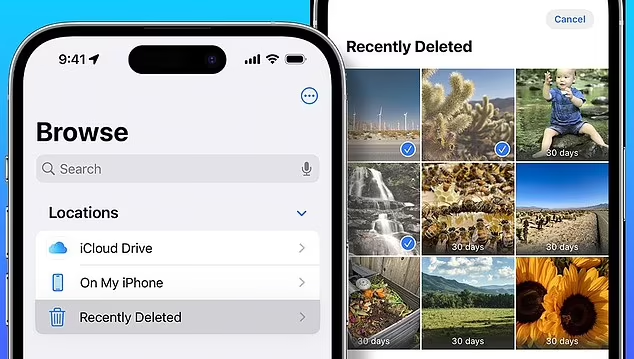
To recover deleted photos from your iPhone, open the photo app, select Album, then Recently Deleted and check if the desired ones are among the deleted images.
-
If the photos you are looking for are not in the recently deleted list, you are sorry but, due to Apple restrictions, there are no specific apps for data recovery that can be used directly from iOS.
-
You can try using alternative solutions that work on your computer.
2. Pc
Yes, you can recover deleted photos from your iPhone using your PC!
To find out more about how to proceed, continue reading.
How to Recover Deleted Photos Using a Pc
1. Photorec (windows/macos/linux)
Download and install the photorec app on your windows or macos computer, first connect the smartphone to the computer or the external memory card if it is on a microsd.
-
Start the program by selecting the location of the SD card, choosing the file format to recover and indicating the folder in which to save the recovered data.
-
If you are using photorec on your mac, open the tar.Bz2 archive downloaded to your computer, extract its contents to a location of your choice and launch the photorec file inside.
2. Easeus Mobisaver (windows/macos)
This free app allows you to restore pictures, messages, notes and contacts directly from phone storage or iCloud backups on Windows and MacOS.
-
Download and install the easeus mobisaver app on your computer.
-
Connect the iPhone to the computer via the charging cable.
-
Launch the program, select the device name from the next screen and click on the Scan button to start the memory analysis.
3. How to Recover Deleted Photos
To recover deleted photos from iPhone with Easeus Mobisaver, do the following:
-
Connect the iPhone to the computer via the charging cable.
-
Launch the program and select Recover Data From Device.
-
Choose the item to recover deleted photos.
Conclusion
Losing important photos is a despairing experience, but not always inevitable. Using these specified procedures and tools, you will be able to recover your favorite images even if they have been accidentally deleted from your Android or iPhone phone.
Frequently Asked Questions (FAQ)
- What is The Difference Between Photos in The “trash” of Google Photos And Those Permanently Deleted?
Photos in the Google Photos “trash” remain for about 60 days before they are definitively deleted, unlike those permanently deleted which are deleted immediately.
- Can I Recover Deleted Photos From my Iphone Using The Easeus Mobisaver App?
Yes! Easeus Mobisaver lets you restore pictures, messages, notes and contacts directly from your phone’s storage or from iCloud backups on Windows and Mac.
- What is The Limit on The Number of Photos I Can Recover Using The Free Easeus Mobisaver App?
The free edition of easeus mobisaver allows you to recover only one file or five contacts at a time, to restore multiple images at the same time you must purchase the full version.
- Can I Use The Diskdigger Photo Recovery App Directly From Ios?
No! diskdigger photo recovery is only compatible with Android and requires root, to recover deleted photos from iPhone I recommend using alternative solutions from PC.
- What is The Difference Between The Free And Paid Undeleter Recover Files & Data App?
The free version of undeleter recover files & data only allows you to recover deleted data without purchasing the full version to save the recovered data, requiring only root.


