
Understanding Sim Card Phone Numbers: A Comprehensive Guide
Are you wondering how to find the phone number associated with your SIM card? Look no further! This guide will walk you through the easiest ways to discover the phone number of a SIM card, whether it’s for an Android or iPhone device, as well as for different mobile operators like TIM, Vodafone, Wind, and more.
Know Your Phone Number: A Simple Yet Essential Guide
In today’s digital age, having access to your phone number is crucial. It’s not just about receiving calls; it’s also essential for various purposes such as:
- Managing your mobile plan
- Accessing online services that require a verified phone number
- Updating your emergency contact information
How to Find Your Phone Number on Android Devices
If you’re an Android user, finding your phone number is relatively straightforward. Here are the steps:
- Access Settings: Open your device’s settings app.
- Info Section: Scroll down and select “About phone” or “About device.”
- Number of Phone: Look for the option labeled “Number of phone” or “My number.” This should display your associated SIM card phone number.
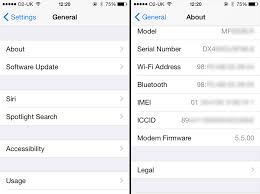
How to Find Your Phone Number on Iphone Devices
If you’re an iPhone user, follow these steps:
- Settings App: Open the Settings app.
- Phone Section: Scroll down and select “Phone.”
- My Number: Look for the option labeled “My number.” This should display your associated SIM card phone number.
How to Find Your Phone Number on Other Mobile Operators
While the above steps are for specific devices, other mobile operators have their own processes for retrieving your phone number. Here’s a brief overview:
- Tim: Call 119 and follow the automated voice prompts.
- Vodafone: Call 190 and select option 2 to access assistance services.
- Wind: Call 155 and select options 2 and 3 to speak with an operator.
Alternative Methods For Finding Your Phone Number
If you’re unable to find your phone number using the above methods, there are alternative solutions:
- Check Your Sim Card: Some older SIM cards have their associated phone numbers printed on them.
- Look at Your Sim Card Package: The packaging of your SIM card may include information such as your phone number.
- Contact Your Mobile Operator’s Customer Service
Conclusion: Finding Your Phone Number Made Easy!
Now that you’ve read this comprehensive guide, finding your phone number should be a breeze. Remember to always have access to your phone number for various purposes, and don’t hesitate to contact your mobile operator if you encounter any issues.
Frequently Asked Questions (FAQs)
- What is The Purpose of Having Access to my Phone Number?
- Having access to your phone number is crucial for managing your mobile plan, accessing online services that require a verified phone number, and updating your emergency contact information.
- How do I Find my Phone Number on Android Devices?
- To find your phone number on an Android device, follow the steps outlined in this guide: Access Settings, then select “About phone” or “About device,” and look for the option labeled “Number of phone” or “My number.”
-
How do I Find my Phone Number on Iphone Devices?
- To find your phone number on an iPhone device, follow these steps: Open the Settings app, scroll down and select “Phone,” then look for the option labeled “My number.”
-
What Should I do if I’m Unable to Find my Phone Number Using The Above Methods?
- If you’re unable to find your phone number using the above methods, try alternative solutions such as checking your SIM card, looking at your SIM card package, or contacting your mobile operator’s customer service.
-
Why is it Essential to Have Access to my Phone Number?
- It’s essential to have access to your phone number for various purposes such as managing your mobile plan, accessing online services that require a verified phone number, and updating your emergency contact information.
-
Can I Find my Phone Number on The Packaging of my Sim Card?
- Yes, you can check the packaging of your SIM card, which may include information such as your phone number.
-
How do I Retrieve my Phone Number if It’s Not Printed on my Sim Card or Packaging?
- If your phone number is not printed on your SIM card or packaging, try alternative solutions such as contacting your mobile operator’s customer service or visiting a physical store location.


