
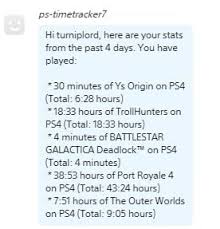
The Ultimate Guide to Viewing Hours Spent on Ps4: A Step-by-step Tutorial
Are you curious about how much time you’ve spent playing games on your PlayStation 4? Look no further! In this article, we’ll guide you through the process of viewing hours spent on PS4, whether it’s through official Sony initiatives or third-party software.
Understanding The Context: Sony’s Initiatives And Third-party Software
Before diving into the tutorial, let’s understand the context. Sony periodically releases initiatives that allow users to view their gaming statistics, including hours spent playing games. These initiatives usually coincide with the end of the year and provide a comprehensive overview of user activity.
However, not all Sony initiatives offer this feature. In such cases, third-party software can be used to achieve the same goal.
How to View Hours Spent on Ps4: A Step-by-step Guide
Official Sony Initiatives
If you’re looking for an official way to view hours spent on PS4, follow these steps:
- Log in to your PS4 and access the Settings menu.
- Go to [Account] > [PSN Profile].
- Look for the “Time Played” section, which displays the total hours you’ve spent playing games.
How to View Hours Spent on Ps4 Through Third-party Software
If you’re unable to find an official Sony initiative or prefer a third-party solution, here’s how to view hours spent on PS4 using Rockstar Games’ Grand Theft Auto V as an example:
- Log in to your Rockstar Social Club account and access the “Grand Theft Auto V” section.
- Click on the “Playtime” tab to see how much time you’ve spent playing GTA V.
Tips And Tricks For Viewing Hours Spent on Ps4
- Make sure you’re logged in to your PSN profile to view hours spent on PS4 through official Sony initiatives.
- Check if the game supports viewing playtime directly within the title. Some games, like Death Stranding, display this information in-game.
- If you can’t find an official initiative or third-party software for a specific game, try checking the game’s settings or online resources.
Conclusion
Viewing hours spent on PS4 is a straightforward process, whether it’s through official Sony initiatives or third-party software. By following these steps, you’ll be able to gain insights into your gaming habits and make informed decisions about your gaming experience.
Frequently Asked Questions (FAQs)
- Q: How do I View Hours Spent on Ps4 Through Official Sony Initiatives?
A: To view hours spent on PS4 through official Sony initiatives, log in to your PSN profile and access the Settings menu. - Q: Can I Use Third-party Software to View Hours Spent on Ps4?
A: Yes, some third-party software, such as Rockstar Games’ Grand Theft Auto V, allows you to view hours spent playing games through their platforms. - Q: Do All Games Support Viewing Playtime Directly Within The Title?
A: No, not all games offer this feature. However, some titles display playtime information in-game or through online resources. -
Q: Can I Share my Gaming Statistics on Social Media?
A: Yes, if you’re using an official Sony initiative that allows sharing, you can post your gaming statistics on Facebook or Twitter. -
Q: How Accurate Are The Hours Displayed Through Official Sony Initiatives And Third-party Software?
A: The accuracy of hours displayed may vary depending on the source. Official Sony initiatives usually provide a comprehensive overview, while third-party software might have limitations. -
Q: Can I View Hours Spent Playing Games Across Multiple Platforms?
A: It depends on the specific initiative or software used. Some may allow cross-platform playtime tracking, but this is not always the case. -
Q: Are There Any Potential Downsides to Viewing Hours Spent on Ps4?
A: While viewing hours spent can be informative, it’s essential to maintain a balance between gaming and other aspects of your life. - Q: Can I Use This Information to Track my Progress or Set Goals For Myself?
A: Yes, understanding how much time you spend playing games can help you set realistic goals, prioritize your time more effectively, and make informed decisions about your gaming habits.
By following these guidelines and using the right tools, you’ll be able to gain a deeper understanding of your PS4 usage patterns.


