
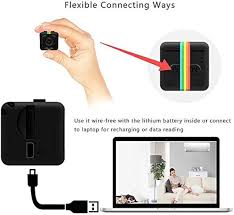
How to Connect Sq11 Camera to Your Phone
Are you looking for a way to connect your SQ11 camera to your phone? Look no further! In this article, we will guide you through the process of connecting your SQ11 camera to both Android and iPhone devices.
Connecting Sq11 Camera to Android Device
The first step in connecting your SQ11 camera to an Android device is to ensure that the camera has a sufficient battery charge. If the camera has a microSD card inserted, it will be recognized by the phone as a USB storage device. To initiate the connection process, follow these steps:
- Download And Install Usb Camera Driver: Download and install the USB camera driver from the official website of your phone’s manufacturer.
- Connect The Camera to Your Phone: Connect the SQ11 camera to your phone using a USB cable. If the camera has a microSD card inserted, it will be recognized by the phone as a USB storage device.
- Grant Permission to Access The Camera: Once connected, grant permission to access the camera on your phone.
- Launch The Camera App: Launch the camera app and select the SQ11 camera from the list of available cameras.
Connecting Sq11 Camera to Android Device Using Wi-fi
If you have a SQ11 camera with built-in Wi-Fi capabilities, you can connect it to your phone wirelessly. To do this:
- Download And Install Jxlcam App: Download and install the JXLCAM app from the Google Play Store.
- Connect The Camera to Your Phone’s Wi-fi Network: Connect the SQ11 camera to your phone’s Wi-Fi network using the JXLCAM app.
- Launch The Jxlcam App: Launch the JXLCAM app on your phone and select the SQ11 camera from the list of available cameras.
Connecting Sq11 Camera to Iphone
To connect your SQ11 camera to an iPhone, you will need to use a Lightning-to-USB adapter or an OTG adapter. Follow these steps:
- Connect The Camera to Your Phone: Connect the SQ11 camera to your phone using a Lightning-to-USB cable and an OTG adapter.
- Launch The Photos App: Launch the photos app on your iPhone and select the SQ11 camera from the list of available cameras.
Connecting Sq11 Camera to Iphone Using Wi-fi
If you have a SQ11 camera with built-in Wi-Fi capabilities, you can connect it to your phone wirelessly. To do this:
- Download And Install Jxlcam App: Download and install the JXLCAM app from the Apple App Store.
- Connect The Camera to Your Phone’s Wi-fi Network: Connect the SQ11 camera to your phone’s Wi-Fi network using the JXLCAM app.
- Launch The Jxlcam App: Launch the JXLCAM app on your iPhone and select the SQ11 camera from the list of available cameras.
Common Issues
If you encounter any issues during the connection process, try the following:
- Check The Battery Charge: Ensure that the camera has a sufficient battery charge.
- Restart Your Phone: Restart your phone to ensure that it recognizes the camera correctly.
- Update The Camera Firmware: Update the camera firmware to the latest version.
Conclusion
Connecting your SQ11 camera to your phone is a straightforward process that can be completed in just a few steps. By following the instructions outlined in this article, you should be able to connect your camera to both Android and iPhone devices using either a cable or Wi-Fi connection.
Frequently Asked Questions
- Q: How do I Connect my Sq11 Camera to my Phone?
A: To connect your SQ11 camera to your phone, follow the instructions outlined in this article. - Q: What is The Difference Between Connecting a Sq11 Camera to an Android Device And an Iphone?
A: The process of connecting a SQ11 camera to an Android device and an iPhone is similar, but you will need to use different adapters for iPhone devices. - Q: Can I Connect my Sq11 Camera to my Phone Wirelessly?
A: Yes, if your SQ11 camera has built-in Wi-Fi capabilities, you can connect it to your phone wirelessly using the JXLCAM app. - Q: What is The Jxlcam App?
A: The JXLCAM app is a software application that allows you to connect your SQ11 camera to your phone wirelessly and access its features. - Q: How do I Troubleshoot Common Issues During The Connection Process?
A: If you encounter any issues during the connection process, try checking the battery charge of the camera, restarting your phone, or updating the camera firmware.
Additional Resources
- Official SQ11 Camera Manual
- JXLCAM App User Guide
- Android Device Driver Download
- IPhone OTG Adapter Purchase


