
The Ultimate Guide to Organizing Work: Top Apps And Tools
Are you tired of feeling overwhelmed by work tasks and responsibilities? Do you struggle to stay organized and focused on your goals? You’re not alone! In today’s fast-paced world, it’s more important than ever to have the right tools and strategies in place to manage your workload effectively.
In this article, we’ll explore the best apps and tools for organizing work, whether you’re a solo entrepreneur or part of a team. From task management to time tracking and collaboration, we’ll cover everything you need to know to stay on top of your game.
Why You Need an App to Organize Your Work
In today’s digital age, having the right tools can make all the difference in managing your workload effectively. Whether you’re working from home or in a traditional office setting, using an app to organize your work can help you:
- Stay focused and on track with tasks and deadlines
- Collaborate with team members more efficiently
- Track time and productivity with ease
- Manage multiple projects and priorities simultaneously
Top Apps For Organizing Work
Here are some of the top apps for organizing work, no matter what industry or role you’re in:
Team Collaboration Tools
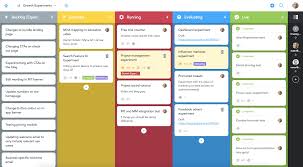
- Trello: A visual project management tool that uses boards, lists, and cards to organize tasks and deadlines.
- Slack: A communication platform designed for teams to collaborate and share information.
Personal Productivity Tools
- Any.Do: A task management app that allows you to create lists, set reminders, and collaborate with others.
- Evernote: A note-taking app that also offers task management and collaboration features.
Time Tracking And Management Tools
- When I Work: An employee scheduling and time tracking app designed for businesses and teams.
- Homebase: A time tracking and scheduling tool that helps you manage your team’s work hours and availability.
PC Apps For Organizing Work
If you prefer to use a desktop app, here are some great options:
- Bitrix24: A comprehensive platform for managing projects, tasks, and collaborations.
- Nozbe: A task management app that allows you to create lists, set reminders, and collaborate with others.
The Benefits of Using an App to Organize Your Work
Using an app to organize your work can have a significant impact on your productivity and overall well-being. Here are some benefits to consider:
- Increased Productivity: By staying focused and on track with tasks and deadlines, you can accomplish more in less time.
- Improved Collaboration: With apps designed for team collaboration, you can work together more efficiently and effectively.
- Better Time Management: Tracking your time and productivity can help you prioritize tasks and make the most of your work hours.
Conclusion
In today’s fast-paced world, having the right tools and strategies in place is crucial for managing your workload effectively. Whether you’re a solo entrepreneur or part of a team, using an app to organize your work can help you stay focused, collaborate more efficiently, track time, and prioritize tasks with ease.
So why wait? Explore the top apps and tools outlined above and discover how they can transform your work experience!
Frequently Asked Questions
Here are some frequently asked questions about organizing work and using apps:
- What is the best app for organizing work?
- Which tool is ideal for team collaboration?
- How do I track my time and productivity?
- Can I use an app to manage multiple projects and priorities?
- Are there any desktop apps available for organizing work?
Answers
- The best app for organizing work depends on your specific needs and preferences. Consider exploring different options, such as Trello or Any.Do.
- Slack is a great tool for team collaboration, offering features like direct messaging and file sharing.
- Yes, you can track your time and productivity using apps designed for this purpose, like When I Work or Homebase.
- Absolutely! Many apps allow you to manage multiple projects and priorities simultaneously, such as Nozbe or Bitrix24.
- Yes, there are desktop apps available for organizing work, including Nozbe and Microsoft Planner.


