
How to Get a Bill From Amazon
Are you an avid shopper on Amazon? Do you need to download your shopping receipts or bills, but don’t know how? Or maybe you’re the owner of a company and need to obtain electronic bills for your business on Amazon? Don’t worry, we’ve got you covered! In this guide, we’ll walk you through the steps on how to get a bill from Amazon.
Getting an Electronic Bill From Amazon
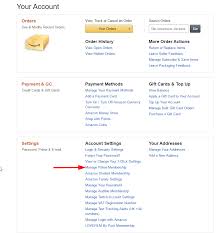
If you’ve purchased a product on Amazon, you can easily download your shopping receipt or bill directly from your account. Here’s how:
- Log in to your Amazon account.
- Click on “Account & Lists” and then select “Your Orders”.
- Find the order for which you want to download the bill and click on it.
- Select “Bill/Got” and choose the type of document you need (bill or receipt).
- Click on “Download Bill” and save the file to your computer.
Requesting a Bill With Fiscal Code
If you’re an individual buyer, you can request a bill with your fiscal code by following these steps:
- Go to the “Manage Your Fiscal Records” page.
- Click on “Add a new fiscal recording”.
- Select the country of residence and fill in the required data.
- Choose the option for a physical person.
- Amazon will generate a bill with your fiscal code.
Alternatively, if you don’t want to record your fiscal code, you can contact Amazon’s customer service within 9 days of dispatching the order (if applicable).
Getting a Bill From Amazon With Split Vat
If you’ve purchased a product on Amazon and need to get a bill for split VAT, follow these steps:
- Log in to your Amazon account.
- Click on “Account & Lists” and then select “Your Orders”.
- Find the order for which you want to download the bill and click on it.
- Select “Bill/Got” and choose the option for a bill with split VAT.
Getting a Bill From Amazon Lussemburgo With Split Italian Vat
If you’ve purchased a product on Amazon Lussemburgo and need to get a bill for split Italian VAT, follow these steps:
- Log in to your Amazon account.
- Click on “Account & Lists” and then select “Your Orders”.
- Find the order for which you want to download the bill and click on it.
- Select “Bill/Got” and choose the option for a bill with split Italian VAT.
Creating an Amazon Business Account
If you’re a business owner, creating an Amazon Business account allows you to obtain electronic bills directly from your account. Here’s how:
- Go to the Amazon website and click on “Create a new account”.
- Fill in the required data for your business.
- Choose the option for split VAT (if applicable).
- Amazon will generate a bill with your business details.
Getting a Bill From Amazon Business
If you’ve created an Amazon Business account, here’s how to get a bill:
- Log in to your Amazon Business account.
- Click on “Account & Lists” and then select “Your Orders”.
- Find the order for which you want to download the bill and click on it.
- Select “Bill/Got” and choose the option for a bill.
Conclusion
Getting a bill from Amazon is a straightforward process, whether you’re an individual buyer or a business owner. By following these steps, you can easily obtain your shopping receipts or bills directly from your account. Remember to contact Amazon’s customer service if you have any issues with getting a bill or need further assistance.
Faqs
- Q: How do I Get a Bill From Amazon?
A: You can download your shopping receipt or bill directly from your Amazon account by following the steps outlined in this guide. - Q: Can I Request a Bill With Fiscal Code?
A: Yes, if you’re an individual buyer, you can request a bill with your fiscal code by following the steps outlined in this guide. - Q: How do I Get a Bill From Amazon With Split Vat?
A: If you’ve purchased a product on Amazon and need to get a bill for split VAT, follow the steps outlined in this guide. - Q: Can I Create an Amazon Business Account?
A: Yes, if you’re a business owner, you can create an Amazon Business account by following the steps outlined in this guide. - Q: How do I Get a Bill From Amazon Business?
A: If you’ve created an Amazon Business account, follow the steps outlined in this guide to obtain your electronic bills. - Q: Can I Request a Bill From Amazon Lussemburgo With Split Italian Vat?
A: Yes, if you’ve purchased a product on Amazon Lussemburgo and need to get a bill for split Italian VAT, follow the steps outlined in this guide. - Q: How do I Contact Amazon’s Customer Service?
A: You can contact Amazon’s customer service by visiting their website or calling their helpline. - Q: Can I Download my Shopping Receipt or Bill Directly From The Amazon App?
A: Yes, you can download your shopping receipt or bill directly from the Amazon app for Android and iOS devices.


