
Unlocking The Power of Ps4: A Step-by-step Guide to Setting Up Your Leading Account
Are you ready to unlock the full potential of your PlayStation 4? Do you want to know how to set up your leading account on this amazing console? Look no further! In this comprehensive guide, we’ll walk you through the simple steps to activate your PS4 as a leading system, and explain why it’s essential for enjoying all the features and functionalities that come with it.
What is a Leading Account on Ps4?
A leading account on PS4 is an essential feature that allows you to associate your PlayStation 4 console with a single PlayStation Network (PSN) account. This means that when you activate your PS4 as a leading system, you’ll be able to use all the digital content available on the PlayStation Store, enjoy exclusive benefits like automatic downloads of pre-ordered games and content, and take advantage of other perks that come with being part of the PSN community.
Why Do You Need a Leading Account on Ps4?
Having a leading account on your PS4 is crucial for several reasons:
- Access to Digital Content: By activating your PS4 as a leading system, you’ll be able to access all the digital content available on the PlayStation Store, including games, demos, and other multimedia offerings.
- Automatic Downloads: With a leading account, you can automatically download pre-ordered games and content directly to your console, saving you time and effort.
- Exclusive Benefits: Being part of the PSN community offers exclusive benefits like discounts on select titles, special promotions, and more.
How to Activate Your Ps4 as a Leading System
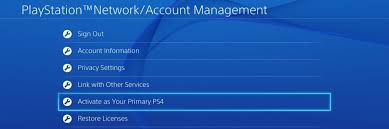
Activating your PS4 as a leading system is an easy process that requires just a few simple steps:
- Light Up Your Console: First, ensure your console is turned on.
- Access The Settings Menu: Navigate to the settings menu by pressing the “X” button on the controller.
- Select Account Management: Choose the account management option from the settings menu.
- Activate Ps4 as Leading System: Select the option to activate your PS4 as a leading system, and confirm the choice.
What Happens When You Activate Your Ps4 as a Leading System?
When you activate your PS4 as a leading system, it will be linked to your PlayStation Network (PSN) account. This means that any changes made to your PSN account will automatically update on your console. Conversely, changes made on your console will also reflect in your PSN account.
How to Deactivate Your Leading Account on Ps4
If you need to deactivate your leading account on your PS4 for some reason, it’s a simple process:
- Access The Settings Menu: Go to the settings menu by pressing the “X” button on the controller.
- Select Account Management: Choose the account management option from the settings menu.
- Deactivate Leading System: Select the option to deactivate your PS4 as a leading system.
Important Notes
- You can only associate one PSN account with your PS4 console at any given time.
- Deactivating your leading account will disconnect your console from the PSN community, but you can reactivate it later if needed.
Conclusion
Setting up your PS4 as a leading system is an essential step to unlock its full potential and enjoy all the features and functionalities that come with it. By following the simple steps outlined in this guide, you’ll be able to activate or deactivate your leading account on your console, ensuring that you’re always connected to the PSN community.
Frequently Asked Questions (FAQs)
Q: What is a leading account on PS4?
A: A leading account on PS4 is an essential feature that allows you to associate your PlayStation 4 console with a single PlayStation Network (PSN) account.
Q: Why do I need a leading account on PS4?
A: Having a leading account on your PS4 is crucial for accessing digital content, automatic downloads, and exclusive benefits like discounts and promotions.
Q: How do I activate my PS4 as a leading system?
A: To activate your PS4 as a leading system, go to the settings menu, select account management, and choose the option to activate your console as a leading system.
Q: What happens when I deactivate my leading account on PS4?
A: Deactivating your leading account will disconnect your console from the PSN community, but you can reactivate it later if needed.


