
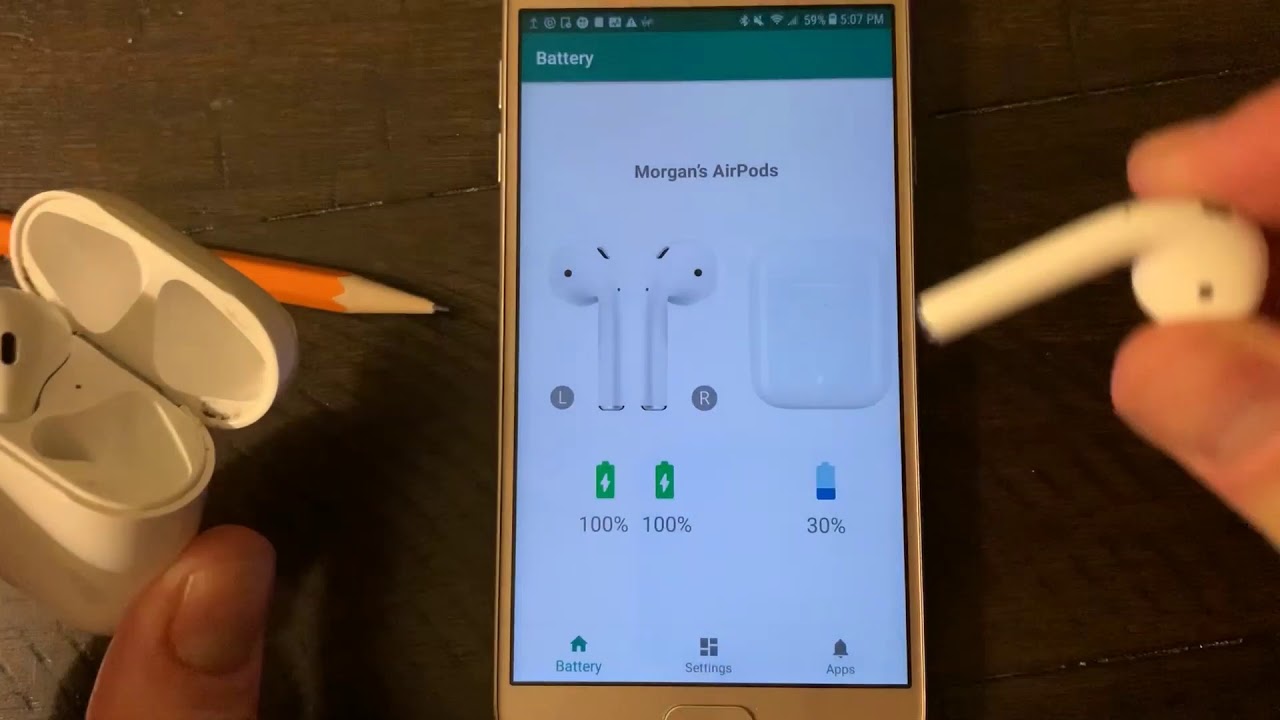
How to See The Battery Level of Airpods on Android: A Step-by-step Guide
Are you tired of not being able to see the battery level of your AirPods on your Android device? Do you want to keep track of how much charge is left in your earphones and their charging case? Look no further! In this article, we will guide you through a step-by-step process on how to see the battery level of AirPods on Android using various applications.
Introduction
AirPods are a popular choice for wireless earbuds, but they can be frustrating when it comes to tracking their battery life. While Apple devices have a built-in feature to display the battery level of AirPods, Android users have been left out in the cold… Until now! With the help of third-party apps, you can easily monitor the battery level of your AirPods on your Android device.
The Limitations of Native Android Support
While some Android devices may have a native feature to display the battery level of Bluetooth devices, including AirPods, this functionality is not available on all devices. Furthermore, even if it is available, it may not provide real-time updates or detailed information about each earphone and its charging case.
Using Third-party Apps to See The Battery Level
Fortunately, there are several third-party apps available that can help you track the battery level of your AirPods on Android. These apps may have some limitations, such as only displaying the battery level when an earphone is connected or only showing updates at intervals, but they can still provide valuable information.
Step 1: Download And Install a Third-party App
To get started, you will need to download and install a third-party app that supports AirPods battery tracking. Some popular options include:
- Airbattery: A free app that displays the battery level of each earphone and its charging case in real-time.
- Andropods: A free app that displays the battery level of each earphone and its charging case, with additional features such as automatic pause during exercise and voice assistant integration.
- Assistant Trigger: A free app that displays the battery level of AirPods using a popup notification.
Step 2: Configure The App
Once you have installed the app, follow these steps to configure it:
- Open the app and select your device
- Choose the AirPods option and connect them to your Android device
- Follow the on-screen instructions to grant the necessary permissions
Step 3: Monitor The Battery Level
With the app configured, you can now monitor the battery level of your AirPods. This may involve opening a separate window or popup notification that displays the current charge level.
Other Apps to Consider
If Airbattery doesn’t meet your needs, there are other apps available that can help you track the battery level of AirPods on Android. Some options include:
- Materialpods: A free app that displays the battery level using a popup notification.
- Airdroid: A free app that displays the battery level and provides additional features such as dark mode.
Conclusion
In conclusion, while Apple devices have a built-in feature to display the battery level of AirPods, Android users can still use third-party apps to track their battery life. By following these steps, you can easily monitor the battery level of your AirPods on your Android device and enjoy the convenience and flexibility that comes with wireless earbuds.
Frequently Asked Questions
Here are some frequently asked questions about seeing the battery level of AirPods on Android:
- Q: Why Can’t I See The Battery Level of my Airpods on my Android Device?
A: Unfortunately, native Android support for displaying AirPods battery levels is limited or unavailable on many devices. - Q: What Apps Can I Use to Track The Battery Level of my Airpods on Android?
A: Some popular options include AirBattery, AndroPods, Assistant Trigger, MaterialPods, and AirDroid. - Q: Do These Apps Provide Real-time Updates or Detailed Information About Each Earphone And Its Charging Case?
A: While some apps may not provide real-time updates, they can still display the battery level and other relevant information. - Q: Are These Apps Free or Paid?
A: Some apps are free with ads, while others require a one-time payment to unlock additional features. - Q: Can I Use These Apps on my Android Device if I Have a Different Type of Earphone?
A: Yes, many apps support other types of wireless earbuds, not just AirPods.
We hope this article has been helpful in providing you with the information you need to see the battery level of your AirPods on Android!


