
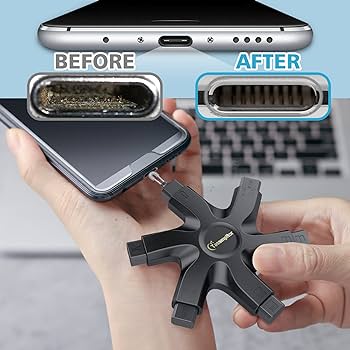
How to Clean The Charging Port of Your Phone: A Step-by-step Guide
Are you tired of dealing with a dirty charging port on your phone? Do you want to know how to clean it without damaging your device? Look no further! In this article, we will guide you through a step-by-step process on how to clean the charging port of your phone.
Why is it Important to Clean The Charging Port?
The charging port is one of the most sensitive areas of your phone. It’s where the power flows in and out, and any debris or dust can cause issues with charging. If you don’t clean the charging port regularly, it can lead to:
- Slow charging
- Intermittent connection problems
- Complete failure to charge
Preparation is Key
Before we dive into the cleaning process, make sure you’re prepared with the right tools.
- A soft-bristled brush (preferably a small one)
- A cotton swab or a small piece of cloth
- A can of compressed air
- A needle or a small pin (optional)
Step 1: Prepare Your Phone
Before cleaning the charging port, make sure your phone is completely powered off. If you’re using an iPhone, remove any SIM cards and SD cards.
Step 2: Identify The Charging Port
Locate the charging port on your phone. It’s usually at the bottom of the device, near the USB-C port.
Step 3: Remove Any Visible Debris
Use a soft-bristled brush to gently sweep away any visible dust or debris from the charging port. Be careful not to push anything further into the port.
Step 4: Clean The Charging Port
Insert the cotton swab or small piece of cloth into the charging port, and gently rotate it to clean out any remaining dust or debris. Repeat this process a few times until you feel confident that the port is clean.
Step 5: Use Compressed Air (Optional)
If there’s still some stubborn dust or debris in the charging port, use compressed air to blow it out. Hold the can upright and spray the air directly into the port for about 10-15 seconds.
Step 6: Inspect And Repeat
Take a closer look at the charging port using a magnifying glass or a flashlight to ensure that it’s clean. If you still see some debris, repeat steps 3-5 until you’re satisfied with the results.
Iphone-specific Instructions
If you have an iPhone, use a soft-bristled brush to gently sweep away any visible dust or debris from the charging port. Be careful not to scrape too hard on the walls of the port, as this can damage the contacts.
- How to Clean The Charging Port of Your Iphone
- Use a cotton swab or small piece of cloth to clean out any remaining dust or debris.
- Avoid using compressed air, as it can push debris further into the port.
- Instead, use a soft-bristled brush to gently sweep away any visible dust or debris.
Tips And Tricks
- To prevent dust from accumulating in the charging port, turn off your phone when not in use.
- Clean the charging port regularly to maintain optimal performance.
- Avoid using liquids, such as water or cleaning solutions, to clean the charging port, as this can cause damage to the electrical components.
- If you’re unsure about how to clean the charging port or if it’s damaged beyond repair, consult a professional.
Conclusion
Cleaning the charging port of your phone is a relatively simple process that requires some patience and attention to detail. By following these steps, you’ll be able to keep your phone’s charging port in optimal condition, ensuring smooth and efficient charging.
Frequently Asked Questions (FAQs)
Q: Why should I clean my phone’s charging port?
A: Cleaning the charging port regularly can prevent slow charging, intermittent connection problems, and complete failure to charge.
Q: What tools do I need to clean my phone’s charging port?
A: A soft-bristled brush, a cotton swab or small piece of cloth, and compressed air are all you’ll need for most phones. For iPhones, use a soft-bristled brush instead of compressed air.
Q: Can I use liquids to clean the charging port?
A: No, it’s not recommended to use liquids, such as water or cleaning solutions, to clean the charging port, as this can cause damage to the electrical components.
Q: What if I still see debris in the charging port after cleaning?
A: Repeat the cleaning process a few times until you’re satisfied that the port is clean.
Q: Can I clean my phone’s charging port with compressed air?
A: Only for Android phones, as using compressed air on iPhones can push debris further into the port.


