
How to Vote on Instagram: A Step-by-step Guide
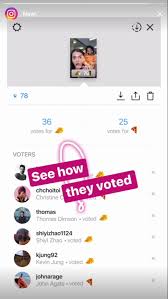
As one of the most popular social media platforms, Instagram has become an essential tool for staying connected with friends, family, and brands. One of the features that makes Instagram so engaging is its ability to allow users to vote in surveys and polls. In this article, we will explore how to vote on Instagram, including how to participate in surveys within posts, stories, and Reels.
Why Vote on Instagram?
Voting on Instagram allows you to express your opinions and preferences in a fun and engaging way. By participating in surveys and polls, you can help shape the content and direction of brands and individuals. Additionally, voting on Instagram can be a great way to connect with others who share similar interests and opinions.
How to Vote on Instagram: A Step-by-step Guide
Voting on Instagram Posts
To vote on an Instagram post, follow these steps:
- Open The Instagram App: First, make sure you have the latest version of the Instagram app installed on your smartphone.
- Access Your Account: Log in to your Instagram account if you haven’t already done so.
- Find The Post: Search for the post that contains the survey or poll you want to participate in. You can do this by searching for the username of the person who posted it, using the hashtag associated with the post, or browsing through your feed.
- Tap on The Post: Once you’ve found the post, tap on it to open it up.
- Look For The Survey: Check the comments section of the post to see if there is a survey or poll attached to it.
- Vote: If you see a survey or poll, tap on one of the options to cast your vote.
Voting on Instagram Stories
To vote on an Instagram story, follow these steps:
- Open The Instagram App: Make sure you have the latest version of the Instagram app installed on your smartphone.
- Access Your Account: Log in to your Instagram account if you haven’t already done so.
- Find The Story: Search for the person who posted the story that contains the survey or poll you want to participate in.
- Tap on The Story: Once you’ve found the story, tap on it to open it up.
- Look For The Survey: Check the bottom of the story to see if there is a survey or poll attached to it.
- Vote: If you see a survey or poll, tap on one of the options to cast your vote.
Voting on Instagram Reels
To vote on an Instagram Reel, follow these steps:
- Open The Instagram App: Make sure you have the latest version of the Instagram app installed on your smartphone.
- Access Your Account: Log in to your Instagram account if you haven’t already done so.
- Find The Reel: Search for the person who posted the Reel that contains the survey or poll you want to participate in.
- Tap on The Reel: Once you’ve found the Reel, tap on it to open it up.
- Look For The Survey: Check the comments section of the Reel to see if there is a survey or poll attached to it.
- Vote: If you see a survey or poll, tap on one of the options to cast your vote.
How to Remove a Vote
If you want to remove a vote you’ve already cast, follow these steps:
- Find The Post or Story: Search for the post or story that contains the survey or poll you want to change.
- Tap on The Post or Story: Once you’ve found it, tap on it to open it up.
- Look For The Survey: Check the comments section of the post or story to see if there is a survey or poll attached to it.
- Tap on “Remove Vote”: If you see an option to remove your vote, tap on it.
Tips And Tricks
- Make sure you have the latest version of the Instagram app installed on your smartphone to ensure that voting works smoothly.
- If you’re having trouble finding a survey or poll, try searching for the username of the person who posted it or using the hashtag associated with the post.
- Don’t forget to follow your favorite brands and individuals to stay up-to-date on their latest surveys and polls!
Conclusion
Voting on Instagram is a fun and easy way to express your opinions and preferences in a social media platform. By following these step-by-step guides, you can participate in surveys and polls within posts, stories, and Reels. Remember to always follow the rules of each survey or poll, and don’t hesitate to reach out if you have any questions or concerns.


