
How to Do Surveys on Telegram
As summer approaches, you and your friends might be planning a trip or event, but finding the perfect location can be tricky. Instead of relying on individual opinions, why not conduct a survey among your group? In this guide, we’ll show you how to do surveys on Telegram, making it easy for everyone to contribute their thoughts.
Informazioni Preliminari
Before diving into the world of surveys on Telegram, let’s cover some essential information. Creating a survey is a native functionality on Telegram, and you don’t need any third-party bots to get started. You can create surveys in both channels and groups, but only administrators or proprietors can organize them in channels.
Types of Surveys
There are several types of surveys available on Telegram:
- Single-answer Surveys: Users can choose one answer from a list.
- Multiple-answer Surveys: Users can select multiple answers from a list.
- Quiz-style Surveys: The organizer sets the correct answer, and users can choose an answer without modifying it.
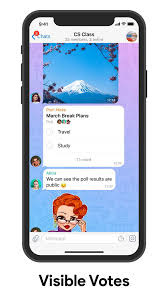
You can also add up to ten options for answers and choose whether to make them visible to all members or allow anonymous voting.
Using The Quiz Bot
Telegram offers an official bot called Quiz Bot that allows you to create quizzes with text or image questions. You can share your quiz in a channel, group, or private chat. When creating a survey using the Quiz Bot, you’ll need to specify the title and description of your quiz, add demands, and choose whether to allow casual answers.
Creating a Survey on Telegram
To create a survey on Telegram, follow these steps:
- Open Telegram on your smartphone or tablet.
- Select the channel or group where you want to conduct the survey.
- Tap the pencil icon in the bottom right corner (on Android) or top left corner (on iOS).
- Choose “Survey” from the menu.
- Enter the survey question and add options for answers.
- Set the survey type (single-answer, multiple-answer, or quiz-style).
- Add up to ten options for answers.
- Choose whether to make the survey public or anonymous.
- Tap “Create/Forward” to share the survey with your group.
Using Telegram on Your Computer
If you prefer using Telegram on your computer, the process is similar:
- Access Telegram Web.
- Select the channel or group where you want to conduct the survey.
- Click the pencil icon in the top right corner.
- Choose “Survey” from the menu.
- Enter the survey question and add options for answers.
- Set the survey type (single-answer, multiple-answer, or quiz-style).
- Add up to ten options for answers.
- Choose whether to make the survey public or anonymous.
Conclusion
Conducting a survey on Telegram is a straightforward process that can help you gather opinions and make informed decisions with your group. By following these steps, you’ll be able to create surveys using both the Telegram app and web version. Remember to explore other features of Telegram, such as groups and channels, to discover even more ways to stay connected and organized.
Frequently Asked Questions
- Q: Can I Modify a Survey After It’s Been Created?
A: No, you cannot modify a survey once it’s been created. - Q: How do I Delete a Survey?
A: To delete a survey, tap on the three dots next to the survey title and select “Delete.” - Q: Can I Create a Quiz-style Survey With Multiple Questions?
A: Yes, you can create a quiz-style survey with multiple questions using the Quiz Bot. - Q: How do I Share my Survey With Others?
A: You can share your survey in a channel, group, or private chat by tapping on the “Share” button. - Q: Can I See Who Voted And What They Chose?
A: Yes, you can see who voted and what they chose if the survey is public. - Q: How do I End a Survey?
A: To end a survey, tap on the three dots next to the survey title and select “End Survey.” - Q: Can I Use Telegram’s Quiz Bot For Other Purposes?
A: Yes, you can use Telegram’s Quiz Bot for creating quizzes or surveys. - Q: How do I Add More Options to my Survey?
A: You can add up to ten options to your survey by tapping on the “Add option” button.


