
Unlocking The Benefits of Sky Extra: A Comprehensive Guide
Are you a loyal client of Sky? Do you want to take your experience to the next level? Look no further than Sky Extra, the exclusive loyalty program designed specifically for Sky subscribers. In this article, we’ll delve into the details of Sky Extra, exploring its benefits, how to access it, and what you can expect from this exciting new initiative.
What is Sky Extra?
Sky Extra is a free loyalty program offered by Sky, providing clients with a series of initiatives, promotions, and exclusive experiences reserved specifically for loyal subscribers. The more years you’ve subscribed to Sky, the more benefits you’ll unlock, making it an attractive option for those who want to get the most out of their subscription.
Benefits of Sky Extra
The benefits of Sky Extra are numerous and varied, depending on your level of subscription. Here are some of the perks you can expect:
- Any More Saving: Enjoy savings on products and services from partner companies with a minimum of 1 year of subscription.
- Any More Contained: Get access to trailers for upcoming TV series and movies after 3 years of subscription, including exclusive content from Sky Originals and a film in gift every month if you have Sky Cinema.
- Any More Experiences: Participate in exclusive experiences, contests, and technology demonstrations after 6 years of subscription, offering a unique glimpse into the latest innovations from Sky.
- Any More Attentions: Unlock all previous benefits plus personalized assistance on-demand and services in gift from partner companies with a minimum of 10 years of subscription.
How to Access Sky Extra
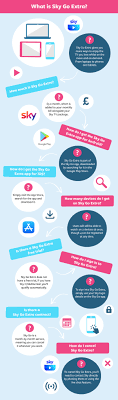
Accessing Sky Extra is straightforward. You’ll need to be a registered client with Sky, possessing a valid Sky ID (username or email and password). To activate your Sky Extra benefits:
- Visit the website (www.Sky.It) or open the My Sky app on your device.
- Log in using your username and password.
- Click on the Sky Extra button, followed by Activate / Sign up.
Alternatively, you can contact Sky’s customer service department via phone to activate your benefits. If you have a nearby Sky Service Center, you can also visit them for assistance.
Exploring The Bids
Once activated, you’ll be able to access the various bids and initiatives offered through Sky Extra. Here’s how:
- Visit the website or open the My Sky app.
- Search for the Sky Extra page.
- Browse through the different bids and select the ones that interest you.
If a bid requires registration, follow the on-screen instructions to complete the process.
Tips And Tricks
- Make sure to read the conditions carefully before participating in any contests or experiences.
- Use the decoder Sky feature to access trailers and films reserved for Sky Extra clients.
- Consult the My Q page for more information on available content and its expiration dates.
By following these simple steps, you’ll be able to unlock the full potential of Sky Extra, enhancing your overall experience with Sky.
Conclusion
Sky Extra is a game-changing loyalty program designed specifically for loyal Sky subscribers. By offering exclusive benefits and experiences reserved only for long-term clients, Sky rewards dedication and encourages continued subscription. With this comprehensive guide, you’re now equipped to take advantage of the exciting opportunities offered by Sky Extra. Whether you’re looking to save money, enjoy exclusive content, or experience new technologies firsthand, Sky Extra has something for everyone.
Frequently Asked Questions
Here are some additional questions and answers about Sky Extra:
- Q: What is The Minimum Subscription Period Required For Sky Extra?
A: You need a minimum of 1 year of subscription to access any more saving. - Q: How do I Access my Sky Extra Benefits?
A: Log in using your username and password on the website or My Sky app, then click on Sky Extra. - Q: Can I Participate in Contests And Experiences Without Registering For Sky Extra?
A: No, registration is required to participate in contests and experiences reserved for Sky Extra clients. - Q: What if I Have a Nearby Sky Service Center? Can They Assist me With Activating my Sky Extra Benefits?
A: Yes, you can visit your local Sky Service Center for assistance with activating your Sky Extra benefits. - Q: How do I Access Trailers And Films Reserved For Sky Extra Clients?
A: Use the decoder Sky feature to access these exclusive content offerings.
By understanding the basics of Sky Extra, you’ll be able to maximize the value of your subscription and enjoy a more rewarding experience with Sky.


