
Removing Vocals From a Piece of Music: Solutions And Applications
If you are a professional musician or simply love singing as a hobby, you may need to separate the vocals on a piece of music from the rest of the instruments. This can be useful for creating a cover version of your favorite song, doing karaoke with friends or even just organizing a fun evening.
In the past, isolating vocals from a piece of music was a complicated process that required the use of powerful filters and equalizers to eliminate certain acoustic frequencies. However, thanks to modern audio editing software and artificial intelligence, it is possible to obtain excellent results in a few simple steps.
In this article, we will explore several solutions to remove vocals from a song, including free online tools and applications. How to Remove Vocals From a Song With Audacity
The first tool we want to suggest is audacity, one of the best free and open source software for audio editing. Available for windows, macos and linux, it is very simple to use.
To get started, import the song into the program via the file > open menu or by dragging it into the audacity window. Choose the area of the track from which you want to remove the vocals and apply the “vocal reduction and isolation” effect. Select the default settings to delete the entry, or adapt the settings to your needs.
Once the effect has been applied, listen to the audio track by pressing ▶. You’ll notice that the vocals will have been removed, but the volume of the song may be slightly lower. If you want to restore the original volume, select the entire track with double click and apply the “amplify” effect.
How to Remove Vocals From a Song Online
Let’s see how to eliminate the voice from a song online for free and without registration, using cloud solutions. Keep in mind that the songs covered will be uploaded to remote servers without any control.
Night: An Online Tool to Remove The Entry
Notta is an online tool that uses artificial intelligence to remove vocals from a piece of music. It supports various audio and video formats, allowing you to export the result as mp3.
The voice removal service offered by Notta is free with some limitations: You can only upload one audio file at a time with a maximum duration of 20 minutes. Even though the solution is free, there are some minimally invasive advertisements.
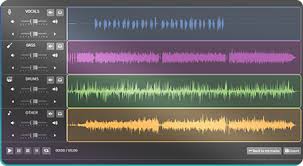
To use notta, connect to its website and upload the song to edit by dragging it into the browser window or clicking on the “upload files” button. After a while of waiting, the song will be processed, and two tracks will appear: The first with the instrumental song and the second with only the vocal track.
Other Solutions to Remove Vocals From a Song Online
If the overnight solution doesn’t suit you, there are other free online options. Some of which include:
-
Lalal.Ai: An online service based on artificial intelligence that allows you to extract the voice but also other instruments from an audio file while keeping the quality intact.
-
Vocal Remover Pro: A highly professional vocal removal software with the ability to also be used online in your browser.
-
Vocal Remover And Isolation: An online service that helps you remove the vocals from a song creating a perfect karaoke base.
App to Remove Vocals From a Song
If you prefer to use the app on your mobile device, there are several options available for Android and iOS/iPados. Some of which include:
-
Moises: The Musician’s App: A very professional app for removing and extracting vocals or even individual instruments from a song.
-
Splithit: Vocal Remover: An app suitable for both professionals and amateurs to create remixes and backing tracks.
Other Apps to Remove Vocals From a Song
If the solutions described so far don’t satisfy you, there are other apps available. Some of which include:
-
Ai Vocal Remover & Karaoke (android): A very fast and precise app for removing vocals from a song.
-
Vocal Extractor — Karaoke Maker (android/ios): One of the fastest apps to extract the vocal track from a song.
-
Ai Vocal Remover For Karaoke (ios/ipados): Thanks to the artificial intelligence of this app, you can automatically isolate the voice from music tracks.
Conclusion
Removing vocals from a piece of music can be a complex procedure. However, thanks to modern tools and applications, it is possible to achieve excellent results in just a few steps.
If you are a professional musician or simply love singing as a hobby, we hope this information has been useful to you in finding the ideal solution for your needs.
Faqs
- What Are The Best Solutions to Remove Vocals From a Song?
The best solutions for removing vocals from a song include audacity, notta, lalal.Ai, vocal remover pro and several mobile apps.
- How Does The Entry Removal Process Work With Audacity?
The process of removing vocals with audacity consists of selecting the area of the track from which you want to remove the vocals, applying the “vocal reduction and isolation” effect and adjusting the settings to eliminate the vocals.
- What Are The Limitations of Free Online Solutions?
Free online solutions such as Notta have limitations such as uploading one audio file at a time with a maximum duration of 20 minutes, but offer the possibility of exporting audio files in mp3 format.
- What is The Difference Between Audacity And Other Solutions?
Audacity is a free and open source tool for audio editing while other solutions include professional software like vocal remover pro and mobile apps like moises and splithit.


